


Part Number: CC3100BOOST
Other Parts Discussed in Thread: CC3100, MSP-EXP430F5529LP, , CC31XXEMUBOOST, CC3100SDK, CC3200
Tool/software: Code Composer Studio
Dear TI:
I have made a list below to describe the problem I encountered.
REFERENCE:
1.swru375d, CC3100 SimpleLink™ Wi-Fi®and IoT Solution Getting Started Guide ---User's Guide
DEVICE:
1.CC3100BOOST 2.CC31XXEMUBOOST 3.MSP-EXP430F5529LP 4. a PC with windows10 home system
SOFTWARE:
1.CCS | 6.1.0.00104 2.MSPWare for CCS | 2.40.00.37 3.Visual Studio | 2010 with SP1 Update 4.CC3100SDK_1.2.0 5. CCS UniFlash v3.2
At first, I can't follow this User's Guide successfully,then I ask for help. A staff of TI told me the test environment of CC3100BOOST, so I installed the softwares above.
in Getting Started section,I failed to flash the CC3100BOOST, and it shown
--Error connecting to the device. Please check your COM port settings. Error code: 1
BUT it work successfully in VISUAL STUDIO
BUT it does not work successfully in CCS, which is the most important part for me. It shown
--Error initializing emulator: No USB FET was found
This is the picture of device manager in PC
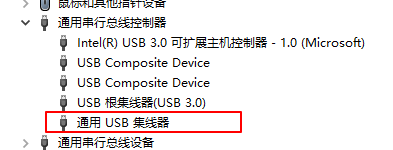
When I plug the USB into my PC,It appears this,which means General USB Hub.
