This thread has been locked.

If you have a related question, please click the "Ask a related question" button in the top right corner. The newly created question will be automatically linked to this question.

CCS/LAUNCHXL-CC26X2R1: cannot import project from SCS files and how to set duty cycle in PWM in CCS?

Part Number: LAUNCHXL-CC26X2R1


Tool/software: Code Composer Studio

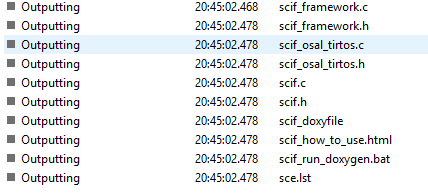
I used SCS (Sensor Controller Studio)examples----LED PMW and it just generated ten scif related files like the first figure.WHY no main_trtos files?

Then I used CCS9.1 to import the project from the default path it will report the error as shown in the second figure.

I want to know how the main.c run in the CCS and how to set the duty cycle and why now I cannot see it in CCS.
  • Hello,

    Can you please share the generated led_pwm_launchpad.projectspec file?

    Thanks

    ki

  • <?xml version="1.0" encoding="UTF-8"?>
    <projectSpec>
    <project
    title="led_pwm_launchpad"
    name="led_pwm_launchpad"
    device="CC2652R1F"
    toolChain="TI"
    linkerCommandFile=""
    compilerBuildOptions=" --silicon_version=7M4 --float_support=FPv4SPD16 --little_endian --code_state=16 --abi=eabi -me -g --gcc --c99 --gen_func_subsections=on --display_error_number --diag_warning=255 --diag_wrap=off --symdebug:dwarf -ID:/ti/simplelink_cc13x2_26x2_sdk_2_40_00_81/source/ti/devices/cc13x2_cc26x2 -ID:/ti/simplelink_cc13x2_26x2_sdk_2_40_00_81/source -DDEVICE_FAMILY=cc13x2_cc26x2 -DDeviceFamily_CC26X2"
    linkerBuildOptions=" -lD:/ti/simplelink_cc13x2_26x2_sdk_2_40_00_81/source/ti/devices/cc13x2_cc26x2/driverlib/bin/ccs/driverlib.lib -x"
    description="LED PWM (no operating system)"
    connection="TIXDS110_Connection.xml"
    launchWizard="false">

    <property name="target" value="ti.targets.arm.elf.M4F"/>
    <property name="platform" value="ti.platforms.simplelink:CC2652R1F"/>
    <property name="buildProfile" value="release"/>
    <property name="isHybrid" value="true"/>
    <property name="configuroOptions" value="--compileOptions &quot;${COMPILER_FLAGS} &quot; "/>

    <file path="D:/ti/simplelink_cc13x2_26x2_sdk_2_40_00_81/source/ti/devices/cc13x2_cc26x2/linker_files/cc26x2r1f.cmd" openOnCreation="false" excludeFromBuild="false" action="link" targetDirectory="./sdk_files__do_not_edit">
    </file>
    <file path="D:/ti/simplelink_cc13x2_26x2_sdk_2_40_00_81/source/ti/devices/cc13x2_cc26x2/startup_files/ccfg.c" openOnCreation="false" excludeFromBuild="false" action="link" targetDirectory="./sdk_files__do_not_edit" createVirtualFolders="true">
    </file>
    <file path="D:/ti/simplelink_cc13x2_26x2_sdk_2_40_00_81/source/ti/devices/cc13x2_cc26x2/startup_files/startup_ccs.c" openOnCreation="false" excludeFromBuild="false" action="link" targetDirectory="./sdk_files__do_not_edit" createVirtualFolders="true">
    </file>

    <file path="./../../source/scif.c" openOnCreation="false" excludeFromBuild="false" action="link" targetDirectory=".">
    </file>
    <file path="./../../source/scif.h" openOnCreation="false" excludeFromBuild="false" action="link" targetDirectory=".">
    </file>
    <file path="./../../source/scif_framework.c" openOnCreation="false" excludeFromBuild="false" action="link" targetDirectory=".">
    </file>
    <file path="./../../source/scif_framework.h" openOnCreation="false" excludeFromBuild="false" action="link" targetDirectory=".">
    </file>
    <file path="./../../source/scif_osal_none.h" openOnCreation="false" excludeFromBuild="false" action="link" targetDirectory=".">
    </file>
    <file path="./../../source/main.c" openOnCreation="false" excludeFromBuild="false" action="link" targetDirectory=".">
    </file>
    </project>
    </projectSpec>

  • Thanks. I see nothing working with the syntax. Can you provide your Eclipse error log? It can be found in:

    [WORKSPACE DIR]\.metadata\.log

    Also attach the actual projectspec file, not just a copy and paste of the contents

  • Sorry to the late reply. But I cannot upload the projectspec file because "Only known URLs and the following file extensions are allowed"

    And now I have solved my issue because the properties of my folder are set to read-only.

    Thank u very much.

  • Good to hear you resolved the issue. Thank you for the update!

    ki