This thread has been locked.

If you have a related question, please click the "Ask a related question" button in the top right corner. The newly created question will be automatically linked to this question.

Where is component manager


I recently performed clean install of Code Composer. Started with disk image v4.2.0 from TI site. After install ran the suite of upgrades. Help about => CCS version 4.2.0.10017 Quite a while ago my RTA/RTDX stopped working, and so it iwas time for me to get back to sorting this out. Sifted through the TI help and Wiki stuff. Got to the point where I needed to confirm my CCS BIOS veriosn was same as that being used by my application. I have (due to the clean install and subsequent updates) 2 installed BIOS vers, 5.41.02.14 or 5.41.09.34. My app is using the older ...02.14. Instructions are to use "Component Manager", and that it should be found either using Help->About or the Start Menu->Texas Instruments. I should then be able to set the BIOS CCS uses for each target, eg "TMS320C55xx". I cannot see either of these. Where is "Component Manager"?
  • Ben,

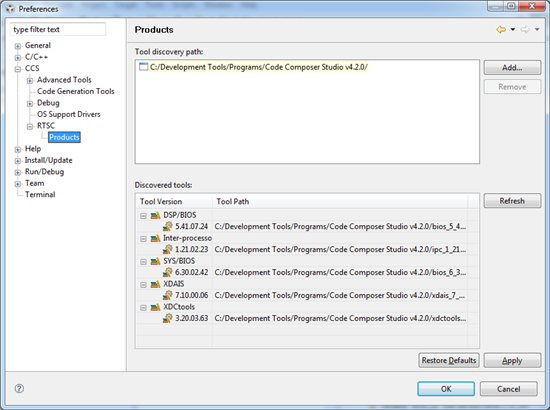
    In CCSv3.3 there was a tool called component manager that allows you to control which version of BIOS or the compiler CCS is using.  In CCSv4 it works differently.  If you go to Window->Preferences you can tell CCS where your BIOS installations are located.  


    Then for each project you can choose which version of BIOS it uses.


    Regards,

    John

  • John, Thanks for answer.

    Is pretty ordinary that the Help files supplied with my clean install dont mention that, they instructed me to look for this "component manager". More time wasted, thanks to TI.

  • Ben,

    I have filed SDOCM00077165 to track the issue with the help.  The issue is that BIOS5 releases are designed to work with both CCSv3 and CCSv4 but the help only has the instructions for CCSv3.


    Regards,

    John