This thread has been locked.

If you have a related question, please click the "Ask a related question" button in the top right corner. The newly created question will be automatically linked to this question.

CCS/AWR1642BOOST: Makefile for CCS project , sources.mk error : empty variable name

Part Number: AWR1642BOOST
Other Parts Discussed in Thread: MMWAVE-SDK

Tool/software: Code Composer Studio

Hi

I want to compile the mmwave demo code with TI CCS IDE to build the “.out files”

which can be loaded into the ARW1642 EVM board by using JTAG for debug

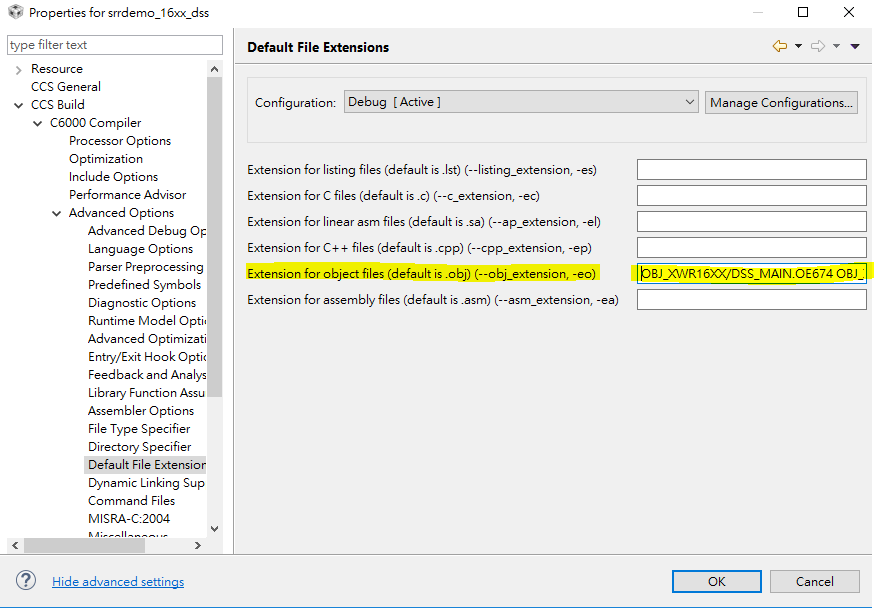
However , in order to compile mmwave demo code , I modified the CCS project  properties. Like follow

Properties->Build->C6000 Compiler->Advanced Options->Default File Extensions->Extension for Object files

Unfortunately, i type error string to this setting

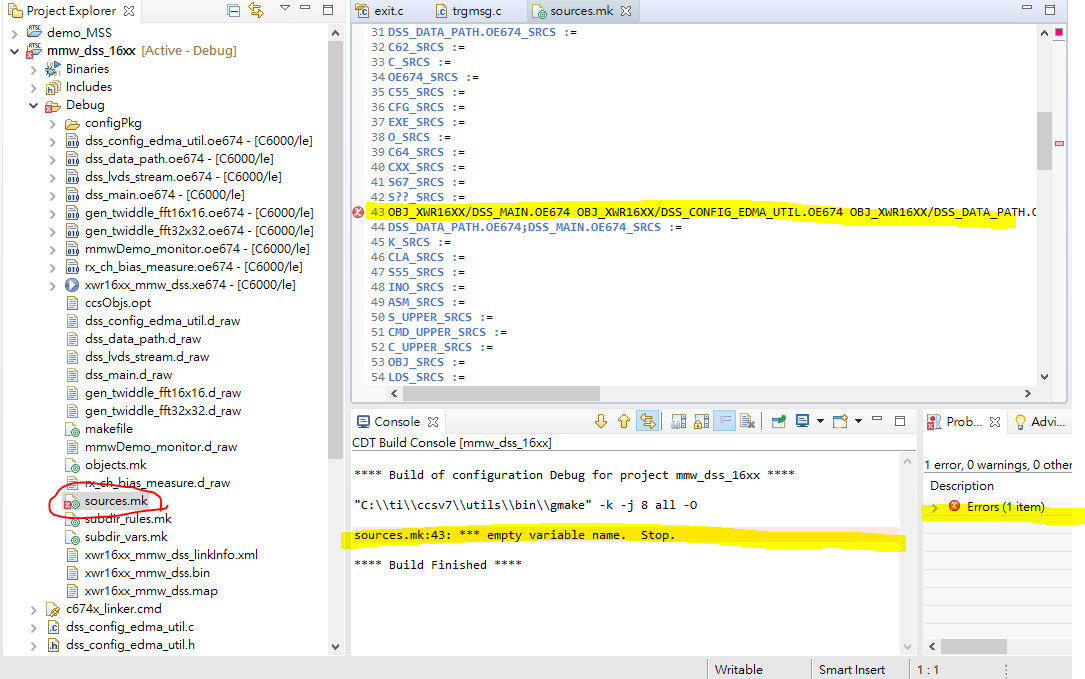
After that , the makefile (sources.mk) appeared error due to the mistake of modification in Extension for Object files .


The error message like that when rebuilding project

sources.mk:42: *** empty variable name.  Stop.

This error also make other complied project fail.

Because the sources.mk is automatically-generated by CCS,  I have no idea how to fix it

My question is how to fix this make file (sources.mk)  to default status?   

PS. i have already reinstalled the CCS, but the problem is still here.

  • Hi,

    Is it possible to use the default CCS project which you can find from TI-Rex?

    Or in the existing project you need to go to Project Properties->Build->C6000 Compiler->Edit Flags, here you can edit or remove the flags if it is not getting set from the GUI setting.

    Regards,

    Jitendra

  • HI Jitendra

    Thanks your reply 

    I have already tried those two method that you mentioned. Unfortunately, the error can't be eliminated.

    And i also try to use the example project which is built-in CCS project (like Hello project) . But the result is the same.

    I find out the problem is that when the setting of project property is changed, the sources.mk file will keep saving this modification EVEN IF the setting is change to default.

    And, this sources.mk affect all project when doing compile 

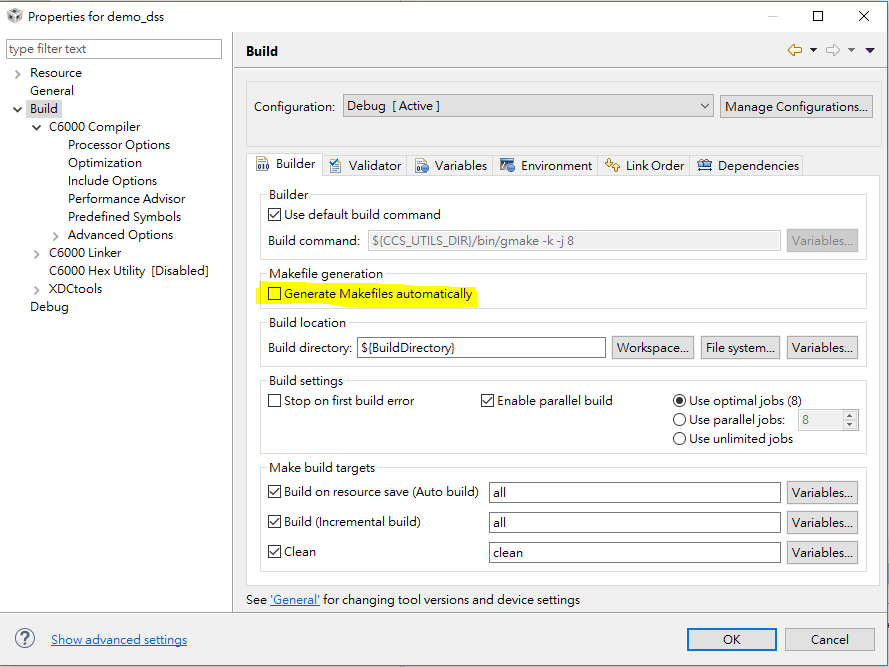
    However, when i uncheck the "Generate Makefiles automatically", the project can be compiled successfully , like following picture

    My question is about why the sources,mk file keep all the modification of project property.

    And it can't be change to default even if the setting of project property is back to default setting 

    Is it related to the setting of GNU compiler in CCS or eclipse IDE?  

    Regards,

    Marcus

  • Hi Marcus,

    I would suggest you to refer to the "mmWave SDK Demo" Lab in the TI Resource Explorer. This provides you the CCS projects for the mmWave OoB demo for AWR14xx/AWR16xx.

    Thanks,

    Raghu

  • HI, Raghu

    Thanks your reply.

    Actually, i have used the project which is  "mmWave SDK Demo" project in the TI Resource Explorer to compile.

    But the result of compilation always fails. Like the reason that i have mentioned above.

    This files (sources.mk) is always wrong, and the error message is following 

     sources.mk:43: *** empty variable name.  Stop.


    Thanks, 

    Marcus 

  • Markus,

    The MMWAVE-SDK that the CCS project expects is ver2.0.0.4 . Have you installed this version of the SDK for building the demo using the CCS ?

    If you have changed the version of the SDK then you will get these errors as there are some other dependent tools for different versions of SDK.

    -Raghu

  • HI, Raghu 

    Yes, my MMWAVE-SDK  version is 2.0.0.4

    I have used this version to build the other labs demo in CCS IDE before. Like Short range radar 

    After make file error happened, i can't use this version to build any project that i have build already before 

    Due to this situation, I think that maybe it's the GNU compiler problem or IDE setting problem which is probably related to the automatically-generated ".mk" file.

    Could i use the higher CCS version to build the project which is in MMWAVE-SDK ver.2.0.0.4? 

    Thanks, 

    Marcus.

  • Marcus,

    I have used a CCS version 7.4 to build this mmW demo code . I do not see any issue when building.

    Could you delete the SDK demo project from your project explorer and re-check it?

    BR,

    Raghu

  • HI, Raghu 

    Thanks your patience on this issue.

    The method that you mentioned have been tried before. unfortunately, the error is still here.

    I think if you could modify the CCS project properties with wrong setting, like following figure 

     Properties->Build->C6000 Compiler->Advanced Options->Default File Extensions->Extension for Object files 

    you will meet the situation that i saw in sources.mk files , like following figure

    And after above error modification, The error will be saved in sources.mk file. like above fluorescent yellow 

    if you change the project property to the correct setting, like following figure 

    The error that happened in sources.mk file can't be modified correctly EVEN if the project property is correct.

    The above process is the reason of this issue. 

    And, this all the method we discuss in this thread so far could't solve this problem.

    Thanks your help

    Best regards. 

    Marcus

  • Marcus,

    The point I am trying to make is that if you have all the dependent tools and the right SDK installed you will not need to changes any of the settings in any of the projects. They will build successfully without any issues. 

    I believe there is some  corruption that have happened in some of the dependent files and that is causeing the build issue.

    BR,

    Raghu

  • Raghu

    Yes, there is some error that result in this build issue

    But now, the error come from the sources.mk makefile

    I really want to know how to correct the dependent files such that the makefile can be modified correctly.

    Do you have any idea or suggestion on this issue? 

    Thanks your help!

    best regards

    Marcus 

  • Marcus,

    If the issue is happening with all the project builds, I would suggest to re-install all the tools and retry.

    -Raghu

  • HI Raghu

    Actually,  i have tried to re-install CCS before, but the error is still happening 

    Maybe, i will try it again, Thanks your help.

    Best regards,

    Marcus