This thread has been locked.

If you have a related question, please click the "Ask a related question" button in the top right corner. The newly created question will be automatically linked to this question.

CCS/AM5716: Debug error

Part Number: AM5716


Tool/software: Code Composer Studio

Hi,

We have an issue with our custom board based on AM5716 when running our code in debug mode with emulator. Some times, when our board is running, the code stops executing, while CCS still says "Running" (and not "Suspended"). Then, when we click the button "Suspend", we get this red line in the Console:

CortexA15_0: Trouble Halting Target CPU: (Error -1323 @ 0x80013D70) Device failed to enter debug/halt mode because pipeline is stalled. Power-cycle the board. If error persists, confirm configuration and/or try more reliable JTAG settings (e.g. lower TCLK). (Emulation package 8.1.0.00012)

I would appreciate any ideas on how this can be caused, and any tips on how to get more insight to where in our code this error is occurring.

I have tried Ticking on/off the Realtime Option "Halt the target before any debugger access (will impact servicing of interrupts)", but it did not seems to make any difference.

Best Regards,

Anders

  • Anders, 

    This error is covered in the Debugging JTAG page below - just search for the error code. 

    https://software-dl.ti.com/ccs/esd/documents/ccs_debugging_jtag_connectivity_issues.html 

    It contains an explanation and a few tips to recover from this issue. 

    Hope this helps,

    Rafael

  • Hi Rafael,

    Thanks for your answer.

    I have looked at the forum post you linked to, but I do not seem to fully understand why this is occurring. We think (but are not sure) this error started occurring after we enabled our DSP core. (ARM is our main core).

    As it is explained in the link: 

    "This is usually caused by a excessive number of interrupts or by a peripheral or bus contention - all these are caused by the running application."

    Is there any way we could try to mitigate this error?

    We have tried running our code without running the DSP core, but still got the error.

    EDIT: I learned from the youtube video how to look at the ARM memory after getting the pipeline stall, but we are not sure how to use the memory to investigate the root cause of the problem...

    Thanks for any pinpoints in the right direction.

    Anders.

  • Anders, 

    Sorry; I have missed your reply.

    The stalled pipeline indicates the A15 core is waiting for an operation to complete - in other words, if a MOV instruction is trying to read from a memory bus that is busy with other operation (the DSP may be using the same bus with a DMA or other data intensive operation), the A15 core will be stalled waiting for the MOV instruction to complete its execution. 

    In this case, I would connect to the DSP, inspect its status and see if this allows the A15 to complete its instruction. If that is successful, then you are positive the two cores are clashing in some operations. 

    In order to mitigate this problem, I would try to fence the DSP operation with a synchronization mechanism with the A15 core - when the data intensive operation starts, the A15 is made aware and can avoid accessing the same bus at the time.

    Another alternative is to keep the DSP operations limited to its local memory - this way the bus is freed or maybe operate in a buffered way. 

    Unfortunately I lack the intrinsic details on how to do this in the context of the processor SDK. The experts on the SDK for this processor would be able to provide better insights.

    Hope this helps,

    Rafael

  • Hi Rafael,

    Thanks for your answer.

    I understand that this a difficult issue, and is most likely a cause of our application setup.

    However, I tried completely removing the DSP from the solution, by running the application with only ARM code. I also gave A15 access to all internal and external memory and disabled all IPC related code. With this setup, we still got the same pipeline stall. Therefore, I am starting to suspect that the stall is not a cause of a collision between A15 and DSP.

    I can also try as you suggest to connect to the DSP and investigate its status after a pipeline stall. Do you have any suggestions for what registers to look at in order to see if this allows the A15 to complete its instruction?

    Best Regards.

    Anders.

  • Rafael.

    I would also be happy to be forwarded to the experts on the SDK if you think they could have any applicable insight.

    Thanks.

    Anders.

  • Anders,

    Anders Viken said:
    running the application with only ARM code.

    That is a good test and certainly helps to uncover a bit more about the issue at hand. 

    Anders Viken said:
    I can also try as you suggest to connect to the DSP and investigate its status after a pipeline stall. Do you have any suggestions for what registers to look at in order to see if this allows the A15 to complete its instruction?

    There is no registers per se, but given the stall happens without code running on the DSP, this core should be removed from the picture to simplify the debug. 

    You can always use the Disassembly view (menu View --> Disassembly) to see the neighbourhood of the instruction that is causing the pipeline stall.

    Also, you can enable the Core Trace using the ETB (Embedded Trace Buffer) to identify the previous recent history of instructions that lead to the pipeline stall condition. To enable it, simply go to menu Tools --> Hardware Trace Analyzer --> PC Trace. Additional details about Trace can be seen at this webinar

    I will also notify the processor experts to provide additional insights that may be provided with the SDK. For that, you would probably have to provide the version and type of SDK you are using. 

    Regards,

    Rafael

  • Rafael,

    Thanks for your advice. Will investigate if PC Trace give any extra info.

    Here is our environment:

    We are using processor_sdk_rtos_am57xx_6_00_00_07, but I think we had the same issue on processor_sdk_rtos_am57xx_5_03_00_07 and probably on processor_sdk_rtos_am57xx_5_02_00_10 as well.

    Best Regards, 

    Anders.

  • Anders,

    Does the issue only occur on your platform or does the issue also occur on TI Eval platform. Please indicate how you are booting the SOC. Default SYSBOOT pin setup on the custom board. Are you using GEL files like the ones we provide for TI Evaluation platforms that put the A15 in a clean state post boot. Please also describe if this issue occurs as soon as you load code on the A15 or after you run your application. Can you also try to do a CPU reset after the Gel has run before you load and run code on the A15.  

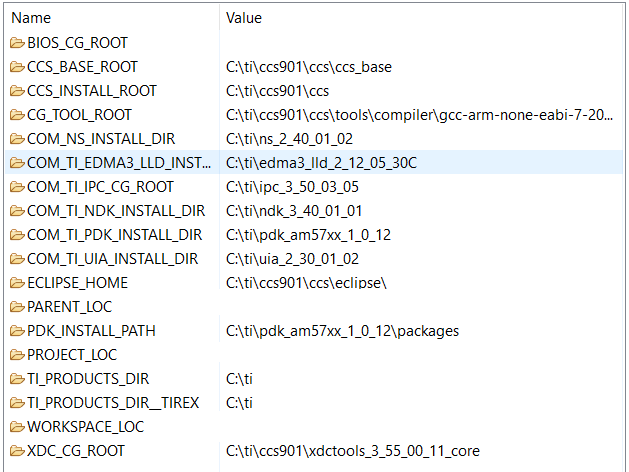
    Also, I noticed from the CG_TOOLS_ROOT in screenshot above that the ARM compiler used in your build is the one that comes with CCS and not the version included as part of the SDK. Please confirm that the version is the same and if not then change the build to use ARM compiler from SDK to see if the issue still persists.

    Regards,

    Rahul

  • Hi Rahul,

    I am actually not sure if the issue occur on the TI evaluation platforms, as it has been a long time since we ran our code on other platforms than our custom board. It would be difficult for us to reproduce the issue on an evaluation board, as the complete codebase can not be run on a single evaluation board.

    We are booting the SOC the same way as with the idkam571x card, with a gel file based on the GEL file for am571x. The modifications done in the GEL file are only for DDR memory size and DDR timings.

    The issue always occur when the software has run for a long time, and when stress-testing the software. The problem does not at boot time / when loading the code.

    Anders.

  • HI Rahul

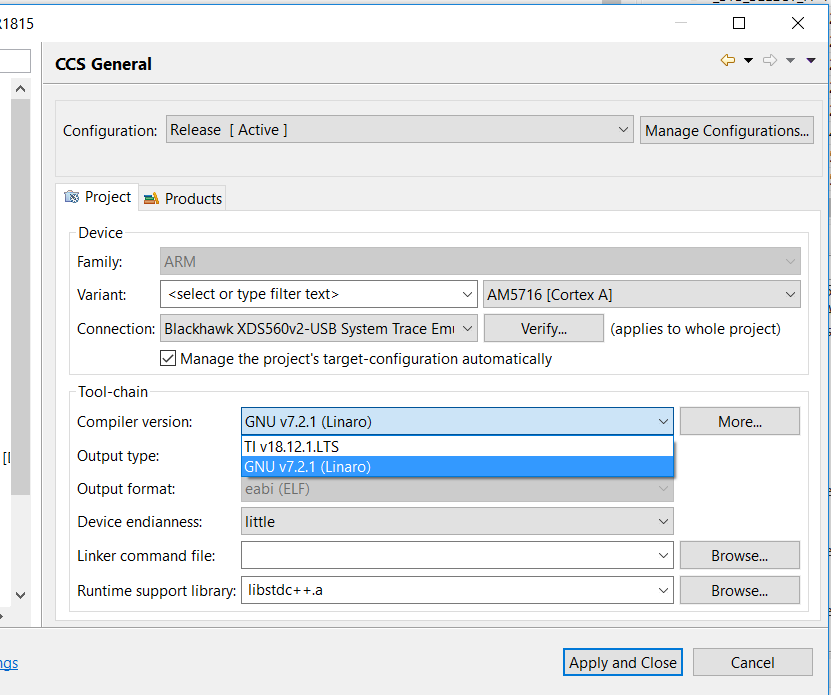
    The compiler used is this one:

    Is GNU v7.2.1 (Linaro) not compatible with the latest SDK?

    Anders.

  • Anders,

    The fact that the issue does not occur at boot/initialization is a good data point. This means that the application and related initialization works and the code only hangs after few hours of execution which could still be a software issue but could also be caused by HW stability or thermal issues.

    Can you connect to other cores when the error occurs? Have you run a comprehensive DDR test memtest to check that there is no external memory stability issue with your EMIF timings? Could this be a thermal issue where the device is running hot when run over long period of time ? Does the issue occur on all the boards that you have built? On how many boards have you noticed similar issue.

    You may also want to look into suggestion on a similar issue here:

    https://e2e.ti.com/support/processors/f/791/t/676031#pi320966=2

    You can also check the CCS capabilities for advanced trace and debug capabilities on this device in the app note to see if advanced trace can help provide additional insight.

    http://www.ti.com/lit/an/sprac17b/sprac17b.pdf 

    Regards,

    Rahul 

  • Hello Rahul,

    Thanks for your detailed answer.

    We have previously performed a DDR test in cold an warm environments, where all block of the RAM where written to and tested. This test passed. However, when running stress test that triggers the pipeline stall, we found that the code stops much more frequently when the temperature it changed quickly from ~40 deg C to ~30 deg C in less than 5 seconds.

    It is no doubt that when changing the temperature VERY quickly, the stability of the code/board is affected. However, when changing the temperature in a slower pace, the stability does not seem to be affected. Do you think this behaviour is  "normal" and how we should expect the processor to behave, or is it likely that we have a possibility for improvement in our DDR timings?

    In that case, we would be very grateful if someone could take a look at our AM571x_DDR_config.gel file: AM571x_ddr_config.gel


    We have based our layout of the processor and DDR lines on the EVMAM5728 evaluation board. The DDR chip used on the custom board is MT41K256M16TW 107-IT. The processor used is AM5716AABCXA.

    Best Regards,

    Anders.

  • Anders,

    From your descriptions, it does appear that you have some type of hardware deficiency.  How many prototypes have you built?  Do that all fail in a similar manner or do only some of them fail?  What speed are you running the DDR interface?  Have you tried slowing it down to see if the behavior changes?  Have you verified that the power supply implementation and decoupling meet the requirements and that the voltage measured at the load is correct?  Program crashes due to any of these possible hardware issues can cause the behavior that you are seeing.  

    Tom

  • Anders,

    Do you have any further questions?  If not, we can close this thread.

    Tom

  • Hi Tom,

    We have to do some investigation with the info you have given. Thanks for you detailed support. We can close this thread for now.

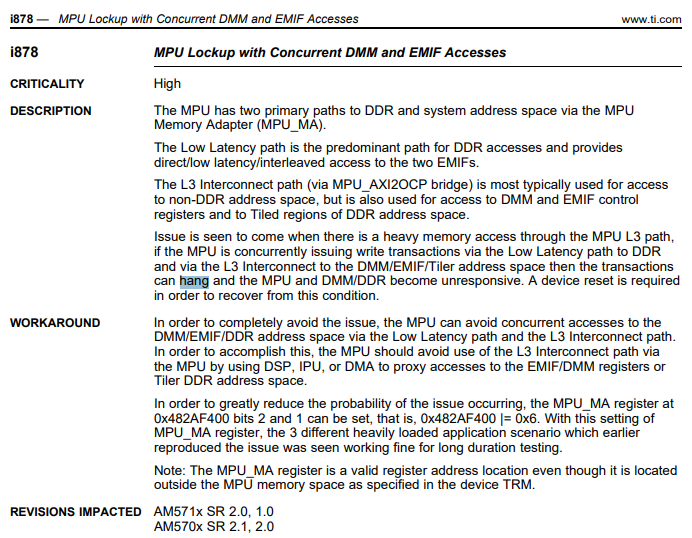
    FYI, we have also tried implementing this workaround, as it seemed relevant:

    Best regards,

    Anders.