This thread has been locked.

If you have a related question, please click the "Ask a related question" button in the top right corner. The newly created question will be automatically linked to this question.

CCS: Problem regarding ex44_compute example project

Other Parts Discussed in Thread: SYSBIOS, MATHLIB

Tool/software: Code Composer Studio

Hii all,

Currently I am working on TI example project ex44_compute. I have created binaries for both ARM and DSP in linux and run the created binaries in C6638K2K board its working fine. Now my task is to create binary for DSP in windows SYS/BIOS and ARM binary in linux. Anyway ARM binary is created. 

I created new project to create binary for DSP in windows SYS/BIOS. I am getting some errors related to the transport. So I excluded the transport folder from the build now the binary is creating but If I load the binary to K2K board it is entering to the ABORT state before running the binary.

please help me in this issue ...

I have some questions related to the example project 

1)   Can I create binary for DSP in example project using windows SYS/BIOS .....?

If its possible to create binary for DSP then can any one help to send the Steps and what modification should be done in config file .

ipc_3_35_01_07

bios_6_41_01_36

xdctools_3_30_05_60

ccsv6

evmTCI6638K2K

Thanks n Regards

Mohan

  • Hi,

    I created new project to create binary for DSP in windows SYS/BIOS. I am getting some errors related to the transport.

    Can you share the error log?

    1)   Can I create binary for DSP in example project using windows SYS/BIOS .....?

    You mean you want to create SYS/BIOS binary on a host that is running Windows, right? In this case yes, this is possible.


    Best Regards,
    Yordan

  • i am unable to reply 

  • Hii Yordan,

    Thank you for your reply Yordan...

    As I told I have created the new project in windows10 CCSv6 and I have added all the .c and .h files from the DSP ex44_compute example project to the created new project in windows10 CCSv6. When I build this project i am getting error related to the transport. I will attach the error log file at the last.

    Because of the error related to the transport ,  the transport folder in work space and code related to the transport in all .c files is excluded from the build and then I rebuilded the project again, now binary is created successfully. If I load the created binary to the K2K board it is getting aborted.

    I am attaching my workspace at the last...

    Windows10

    ipc_3_35_01_07

    bios_6_41_01_36

    xdctools_3_30_05_60

    ccsv6

    evmTCI6638K2K

    I am unable to send the workspace zip file and log file please ping me this mail mohan.ks@lekhawireless.com . I will send respond.

    please help me ....

    thanks n regards 

    Mohan

  • Hii Yordan, 

    Yesterday I was unable to the attach the files.So now I am attaching my workspace .rar file and error log file.

    **** Build of configuration Debug for project dsp_binary ****

    "C:\\ti\\ccsv6\\utils\\bin\\gmake" -k all
    dsp/subdir_rules.mk:21: warning: overriding commands for target `configPkg/linker.cmd'
    transport/rtos/package/subdir_rules.mk:7: warning: ignoring old commands for target `configPkg/linker.cmd'
    'Building file: ../dsp/DspN.cfg'
    'Invoking: XDCtools'
    "C:/ti/xdctools_3_31_00_24_core/xs" --xdcpath="C:/ti/ctoolslib_1_1_1_0/packages/ti;C:/ti/dsplib_c66x_3_4_0_0/packages;C:/ti/ipc_3_35_01_07/packages;C:/ti/pdk_keystone2_3_01_03_06/packages;C:/ti/mcsdk_bios_3_01_03_06/demos;C:/ti/uia_2_00_02_39/packages;C:/ti/bios_6_41_01_36/packages;C:/ti/xdctools_3_30_06_67_core;C:/ti/ccsv6/ccs_base;" xdc.tools.configuro -o configPkg -t ti.targets.elf.C66 -p ti.platforms.evmTCI6638K2K -r debug -b "C:/Users/LEKHA/workspace/Dsp_Binary/dsp_binary/shared/config.bld" -c "C:/ti/ccsv6/tools/compiler/c6000_7.4.12" --cfgArgs "profile = 'debug'" "../dsp/DspN.cfg"
    making package.mak (because of package.bld) ...
    configuring DspN.xe66 from package/cfg/DspN_pe66.cfg ...
    js: "C:/Users/LEKHA/workspace/Dsp_Binary/dsp_binary/dsp/DspN.cfg", line 197: xdc.services.global.XDCException: xdc.PACKAGE_NOT_FOUND: C:\ti\ipc_3_35_01_07\packages\transport\rtos\package.xdc found along the package path, but no schema file was found. Ensure that the package 'transport.rtos' is completely built.
    "./package/cfg/DspN_pe66.cfg", line 191
    gmake.exe: *** [package/cfg/DspN_pe66.xdl] Error 1
    Warning: directory "C:/ti/xdctools_3_30_06_67_core" on package path has a "packages" subdirectory - did you mean this instead?
    js: "C:/ti/xdctools_3_31_00_24_core/packages/xdc/tools/Cmdr.xs", line 51: Error: xdc.tools.configuro: configuration failed due to earlier errors (status = 2); 'linker.cmd' deleted.
    gmake: *** [configPkg/linker.cmd] Error 1
    gmake: Target `all' not remade because of errors.

    **** Build Finished ****

    6114.Dsp_Binary.rar

    Thanks n Regards

    Mohan

  • Hi Mohan,


    Take a look at this thread:
     

    In your case you should consider the transport.rtos.

    Best Regards,
    Yordan

  • Hii Yordan, 

    Thank you for your suggestions ...

    As I told in the previous reply I was facing a problem with "no schema file found" Now that bug is resolved and I have created the binary for DSP in windows10 CCSv6. If I load and run  the DSP binary in evmTCI6638K2K board with ARM binary (created in linux), the output i am getting as follow.

    OUTPUT LOG

    ResMgr_threadFxn: -->
    ResMgr_setup: -->
    App_threadFxn: -->
    App_setup: -->
    ResMgr_setup: initalizing IPC
    App_setup: initalizing IPC
    ResMgr_setup: IPC ready, status=0
    App_setup: IPC ready, status=1
    ResMgr_setup: <-- status=0
    ResMgr_exec: -->
    ResMgr_exec: waiting for message
    App_setup: cluster baseId=0, cluster members:
    App_setup: 0 HOST
    App_setup: 1 CORE0
    App_setup: 2 CORE1
    App_setup: 3 CORE2
    App_setup: 4 CORE3
    App_setup: 5 CORE4
    App_setup: 6 CORE5
    App_setup: 7 CORE6
    App_setup: 8 CORE7
    App_setup: MessageQ_open(PEB_Proc1)
    App_setup: MessageQ_open(PEB_Proc1)
    Error: MessageQ_open, name=PEB_Proc1 error=-6
    App_setup: <-- status=-6
    App_destroy: -->
    App_destroy: <--
    App_threadFxn: <-- status=-6
    main: application thread as terminated
    ResMgr_exec: <-- status=0
    ResMgr_destroy: -->
    ResMgr_destroy: <--
    ResMgr_threadFxn: <-- status=0
    main: appStatus=-6
    main: rmStatus=0
    main: <-- status=-1

    I am getting the status value "-6" that means messageQ timeout.

    I have included all the folders except Host folder from the ex44_compute example project to CCS environment in windows10. only I have changed the length and base of the shared region as shown below

    BEFORE CHANGING

    SharedRegion.setEntryMeta(0,
    new SharedRegion.Entry({
    name: "SR_0",
    base: SR0Mem.base,
    len: SR0Mem.len,
    // ownerProcId: MultiProc.getIdMeta(Program.global.SR0_owner),
    isValid: false,
    cacheEnable: xdc.global.SR0_cacheEnable
    })
    );

    /* make SR_0 non-cacheable */
    var Cache = xdc.useModule('ti.sysbios.family.c66.Cache');
    Cache.setMarMeta(SR0Mem.base, SR0Mem.len, Cache.Mar_DISABLE);


    AFTER CHANGING

    SharedRegion.setEntryMeta(0,
    new SharedRegion.Entry({
    name: "SR_0",
    base: 0x0c000000,
    len: 0x00200000,
    // ownerProcId: MultiProc.getIdMeta(Program.global.SR0_owner),
    isValid: true,
    cacheEnable: xdc.global.SR0_cacheEnable
    })
    );

    /* make SR_0 non-cacheable */
    var Cache = xdc.useModule('ti.sysbios.family.c66.Cache');
    Cache.setMarMeta(0x0c000000, 0x00200000, Cache.Mar_DISABLE);

    I have some questions

    1)  Only I have changed the length and base in the config file rest all is same so it should work right ...?

    2)  Is there any any changes we should make to build DSP binary in windows10 ,because ex44_compute is a linux project...? 

    Help me regarding this issue because I should ensure that DSP binary created in windows10 CCS and ARM binary created in linux both should work. After that I should trim the code as we needed.

    ipc_3_35_01_07

    bios_6_41_01_36

    xdctools_3_30_05_60

    ccsv6

    evmTCI6638K2K

    mcsdk_bios_3_01_03_06

    Thanks n regards

    Mohan

  • Hi all,

    As I posted in the previous replies, every thing is solved. At present binary for DSP in windows10 CCS is created with the same code as it is in the ex44_compute example project. Now the binary is creating for ARM in Linux terminal and DSP in windows10 CCS. If I run the binaries in K2K board the output is as follow.

    ARM prints:

    ResMgr_threadFxn: -->
    ResMgr_setup: -->
    App_threadFxn: -->
    App_setup: -->
    ResMgr_setup: initalizing IPC
    App_setup: initalizing IPC
    ResMgr_setup: IPC ready, status=0
    App_setup: IPC ready, status=1
    ResMgr_setup: <-- status=0
    ResMgr_exec: -->
    ResMgr_exec: waiting for message
    App_setup: cluster baseId=0, cluster members:
    App_setup:  0 HOST
    App_setup:  1 CORE0
    App_setup:  2 CORE1
    App_setup:  3 CORE2
    App_setup:  4 CORE3
    App_setup:  5 CORE4
    App_setup:  6 CORE5
    App_setup:  7 CORE6
    App_setup:  8 CORE7
    App_setup: MessageQ_open(PEB_Proc1)
    App_setup: MessageQ_open(PEB_Proc1)
    App_setup: MessageQ_open(PEB_Proc1)
    App_setup: MessageQ_open(PEB_Proc1)
    App_setup: MessageQ_open(PEB_Proc1)
    App_setup: MessageQ_open(PEB_Proc1)
    App_setup: MessageQ_open(PEB_Proc1)
    App_setup: MessageQ_open(PEB_Proc1)
    App_setup: MessageQ_open(PEB_Proc1)
    App_setup: MessageQ_open(PEB_Proc1)
    App_setup: MessageQ_open(PEB_Proc1)
    App_setup: MessageQ_open(PEB_Proc1)
    App_setup: MessageQ_open(PEB_Proc1)
    App_setup: MessageQ_open(PEB_Proc1)
    App_setup: MessageQ_open(PEB_Proc1)
    App_setup: MessageQ_open(PEB_Proc1)
    App_setup: MessageQ_open(PEB_Proc1)
    App_setup: MessageQ_open(PEB_Proc1)
    App_setup: MessageQ_open(PEB_Proc1) 

    DSP print:


    ti.sdo.utils.MultiProc: line 151: assertion failure: A_invalidMultiProcId: Invalid MultiProc id
    xdc.runtime.Error.raise: terminating execution

    ipc_3_35_01_07

    bios_6_41_01_36

    xdctools_3_30_05_60

    ccsv6

    evmTCI6638K2K

    mcsdk_bios_3_01_03_06

    Thank you

    Mohan

  • Mohan,

    How are you loading the DSP binary? Please ensure you are loading it via Linux and not from CCS. When the DSP image is loaded by Linux, RemoteProc parses the system resources defined in the resource table that is linked into the DSP image, and allocates the rpmsg vring buffers and trace buffer, and configures the DSP MMU. If the DSP image is loaded via CCS, this step will be skipped.

    Can you try getting the example to build in CCS and run successfully without making any modifications to it first? This will help us determine if the issue is due to some missing CCS build setting (compiler or linker options), or due to the changes you've made to the example. 

    Regards,
    Sahin

  • Hii Sahin,

    Thank you for your reply...

    1)   I am loading the binary using "mpmcl".

    2)   I have copied the dsp, transport, shared folders from the ex44_compute to my workpace project location. I have not modified the code, I have taken as it is in the ex44_compute example project. If I build the project in CCS windows I am  getting the following error

    Note: Only i want to create the dsp binary in windows10 CCS. ARM binary i will create in linux terminal.

    Console log:  


    **** Build of configuration Debug for project DSP_binary ****

    "C:\\ti\\ccsv6\\utils\\bin\\gmake" -k all
    'Building file: ../dsp/DspN.cfg'
    'Invoking: XDCtools'
    "C:/ti/xdctools_3_30_06_67_core/xs" --xdcpath="C:/ti/ctoolslib_1_1_1_0/packages/ti;C:/ti/dsplib_c66x_3_4_0_0/packages;C:/ti/edma3_lld_02_11_13_17/packages;C:/ti/ipc_3_35_01_07/packages;C:/ti/pdk_keystone2_3_01_03_06/packages;C:/ti/mathlib_c66x_3_1_0_0/packages;C:/ti/mcsdk_bios_3_01_03_06/demos;C:/ti/bios_6_41_01_36/packages;C:/ti/uia_2_00_02_39/packages;C:/ti/ccsv6/ccs_base;" xdc.tools.configuro -o configPkg -t ti.targets.elf.C66 -p ti.platforms.evmTCI6638K2K:coreN -r release -b "C:/Users/LEKHA/workspace/Dsp_Binary1/DSP_binary/shared/config.bld" -c "C:/ti/ccsv6/tools/compiler/ti-cgt-c6000_8.0.3" --cfgArgs "profile = 'debug'" "../dsp/DspN.cfg"
    making package.mak (because of package.bld) ...
    configuring DspN.xe66 from package/cfg/DspN_pe66.cfg ...
    generating custom ti.sysbios library makefile ...
    generating custom ti.sdo.ipc library makefile ...
    Starting build of library sources ...
    making C:/Users/LEKHA/workspace/Dsp_Binary1/DSP_binary/dsp/src/ipc.ae66 ...
    gmake[1]: Entering directory `C:/Users/LEKHA/workspace/Dsp_Binary1/DSP_binary/dsp/src/ipc'
    gmake[1]: Nothing to be done for `all'.
    gmake[1]: Leaving directory `C:/Users/LEKHA/workspace/Dsp_Binary1/DSP_binary/dsp/src/ipc'
    making C:/Users/LEKHA/workspace/Dsp_Binary1/DSP_binary/dsp/src/sysbios/sysbios.ae66 ...
    gmake[1]: Entering directory `C:/Users/LEKHA/workspace/Dsp_Binary1/DSP_binary/dsp/src/sysbios'
    gmake[1]: Nothing to be done for `all'.
    gmake[1]: Leaving directory `C:/Users/LEKHA/workspace/Dsp_Binary1/DSP_binary/dsp/src/sysbios'
    Build of libraries done.
    cle66 package/cfg/DspN_pe66.c ...
    "package/cfg/DspN_pe66.c", line 5089: remark #2142-D: comparison between signed and unsigned operands
    'Finished building: ../dsp/DspN.cfg'
    ' '
    'Building file: ../transport/rtos/TransportQMSS.c'
    'Invoking: C6000 Compiler'
    "C:/ti/ccsv6/tools/compiler/ti-cgt-c6000_8.0.3/bin/cl6x" -mv6600 --abi=eabi --include_path="C:/ti/ccsv6/tools/compiler/ti-cgt-c6000_8.0.3/include" -g --display_error_number --diag_warning=225 --diag_wrap=off --preproc_with_compile --preproc_dependency="transport/rtos/TransportQMSS.pp" --obj_directory="transport/rtos" --cmd_file="./configPkg/compiler.opt" "../transport/rtos/TransportQMSS.c"
    "../transport/rtos/TransportQMSS.c", line 39: fatal error #1965: cannot open source file "package/internal/TransportQMSS.xdc.h"
    1 catastrophic error detected in the compilation of "../transport/rtos/TransportQMSS.c".
    Compilation terminated.

    >> Compilation failure
    gmake: *** [transport/rtos/TransportQMSS.obj] Error 1
    'Building file: ../dsp/Compute.c'
    'Invoking: C6000 Compiler'
    "C:/ti/ccsv6/tools/compiler/ti-cgt-c6000_8.0.3/bin/cl6x" -mv6600 --abi=eabi --include_path="C:/ti/ccsv6/tools/compiler/ti-cgt-c6000_8.0.3/include" -g --display_error_number --diag_warning=225 --diag_wrap=off --preproc_with_compile --preproc_dependency="dsp/Compute.pp" --obj_directory="dsp" --cmd_file="./configPkg/compiler.opt" "../dsp/Compute.c"
    'Finished building: ../dsp/Compute.c'
    ' '
    'Building file: ../dsp/Control.c'
    'Invoking: C6000 Compiler'
    "C:/ti/ccsv6/tools/compiler/ti-cgt-c6000_8.0.3/bin/cl6x" -mv6600 --abi=eabi --include_path="C:/ti/ccsv6/tools/compiler/ti-cgt-c6000_8.0.3/include" -g --display_error_number --diag_warning=225 --diag_wrap=off --preproc_with_compile --preproc_dependency="dsp/Control.pp" --obj_directory="dsp" --cmd_file="./configPkg/compiler.opt" "../dsp/Control.c"
    'Finished building: ../dsp/Control.c'
    ' '
    'Building file: ../dsp/MainDspN.c'
    'Invoking: C6000 Compiler'
    "C:/ti/ccsv6/tools/compiler/ti-cgt-c6000_8.0.3/bin/cl6x" -mv6600 --abi=eabi --include_path="C:/ti/ccsv6/tools/compiler/ti-cgt-c6000_8.0.3/include" -g --display_error_number --diag_warning=225 --diag_wrap=off --preproc_with_compile --preproc_dependency="dsp/MainDspN.pp" --obj_directory="dsp" --cmd_file="./configPkg/compiler.opt" "../dsp/MainDspN.c"
    'Finished building: ../dsp/MainDspN.c'
    ' '
    'Building file: ../dsp/PEB.c'
    'Invoking: C6000 Compiler'
    "C:/ti/ccsv6/tools/compiler/ti-cgt-c6000_8.0.3/bin/cl6x" -mv6600 --abi=eabi --include_path="C:/ti/ccsv6/tools/compiler/ti-cgt-c6000_8.0.3/include" -g --display_error_number --diag_warning=225 --diag_wrap=off --preproc_with_compile --preproc_dependency="dsp/PEB.pp" --obj_directory="dsp" --cmd_file="./configPkg/compiler.opt" "../dsp/PEB.c"
    'Finished building: ../dsp/PEB.c'
    ' '
    gmake: Target `all' not remade because of errors.

    **** Build Finished ****


    I am also attaching my workspace please look into that and inform me if I have done any mistake in workspace.

    Dsp_Binary1.rar

    Thanks n Regards

    Mohan

  • Hi Mohan,

    I was able to get the project to build on my end. These are the steps I took:

    1. Create a new CCS project with target: ti.targets.elf.c66 and platform: ti.platforms.evmTCI6638K2K:coreN
    2. Add all files from dsp folder and shared folder
    3. Added package repository paths under CCS project settings > XDCtools > Package Repositories
    4. Added compiler include paths
    5. Added -Dxdc.platform.custom.check=false to XDCtools options

    I've attached the project below for your reference. You will need to modify the XDCtools Package Repositories paths to match your machine. 

    ex44_compute_dsp.zip

  • Hii Sahin,

    Thank you for your reply..

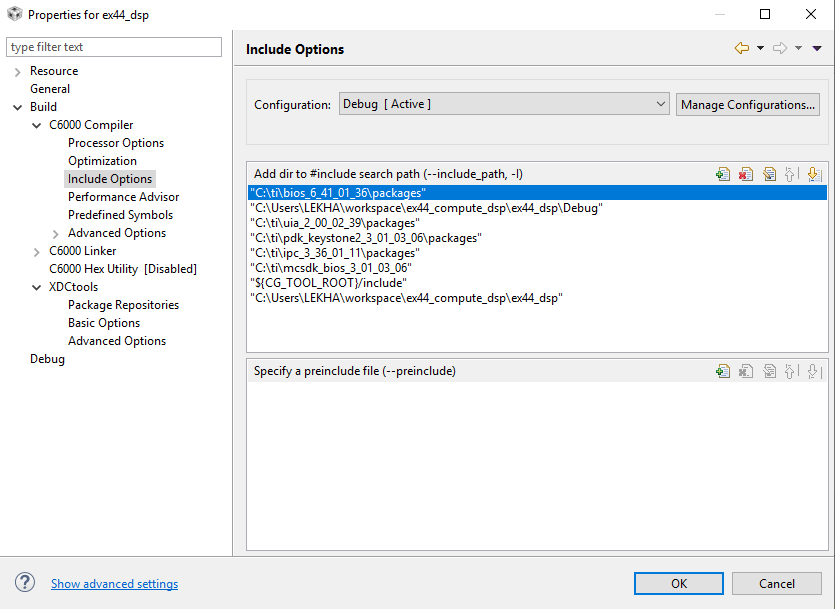
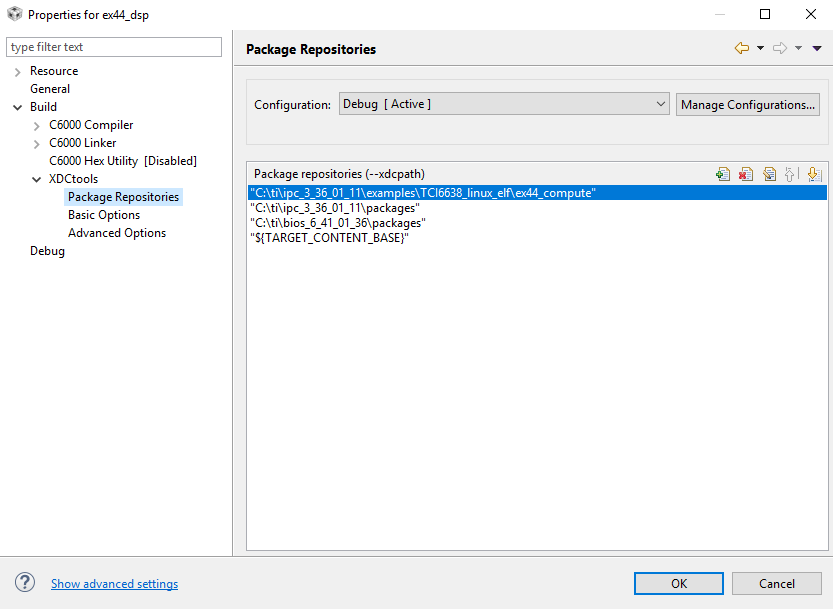
    Sahin I have created the new CCS project and I have followed the same steps which u have sent in the previous post. Now also I am getting the error that " no schema file found "... I am attaching the images of the my CCS project properties.


    CONSOLE LOG 


    **** Build of configuration Debug for project ex44_dsp ****

    "C:\\ti\\ccsv6\\utils\\bin\\gmake" -k all
    'Building file: ../DspN.cfg'
    'Invoking: XDCtools'
    "C:/ti/xdctools_3_30_06_67_core/xs" --xdcpath="C:/ti/ipc_3_36_01_11/examples/TCI6638_linux_elf/ex44_compute;C:/ti/ipc_3_36_01_11/packages;C:/ti/bios_6_41_01_36/packages;C:/ti/ccsv6/ccs_base;" xdc.tools.configuro -o configPkg -t ti.targets.elf.C66 -p ti.platforms.evmTCI6638K2K:coreN -r release -b "C:/Users/LEKHA/workspace/ex44_compute_dsp/ex44_dsp/shared/config.bld" -c "C:/ti/ccsv6/tools/compiler/ti-cgt-c6000_8.3.0" -Dxdc.platform.custom.check=false "../DspN.cfg"
    making package.mak (because of package.bld) ...
    generating interfaces for package configPkg (because package/package.xdc.inc is older than package.xdc) ...
    configuring DspN.xe66 from package/cfg/DspN_pe66.cfg ...
    js: "C:/Users/LEKHA/workspace/ex44_compute_dsp/ex44_dsp/DspN.cfg", line 198: xdc.services.global.XDCException: xdc.PACKAGE_NOT_FOUND: C:\ti\ipc_3_36_01_11\examples\TCI6638_linux_elf\ex44_compute\transport\rtos\package.xdc found along the package path, but no schema file was found. Ensure that the package 'transport.rtos' is completely built.
    "./package/cfg/DspN_pe66.cfg", line 256
    gmake.exe: *** [package/cfg/DspN_pe66.xdl] Error 1
    js: "C:/ti/xdctools_3_30_06_67_core/packages/xdc/tools/Cmdr.xs", line 51: Error: xdc.tools.configuro: configuration failed due to earlier errors (status = 2); 'linker.cmd' deleted.
    gmake: *** [configPkg/linker.cmd] Error 1
    gmake: Target `all' not remade because of errors.

    **** Build Finished ****

    In this directory C:\ti\ipc_3_36_01_11\examples\TCI6638_linux_elf\ex44_compute\transport\rtos there is no schema file found. 

    Thanks n Regards

    Mohan


  • Hii Sahin,

    Thank you for your reply..

    Sahin I have created the new CCS project and I have followed the same steps which u have sent in the previous post. Now also I am getting the error that " no schema file found "... I am attaching the images of the my CCS project properties.


    CONSOLE LOG 


    **** Build of configuration Debug for project ex44_dsp ****

    "C:\\ti\\ccsv6\\utils\\bin\\gmake" -k all
    'Building file: ../DspN.cfg'
    'Invoking: XDCtools'
    "C:/ti/xdctools_3_30_06_67_core/xs" --xdcpath="C:/ti/ipc_3_36_01_11/examples/TCI6638_linux_elf/ex44_compute;C:/ti/ipc_3_36_01_11/packages;C:/ti/bios_6_41_01_36/packages;C:/ti/ccsv6/ccs_base;" xdc.tools.configuro -o configPkg -t ti.targets.elf.C66 -p ti.platforms.evmTCI6638K2K:coreN -r release -b "C:/Users/LEKHA/workspace/ex44_compute_dsp/ex44_dsp/shared/config.bld" -c "C:/ti/ccsv6/tools/compiler/ti-cgt-c6000_8.3.0" -Dxdc.platform.custom.check=false "../DspN.cfg"
    making package.mak (because of package.bld) ...
    generating interfaces for package configPkg (because package/package.xdc.inc is older than package.xdc) ...
    configuring DspN.xe66 from package/cfg/DspN_pe66.cfg ...
    js: "C:/Users/LEKHA/workspace/ex44_compute_dsp/ex44_dsp/DspN.cfg", line 198: xdc.services.global.XDCException: xdc.PACKAGE_NOT_FOUND: C:\ti\ipc_3_36_01_11\examples\TCI6638_linux_elf\ex44_compute\transport\rtos\package.xdc found along the package path, but no schema file was found. Ensure that the package 'transport.rtos' is completely built.
    "./package/cfg/DspN_pe66.cfg", line 256
    gmake.exe: *** [package/cfg/DspN_pe66.xdl] Error 1
    js: "C:/ti/xdctools_3_30_06_67_core/packages/xdc/tools/Cmdr.xs", line 51: Error: xdc.tools.configuro: configuration failed due to earlier errors (status = 2); 'linker.cmd' deleted.
    gmake: *** [configPkg/linker.cmd] Error 1
    gmake: Target `all' not remade because of errors.

    **** Build Finished ****

    In this directory C:\ti\ipc_3_36_01_11\examples\TCI6638_linux_elf\ex44_compute\transport\rtos there is no schema file found. 

    Thanks n Regards

    Mohan

  • Hi Mohan,

    My apologies, I forgot to mention an additional step. You will need to build the rtos transport package as well by modifying the products.mak file under ex44_compute/ and running make. A snippet of my products.mak is shown below for your reference.

    # By default, the necessary build variables are found/assigned via
    # ../products.mak or ../../products.mak, included above.  If you want to
    # override these variables, or are building this example without
    # ../products.mak or ../../products.mak, uncomment and assign the variables
    # below.
    
    DEPOT = C:/ti
    
    #### Linux toolchain ####
    #TOOLCHAIN_LONGNAME     = arm-linux-gnueabihf
    #TOOLCHAIN_INSTALL_DIR  = $(DEPOT)/_your_linux_gcc_toolchain_install_
    #TOOLCHAIN_PREFIX       = $(TOOLCHAIN_INSTALL_DIR)/bin/$(TOOLCHAIN_LONGNAME)-
    
    #### BIOS-side dependencies ####
    BIOS_INSTALL_DIR       = $(DEPOT)/mcsdk/bios_6_41_04_54
    IPC_INSTALL_DIR        = $(DEPOT)/mcsdk/ipc_3_36_02_13
    XDC_INSTALL_DIR        = $(DEPOT)/mcsdk/xdctools_3_31_02_38_core
    #DESTDIR                = $(DEPOT)/_your_destdir__
    
    #### BIOS-side toolchains ####
    ti.targets.elf.C66     = $(DEPOT)/ccsv8/tools/compiler/ti-cgt-c6000_8.2.5

    Regards,
    Sahin

  • Hii Sahin,

    Thank you for your valuable suggestions....

    Thanks n Regards

    Mohan