This thread has been locked.

If you have a related question, please click the "Ask a related question" button in the top right corner. The newly created question will be automatically linked to this question.

CCS/TM4C1290NCPDT: Hardware trace analyzer setup

Part Number: TM4C1290NCPDT
Other Parts Discussed in Thread: TM4C1294NCPDT

Tool/software: Code Composer Studio

I am using CCSV8.3.1.00004, XDS200 debugger SWO trace.

I need to understand setting up the hardware trace analyzer and using:

Statistical function profiling

Interrupt Profiling

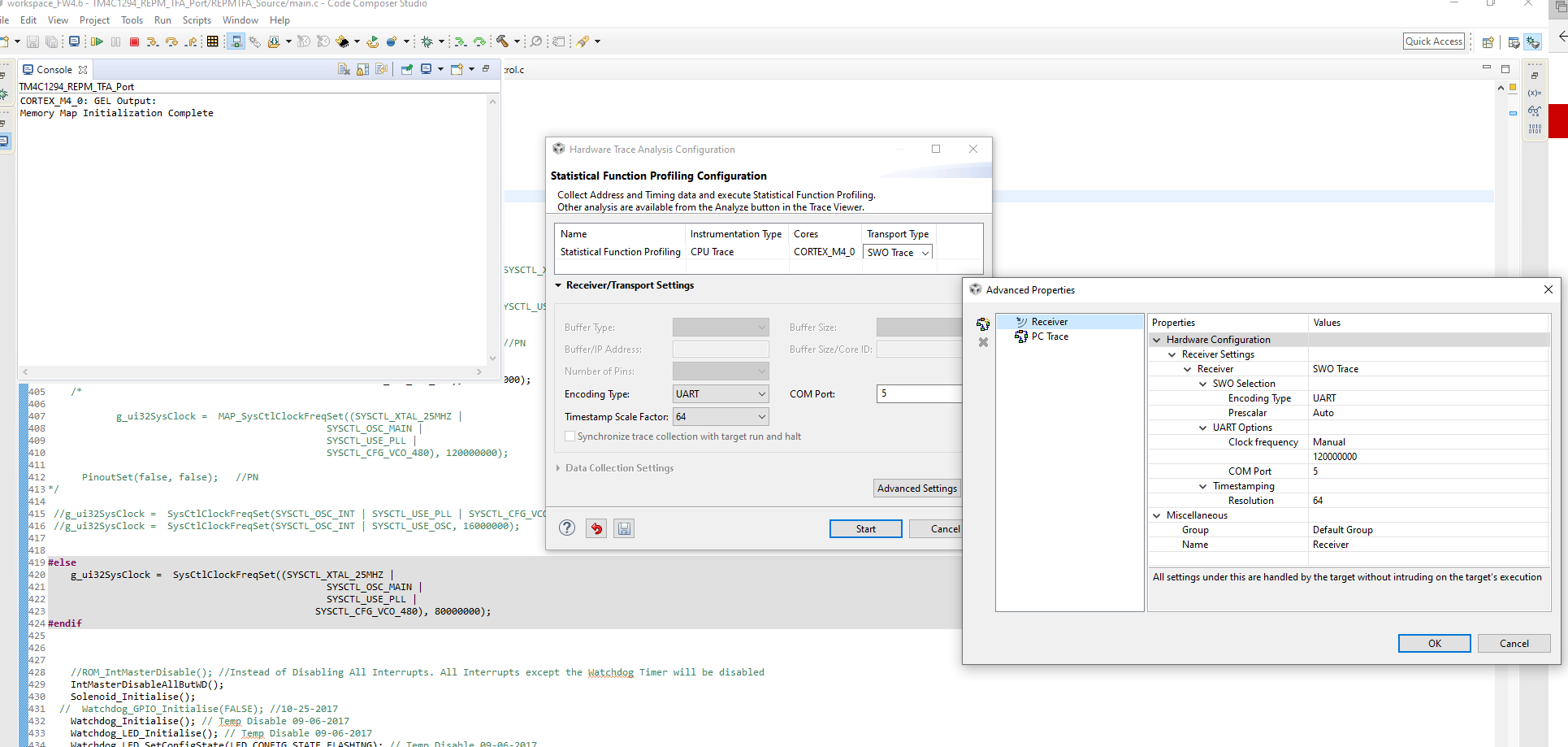
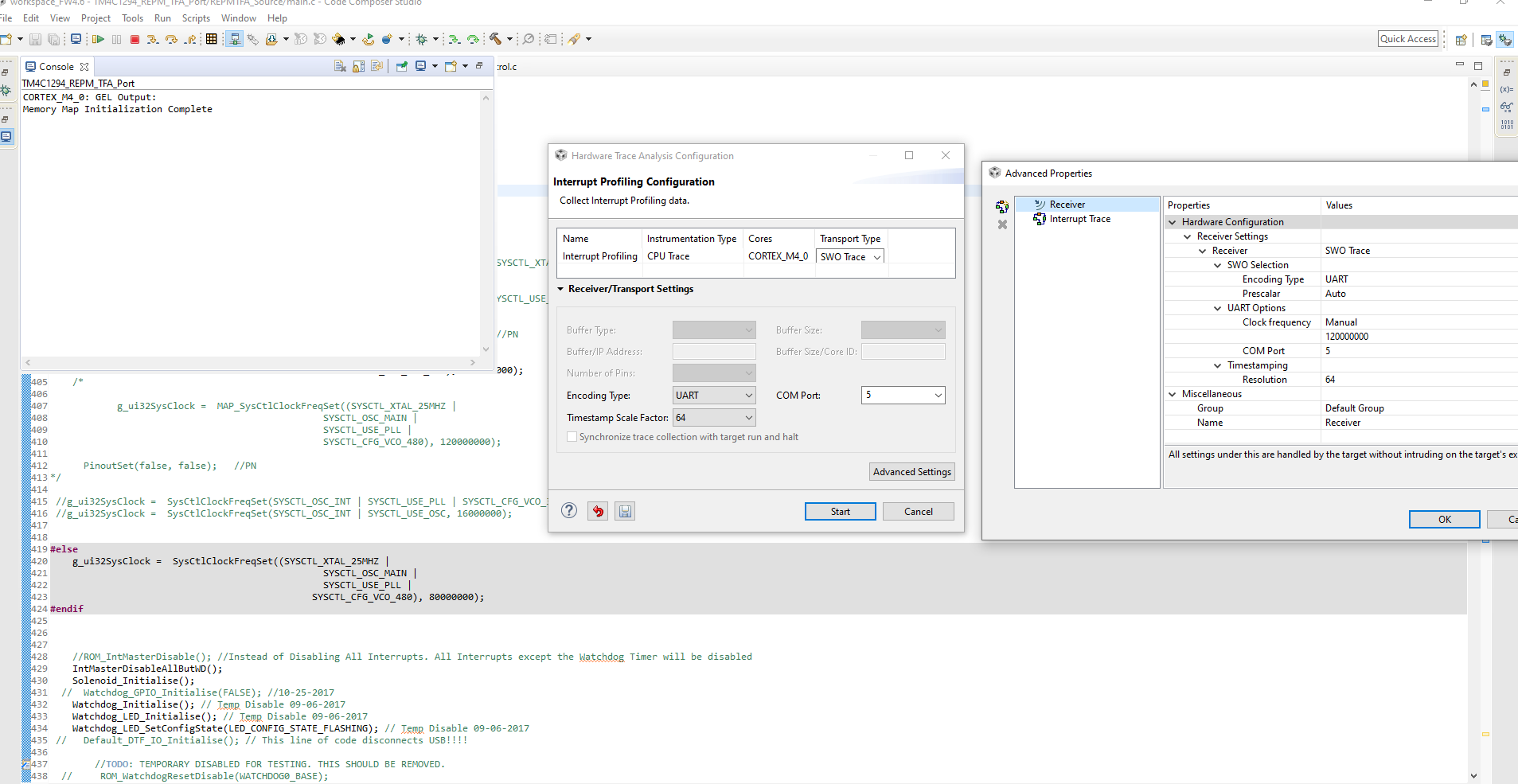
Attached are screeshots to set up these two methods, they seem identical. I don't see a tab to set the sampling CLK.

Why is this? Where can I find this?

I am using resolution of 64. Is this ideal. I am still seeing OVERFLOWS happen when I interrupt profile 19000 out

of 1.4 million records. How to eliminate this?

How do I change the UART prescalar value? Will this help with the overflow issue?

When I use statistical profiling, I am not seeing any output in the trace viewer at all. In CCSV7 

I was able to see something.

It takes a long time, but I was able to export the data to a .csv file.

Please help ASAP. I am on a time crunch and many days have slipped.

Thank you,

Priya

Edited to attach setup pictures and trial run. In the interrupt summary, are the counts the time duration for which the ISR is executing?

Try3.zip
 Try3.zip

  • Priya,

    I will check the interrupts example project on my CCSv8.3.1 and see if there is any difference in behaviour to what I observed with CCSv9.1.0 when I replied to your previous thread. 

    I will reply later today.

    Regards,

    Rafael

  • Priya, 

    Please apologize for the delay. I am able to collect data from a simple example program (interrupts) without the overflow happening. Please check the short clip below, with settings and such. 

    As I mentioned in your other thread, the sample interval must be increased to reduce the data throughput - that is the most effective way to control the data flow and avoid the overflow messages. 

    A while ago a user and I experimented with the UART settings and reported this on the thread below. As you can tell from there, a minimum sampling interval can remove the overflow conditions. 

    https://e2e.ti.com/support/tools/ccs/f/81/t/677821 

    As you mentioned, the prescalar will affect the data throughput as well, but that is a lot more tricky to get it right as it may overflow the buffer on the target (the UART becomes too slow to empty the buffer on the device), thus losing samples. 

    Regarding the inoperative Trace, I would remove all teh Trace temporary files - close CCS and then delete the directory C:\Users\user\.TI-trace

    At last, I would double check system-wide issues such as other processes running, which may cause either the UART or CCS itself operate at a lower speed. 

    Hope this helps,

    Rafael

  • Edited to add: I updated emulator software. The problem below is still there.

    The target is TM4C1290NCPDT, I'm using CCSv8.3.1

    Today, I was able to start the HDWTrace analyzer with statistical function profiling once. The PC value was the same the entire trace, the ticks seemed to increment correctly.

    Since the first time, I repeatedly get errors It says it is unable to select the receiver. Please check target config.

    I am in SWD mode with COM port connected to TDO, JTAG integrity test passes OK. 

    Deleting the workspace and restarting CCS; power cycling the hardware, disabling autorun doesn't seem to help. This error happens following initializing the hardware trace analyzer.

    If I am not using SWD mode, just regular JTAG mode, things seem OK.

  • Upgraded to CCS9.1.0. Changed JTAG CLK to 8MHz. Hardware trace analyzer is not asking to initialize and statistical function profiling won't start. Same error as above.

  • Priya Nadathur70 said:
    Since the first time, I repeatedly get errors It says it is unable to select the receiver. Please check target config.

    I am in SWD mode with COM port connected to TDO, JTAG integrity test passes OK.

    I don't have a XDS200 at the moment, but using CCS 9.1.0.00010 with TI Emulators 8.3.0.00003 under Windows 10 have been able to use the hardware trace analyser with a XDS110 and a TM4C1294NCPDT.

    I am not sure what is causing the error about being unable to select the receiver, but if you generate a cTools/Trace log and post the logs that might give more information on the failure. 

  • file.log

    Here is a copy of trace logs. I see this path only in my ccsv8 installation:

    C:\ti\ccsv8\ccs_base\emulation\specdig

    The specdig dir is not available in the ccsv9 install directory. Not sure if this is one of the situations when you need to uninstall ccsv8 and then install ccsv9 for this directory to appear.

    This is the message I get when I press test connection:

    [Start: Texas Instruments XDS2xx USB Debug Probe_0]
    Execute the command:
    %ccs_base%/common/uscif/dbgjtag -f %boarddatafile% -rv -o -S integrity
    [Result]

    -----[Print the board config pathname(s)]------------------------------------
    C:\Users\PRIYA~1.NAD\AppData\Local\TEXASI~1\
        CCS\ti\1\0\BrdDat\testBoard.dat
    -----[Print the reset-command software log-file]-----------------------------
    This utility has selected a 560/2xx-class product.
    This utility will load the program 'xds2xxu.out'.
    An error occurred while soft opening the controller.
    -----[An error has occurred and this utility has aborted]--------------------
    This error is generated by TI's USCIF driver or utilities.
    The value is '-302' (0xfffffed2).
    The title is 'SC_ERR_PLL_BAD_TCLK_FREQUENCY'.
    The explanation is:
    The requested TCLK PLL frequency option is invalid.
    The utility or debugger has requested a selection of
    the JTAG PLL frequency or clock source that is invalid.
    The value of USCIF.TCLK_FREQUENCY is probably bad.
    [End: Texas Instruments XDS2xx USB Debug Probe_0]

    Look forward to your reply,

    Priya

  • I have ordered a new EK-TM4C1294NCPDT today. To check if I can get the trace analyzer working with the EK.

    All EKs here have been made into JTAG programmers.

    I have made no progress at all running the hardware trace analyzer with the application PCB.

    Priya