This thread has been locked.

If you have a related question, please click the "Ask a related question" button in the top right corner. The newly created question will be automatically linked to this question.

"Error loading managed make project information"


Hello, I just installed the floating license version of CCS version 4.1.2.00027 (Microcontroller edition).  I got thru the install w/o errors and managed to get the license server running.  I then set up CCS to use the license file sent by TI.  It seems happy w/ all that.  However, after that, I get the following dialog.
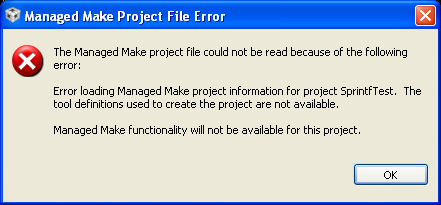
At this point I cannot build or debug my application.  I do not have access to the build properties...

I had been developing using the Eval version 4.1.3 previously.

Any ideas on what is going on?

Regards

Rich

  • Rich,

    I see you are using CCSv4.1.2 with the floating license but was using 4.1.3 before - I think the project information is incompatible since you are now using an older version of the IDE.

    Therefore you can try two options here:

    - Open CCS with a different workspace and import the existing projects you had before (menu Project --> Import Existing CCS/CCE Eclipse project). I would try this first but it may not work, as the projects were created using a newer version of the tools.

    - Update your IDE to 4.1.3 using the Update Manager (menu Help --> Software Updates --> Find and install --> Search for updates of the currently installed features).

    For both options you may have to also update the Code Generation Tools to get the same version of the compiler used in the original project.

    At the moment I don't recall anything else that could be causing this, but I will definitely let you know if I find something else.

    Hope this helps,

    Rafael