This thread has been locked.

If you have a related question, please click the "Ask a related question" button in the top right corner. The newly created question will be automatically linked to this question.

CCS/MSP432P4111: Breakpoint Confusion when files with the same name exist

Part Number: MSP432P4111
Other Parts Discussed in Thread: CC3120

Tool/software: Code Composer Studio

Hi,

Strange one today on the latest CCS 9.2.0.00013.

I have a FreeRTOS project which has a porting file 'msp432p4_port.c'. In the same project I have a CC3120 stack, again with 'msp432p4_port.c' in its porting folder.

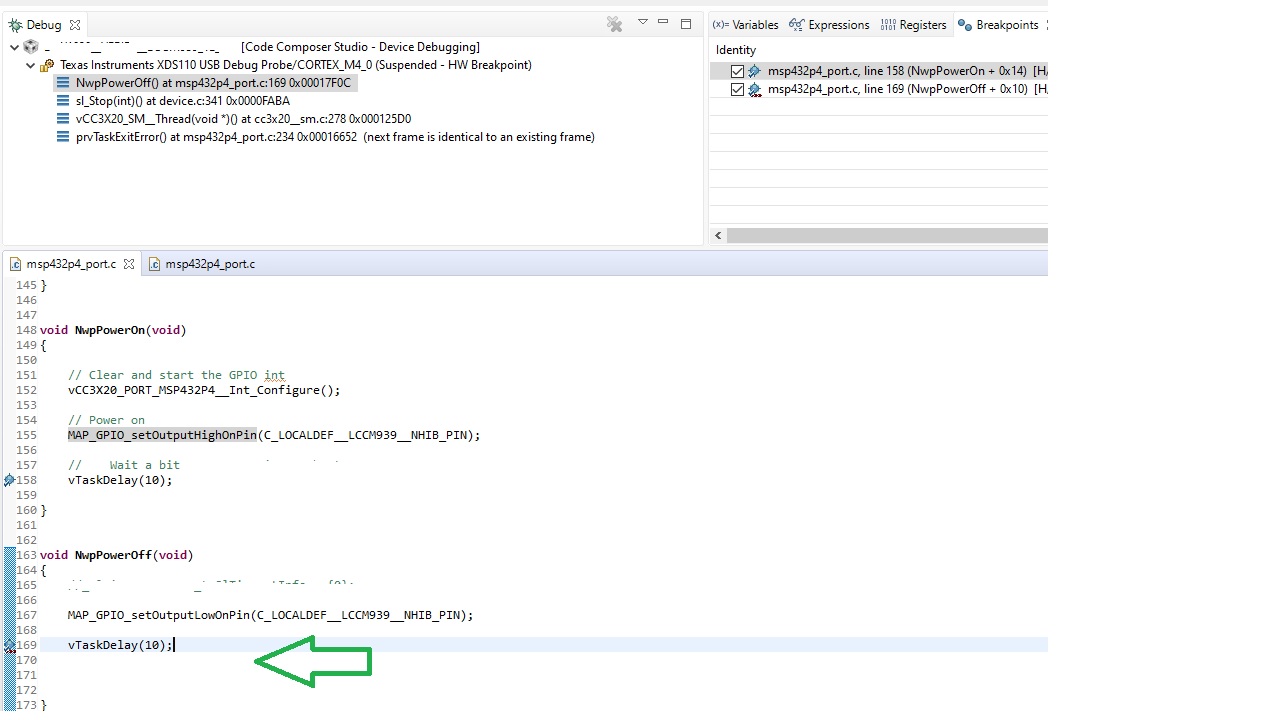
A breakpoint set in the second msp432p4_port.c file, stops the code in the wrong file.

Images attached below

Any ideas?

Thanks

Firstly the not working case:

Breakpoint is triggered on line 169 of msp432p4_port.c, but stops in wrong file.

Secondly, this shows where the breakpoint should actually be:
  • Hi,

    This sounds like an issue that has come up before but I'd like to better understand the environment and circumstance in which it happens for you.
    Could you provide some additional details about your project:

    - Are you building with the TI compiler or GCC compiler? 
    - Are the stack and app within the same project (so you load a single executable) or separate projects (so you load two executables)?
    - How do you set the breakpoints? From the editor or breakpoints view?
    If from the editor, could you try adding it from the Breakpoints view as mentioned in this thread and let us know if that helps?

  • Hi,

    1. We are using TI ARM V18.12.3.LTS

    2. We don't have the concept of 'stack' and 'app'. We build our entire project from raw source, so in that sense we only load a single executable.

    3. To set a breakpoint I double-click on the side bar on line in the source code window.

    Thanks.

  • Thank you for the additional details.

    It seems that this is a known issue in CCS. Did you have a chance to try out my earlier suggestion - (ie) instead of setting breakpoint by double-clicking the side bar in the editor windows, try adding the breakpoint from the Breakpoints view as mentioned in this thread (by specifying filename, line number).

    Let us know if that helps.

  • Since I haven’t heard back from you, I am assuming the above recommendation was helpful and/or you were able to use the above move past this issue. If not, please feel free to post a reply with an update below or create a new thread. Thanks!