This thread has been locked.

If you have a related question, please click the "Ask a related question" button in the top right corner. The newly created question will be automatically linked to this question.

CCS/TMS320F28069F: Variable value not change in Expressions under debug

Part Number: TMS320F28069F

Tool/software: Code Composer Studio

Hello,

I want to monitor the variable values from Expressions under debug. I saw the values always constant without change. These variables were all from an interrupt service routine with sample frequency at 10 kHz. I don't know why? I used CCS9.0.1 with TMS320F28069F.

.

Also if I set a Graph tool for the variable PositionMM as below:
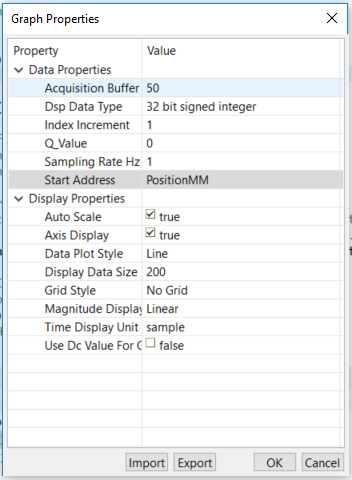
It shew the figure as:

I couldn't see the wave of variable. Can you let me know what cause this issue?

Thanks,

Hao

  • Hao,

    The configurations seem to be pointing to a constant value of PositionMM. If your intention is to plot PositionML, you need to configure the DSP Data Type to 16 bit signed integer and the acquisition data buffer must match the size of the array. 

    I strongly suggest you to read section 7.7 of the CCS User's Guide. In CCSv9.1 and 9.2 you can access it via the online Help (menu Help --> Contents) or online at:

    https://software-dl.ti.com/ccs/esd/documents/users_guide/index.html 

    Hope this helps,

    Rafael

  • Rafael,

    I defined these data type as:

    int16 PositionMM;
    int16 PositionML[100];
    _iq EAngle;

    But when I run the project, I didn't see any changes. Can you let me know what's wrong? How can I set "the acquisition data buffer must match the size of the array"?

    Thanks,

    Hao

  • Hao,

    I don't quite understand your last post. You should run the project and halt or use a breakpoint to see the changes on the graph and other views - this is explained in the reference I sent before (section 7.7.1). Also, each variable mentioned by you requires a different setting for the datatype - for example, int16 is a signed integer of 16bits in size. The array requires the additional parameter to describe its complete size (Acquisition Buffer Size). Check the section Graph properties for a complete description on the options. 

    Hope this helps,

    Rafael