This thread has been locked.

If you have a related question, please click the "Ask a related question" button in the top right corner. The newly created question will be automatically linked to this question.

CCS/AM5728: SBL for custom board

Part Number: AM5728


Tool/software: Code Composer Studio

I need SBLs for a custom board supporting MMCSD and QSPI.  I believe I have successfully added a custom board library to PDK per "Processor SDK RTOS 06_01_00_08, Section 3.1.3.6 Creating Board Library with Custom Name." 

Next, I tried to build the SBL per procedure in "Processor SDK RTOS 06_01_00_08, Section 4.6.3.2.5 Building the SBL" but get errors.  It looks like the underlying makefile needs modification to even recognize my "BOARD_NAME."

Please let me know path forward.  Does a step-by-step procedure exists describing which source files need to be updated?

Thanks,

Dave

  • Hi Dave,

    First of all, which board (evmAM571x, evmAM572x, idkAM571x, idkAM572x or idkAM574x) you have used as the base for your custom board?

    What is the directory name for your custom board (used as directory name)?

    What is the board name for your custom board (used for LIMIT_BOARDS)?

    What is the SOC name for your customer board (used for LIMIT_SOCS)?

    Since you wanted boot from MMCSD and QSPI, you may not want to use evms as your template. They do not support QPSI boot for AM57xx

    The directory name and the board name has to match.

    In fact, SBL is using the board library to set up the custom board (like PLL, DDR etc.). If your SBL build failed by not finding the board seems indicate either your board name is not matching the directory name or the file changes referred in  "Processor SDK RTOS 06_01_00_08, Section 3.1.3.6 Creating Board Library with Custom Name." were not completed.

    Can you send your SBL build log?

    Ming

  • Ming,

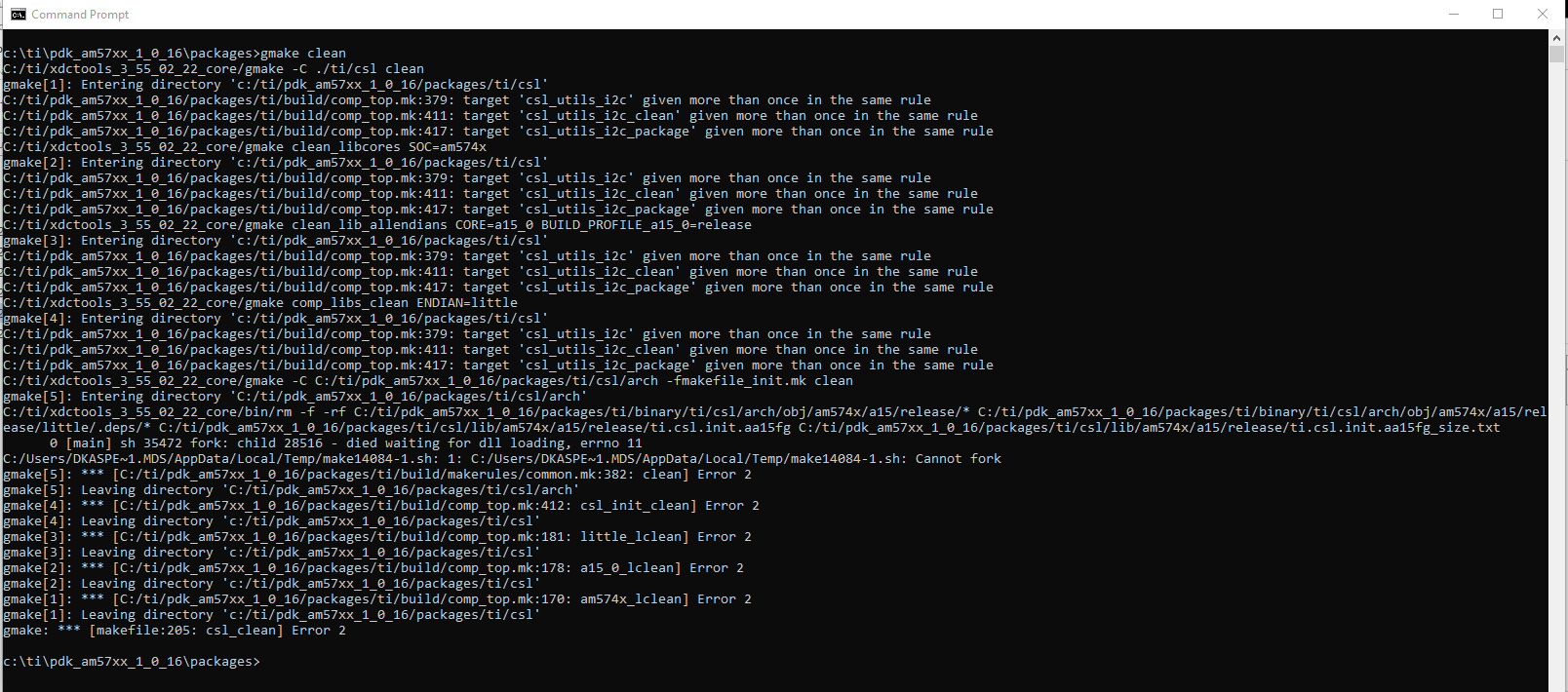
    I think that I have a fundamental issue that needs to be resolved before I can attempt building the SBL.  I get errors trying to clean the pdk per instructions in "1.4.5.1.2. Building PDK using gmake in Windows environment."  Steps that I performed are as follows:

    1. Open DOS command shell

    2. Change to directory "c:\ti\pdk_am57xx_1_0_16\packages"

    3. psksetupenv.bat <CR>

    4.gmake clean <CR> which generates errors illustrated below.

    Please let me know how to resolve these errors.  Thank you very much,

    Dave

  • Hi Dave,

    Did you download and install ALL the components from

    http://software-dl.ti.com/processor-sdk-rtos/esd/AM57X/latest/exports/ti-processor-sdk-rtos-am57xx-evm-06.01.00.08-Windows-x86-Install.exe in C:\ti?

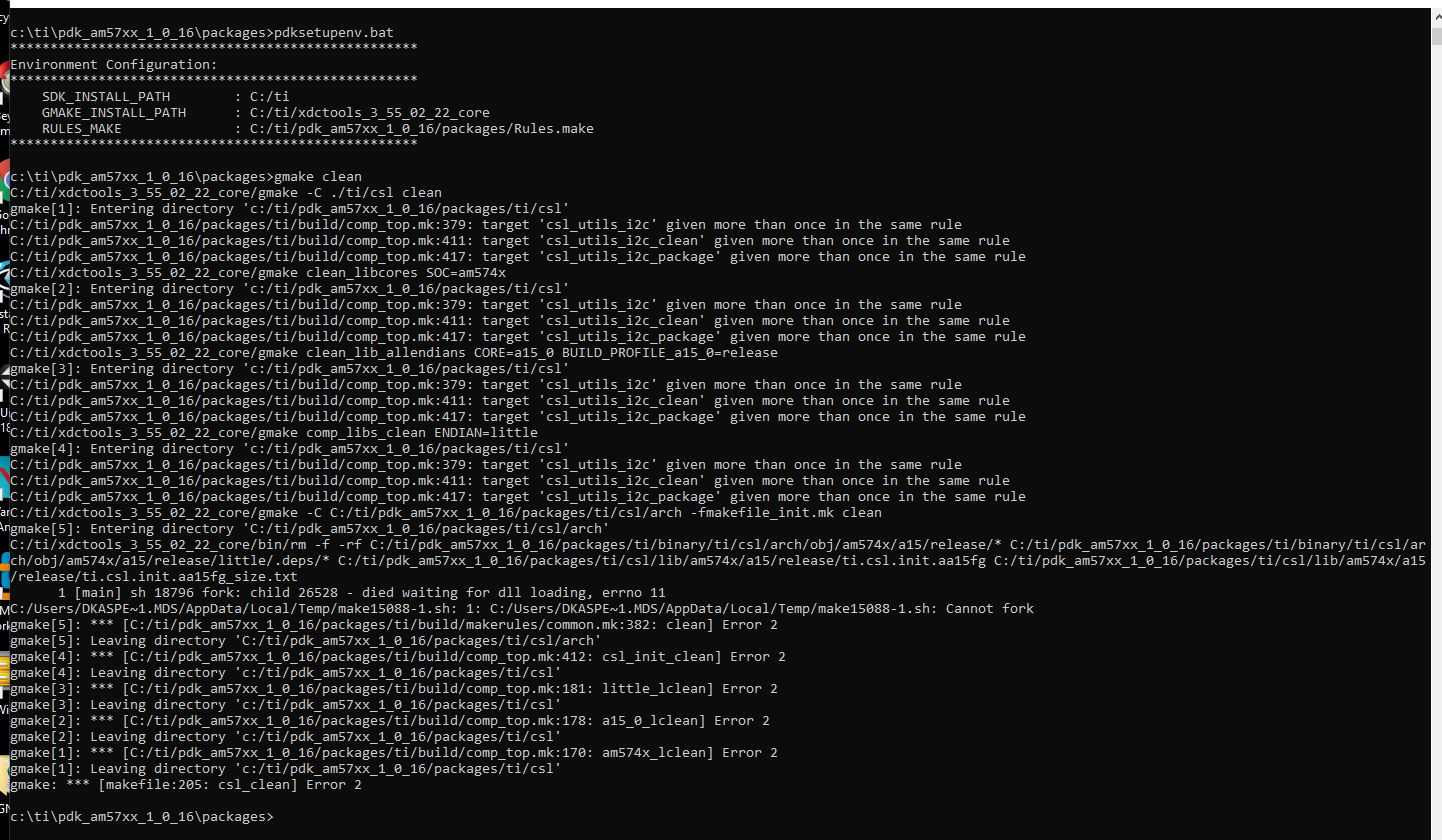
    I just did that on my Windows10 PC. I did not see the problem you described in your previous post, when I did the "gmake clean".

    Ming

  • Ming,

    I tried your recommendation but still get the same error.  Please let me know if I am missing anything.  Note that I didn't first make the sdk.

    Regards,

    Dave

  • Ming,

    Just found that my PC antivirus was blocking the compile.  Will work with IT.  Please wait until I test again before further TI support.  I'll let you know what I find.

    Thanks,

    Dave

  • Hi Dave,

    Here is mine.

    Ming

  • Ming,

    FYI - gmake clean is working now.  My company's antivirus software was causing the errors. 

    Thanks for your help.

    Dave

  • Hi Dave,

    With your building problem resolved, can you please answer the following questions:

    First of all, which board (evmAM571x, evmAM572x, idkAM571x, idkAM572x or idkAM574x) you have used as the base for your custom board?

    What is the directory name for your custom board (used as directory name)?

    What is the board name for your custom board (used for LIMIT_BOARDS)?

    What is the SOC name for your customer board (used for LIMIT_SOCS)?

    Since you wanted boot from MMCSD and QSPI, you may not want to use evms as your template. They do not support QPSI boot for AM57xx

    The directory name and the board name has to match.

    In fact, SBL is using the board library to set up the custom board (like PLL, DDR etc.). If your SBL build failed by not finding the board seems indicate either your board name is not matching the directory name or the file changes referred in  "Processor SDK RTOS 06_01_00_08, Section 3.1.3.6 Creating Board Library with Custom Name." were not completed.

    Can you send your SBL build log?

    Ming

  • Ming,


    See responses below in red.  I am unable to generate an SBL for custom board named "am572_phycore_rdk" based upon evmAM572x when I type the following command below from the packages folder:

    gmake all BOARD=am572x_phycore_rdk SOC=AM572x BOOTMODE=mmcsd <CR>

    I followed steps for "Processor SDK RTOS 06_01_00_08, Section 3.1.3.6 Creating Board Library with Custom Name.

    Please let me know if I also need to add a folder for my custom board under "C:\ti\pdk_am57xx_1_0_16\packages\ti\boot\sbl\board" since this wasn't in the instructions.


    Regards,

    Dave


    Hi Dave,

    First of all, which board (evmAM571x, evmAM572x, idkAM571x, idkAM572x or idkAM574x) you have used as the base for your custom board?

    What is the directory name for your custom board (used as directory name)?

    am572_phycore_rdk

    What is the board name for your custom board (used for LIMIT_BOARDS)?

    am572x_phycore_rdk

    What is the SOC name for your customer board (used for LIMIT_SOCS)?

    am572x

    Since you wanted boot from MMCSD and QSPI, you may not want to use evms as your template. They do not support QPSI boot for AM57xx

    At this point I am using evmAM572x as a baseline. I will verify the created mmcsd SBL on the evmAM572x before I make any modifications.

    The directory name and the board name has to match.

    Yes, am572_phycore_rdk for directory and board name.

    In fact, SBL is using the board library to set up the custom board (like PLL, DDR etc.). If your SBL build failed by not finding the board seems indicate either your board name is not matching the directory name or the file changes referred in  "Processor SDK RTOS 06_01_00_08, Section 3.1.3.6 Creating Board Library with Custom Name." were not completed.

    Changes from Section 3.1.3.6 are as follows:

    1. Created directory: C:\ti\pdk_am57xx_1_0_16\packages\ti\board\src\am572x_phycore_rdk

    a. Populated this folder with files from C:\ti\pdk_am57xx_1_0_16\packages\ti\board\src\evmAM572x

    2. Renamed to “src_files_am572x_phycore_rdk.mk” (located in C:\ti\pdk_am57xx_1_0_16\packages\ti\board\src\am572x_phycore_rdk)

    3. I added the following lines to C:\ti\pdk_am57xx_1_0_16\packages\ti\board\board_cfg.h

    #elif defined (am572x_phycore_rdk)

    #include <ti/board/src/am572x_phycore_rdk/include/board_cfg.h>

    4. Updated C:\ti\pdk_am57xx_1_0_16\packages\ti\board\build\makefile.mk as follows:

    ifeq ($(BOARD),$(filter $(BOARD),evmAM335x icev2AM335x iceAMIC110 skAM335x bbbAM335x evmAM437x idkAM437x skAM437x evmAM572x idkAM571x idkAM572x evmK2H evmK2K evmK2E evmK2L evmK2G iceK2G evmC6678 evmC6657 evmOMAPL137 lcdkOMAPL138 idkAM574x am65xx_evm am65xx_idk am572x_phycore_rdk))

    # Common source files across all platforms and cores

    SRCS_COMMON += board.c

    endif

    ***

    ifeq ($(BOARD),$(filter $(BOARD), evmAM572x idkAM571x idkAM572x idkAM574x am572x_phycore_rdk))

    include $(PDK_BOARD_COMP_PATH)/src/$(BOARD)/src_files_$(BOARD).mk

    include $(PDK_BOARD_COMP_PATH)/src/src_files_lld.mk

    endif

    5. Updated C:\ti\pdk_am57xx_1_0_16\packages\ti\build\makerules\build_config.mk as follows:

    CFLAGS_GLOBAL_am572x_phycore_rdk     = -DSOC_AM572x -Dam572x_phycore_rdk=am572x_phycore_rdk

    I also updated C:\ti\pdk_am57xx_1_0_16\packages\ti\build\makerules\platform.mk as follows.

    ???? Please confirm if I was supposed to use evmAM572xCustom versus embAM572X below.


    # AM572X

    ifeq ($(BOARD),$(filter $(BOARD), am572x-evm am572x-idk evmAM572x idkAM572x am572x_phycore_rdk))

    SOC = am572x

    Endif

    ***

       ifeq ($(BOARD),$(filter $(BOARD), evmAM572x))

         PLATFORM_XDC = "ti.platforms.evmAM572X"

       endif


       ifeq ($(BOARD),$(filter $(BOARD), am572x_phycore_rdk))

         PLATFORM_XDC = "ti.platforms.evmAM572X"

       Endif

    ***

       ifeq ($(BOARD),$(filter $(BOARD), evmAM572x))

         PLATFORM_XDC = "ti.platforms.evmAM572X"

       endif


       ifeq ($(BOARD),$(filter $(BOARD), am572x_phycore_rdk))

         PLATFORM_XDC = "ti.platforms.evmAM572X"

       endif

    ***

       ifeq ($(BOARD),$(filter $(BOARD), evmAM572x))

         PLATFORM_XDC = "ti.platforms.evmAM572X"

       endif


       ifeq ($(BOARD),$(filter $(BOARD), am572x_phycore_rdk))

         PLATFORM_XDC = "ti.platforms.evmAM572X"

       endif


    6. Updated C:\ti\pdk_am57xx_1_0_16\packages\ti\board\src\src_files_lld.mk as follows:

    ifeq ($(BOARD),$(filter $(BOARD), evmAM572x idkAM572x am572x_phycore_rdk))

    SRCDIR +=   $(PDK_INSTALL_PATH)/ti/drv/i2c/soc/am572x \

               $(PDK_INSTALL_PATH)/ti/drv/uart/soc/am572x \

               $(PDK_INSTALL_PATH)/ti/drv/spi/soc/am572x


    INCDIR +=   $(PDK_INSTALL_PATH)/ti/drv/i2c/soc/am572x \

               $(PDK_INSTALL_PATH)/ti/drv/uart/soc/am572x \

               $(PDK_INSTALL_PATH)/ti/drv/spi/soc/am572x


    # Common source files across all platforms and cores

    SRCS_COMMON += I2C_soc.c UART_soc.c SPI_soc.c

    CFLAGS_LOCAL_COMMON += -DPRU_ICSS_FW

    Endif


    7. Updated C:\ti\pdk_am57xx_1_0_16\packages\ti\board\board_component.mk as follows: 

    board_lib_BOARDLIST       = evmAM335x icev2AM335x iceAMIC110 skAM335x bbbAM335x evmAM437x idkAM437x skAM437x evmAM572x am572x_phycore_rdk idkAM571x idkAM572x evmK2H evmK2K evmK2E evmK2L evmK2G iceK2G \

                               evmC6678 evmC6657 tda2xx-evm evmDRA75x tda2ex-evm evmDRA72x tda3xx-evm evmDRA78x evmOMAPL137 lcdkOMAPL138 idkAM574x am65xx_evm am65xx_idk j721e_sim j721e_qt j721e_evm

    8. Updated C:\ti\pdk_am57xx_1_0_16\packages\ti\board\config.bld as follows:

    var am572x_phycore_rdk = {

       name: "am572x_phycore_rdk",

       ccOpts: "-Dam572x_phycore_rdk -DSOC_AM572x",

       targets: [C66LE, A15LE, M4LE],

       lldFiles: ["$(PDK_INSTALL_PATH)/ti/drv/i2c/soc/am572x/I2C_soc.c",

               "$(PDK_INSTALL_PATH)/ti/drv/uart/soc/am572x/UART_soc.c",

               "$(PDK_INSTALL_PATH)/ti/drv/spi/soc/am572x/SPI_soc.c"]

    }


    /* List all the build targets here. */

    Build.targets = [ C66LE, C66BE, A15LE, M4LE, A9LE, A8LE, ARM9LE, C674LE A53LE ];

    var boards = [ evmAM335x, icev2AM335x, skAM335x, bbbAM335x, evmAM437x, idkAM437x, skAM437x, evmAM572x, idkAM571x, idkAM572x, evmK2H, evmK2K, evmK2E, evmK2L, evmK2G, evmC6678, evmC6657, evmOMAPL137 idkAM574x am65xx_evm am65xx_idk am572x_phycore_rdk ];

    Updated C:\ti\pdk_am57xx_1_0_16\packages\ti\board\package.bld as follows:

    Pkg.otherFiles[Pkg.otherFiles.length++] = "src/am572x_phycore_rdk/src_files_am572x_phycore_rdk.mk";


    9. Updated C:\ti\pdk_am57xx_1_0_16\packages/rules.make as follows:

    #export LIMIT_BOARDS ?= evmAM572x am572x_phycore_rdk idkAM571x idkAM572x idkAM574x

    export LIMIT_BOARDS ?= am572x_phycore_rdk

    Can you send your SBL build log?

    Please let me know if the log is automatically created. Otherwise, please confirm the syntax to create the log on Windows.

    Ming

  • Hi Rei,

    Yes, You will need to create a new folder under C:\ti\pdk_am57xx_1_0_16\packages\ti\boot\sbl\board. Simply copy evmAM572x and rename it to am572x_phycore_rdk, then execute the following command:

    gmake -C ./ti/boot/sbl all BOARD=am572x_phycore_rdk SOC=AM572x BOOTMODE=mmcsd <CR>

    The step 5 is optional, unless you have created a new platform in SYS/BIOS for am572x_phycore_rdk, you do not have to change it.

    Ming

  • Ming,

    I followed your steps, built the SBL and verified proper operation on the hardware (i.e. LED blink demo booting from the SD card).  However, I needed to add am572x_phycore_rdk support to ~pdk/packages/ti/boot/sbl/board/src/sbl_avs_config.c,h to fix compiler errors. 

    Next steps are to incorporate changes to support the custom Phytec board.  I am trying to get a better understanding of this process and have a couple of questions below.

    1. Please let me know if the following files are called by the software:

    C:\ti\pdk_am57xx_1_0_16\packages\ti\board\src\evmAM572x\evmAM572x_SR1.1.pinmux

    C:\ti\pdk_am57xx_1_0_16\packages\ti\board\src\evmAM572x\evmAM572x_SR2.0.pinmux

    2. Per my understanding sbl_main.c sets BOARD_INIT_PINMUX_CONFIG.  Please confirm this causes the files output from the pinmux tool to be used (i.e. boardPadDelay.h, boardPadDelayDevice.c, boardPadDelayInit.c and boardPadDelayTune.h).

    3. I assume my next step is to replace the evmAM572x pinmux files listed step 2 with ones supporting the Phytec board.  Can I just execute the make command above after these files are replaced (i.e. gmake -C ./ti/boot/sbl all BOARD=am572x_phycore_rdk SOC=AM572x BOOTMODE=mmcsd <CR>)?  Or do I need gmake clean or etc. to pickup the revised files?

    Thanks for your help!

    Dave

  • >>1. Please let me know if the following files are called by the software:

    C:\ti\pdk_am57xx_1_0_16\packages\ti\board\src\evmAM572x\evmAM572x_SR1.1.pinmux

    C:\ti\pdk_am57xx_1_0_16\packages\ti\board\src\evmAM572x\evmAM572x_SR2.0.pinmux

    [MW] Those files are the input files for pinmux tool to generate the boardPadDelay* files. You will need to change the *.pinmux file according to your custom board and re-run the pinmux tool to generate the updated boardPadDelay* files

    >>2. Per my understanding sbl_main.c sets BOARD_INIT_PINMUX_CONFIG.  Please confirm this causes the files output from the pinmux tool to be used (i.e. boardPadDelay.h, boardPadDelayDevice.c, boardPadDelayInit.c and boardPadDelayTune.h).

    [MW] You are correct. It should be set when Board_init() is called.

    >>3. I assume my next step is to replace the evmAM572x pinmux files listed step 2 with ones supporting the Phytec board.  Can I just execute the make command above after these files are replaced (i.e. gmake -C ./ti/boot/sbl all BOARD=am572x_phycore_rdk SOC=AM572x BOOTMODE=mmcsd <CR>)?  Or do I need gmake clean or etc. to pickup the revised files?

    [MW] When you call the gmake with BOARD=am572x_phycore_rdk, the makefile will use the files in the board\src\am572x_phycore_rdk folder, so you need to update the boardPadDelay* files in board\src\am572x_phycore_rdk folder before you call the gamke. That is why you need to create a new board\src\am572x_phycore_rdk folder at the beginning. The board\src\evmAM572x folder should be kept intact.

    Ming

  • Hi Dave,

    P.S., you do need to use gmake clean to trigger the re-build custom board library.

    Ming

  • Ming,

    Thanks for responding as I was unclear if I needed to perform make clean.  I have output files from the pinmux tool provided by the Phytec vendor.  I'll try adding them to the ~board\src\am572x_phycore_rdk folder next.

    Dave

  • Hi Dave,

    I will mark this thread as "TI Thinks Resolved". You can re-open it by responding to this thread.

    Ming