This thread has been locked.

If you have a related question, please click the "Ask a related question" button in the top right corner. The newly created question will be automatically linked to this question.

CCS/C2000WARE: CCS

Part Number: C2000WARE

Tool/software: Code Composer Studio

Hello, I am new to CCS 9.2, and trying to test example projects for C280049C.  According to the technical guide, I can select project and find "Import CCS project", which I remember using it previously.  However, after doing some other things, and I am trying to select the project again and I do not see "Import CCS project option in the window and see the following options only.  Can some one help me solve this issue?  I would like to import the CCS project that I used.

  • Soonwook,

    The screen capture did not come through.

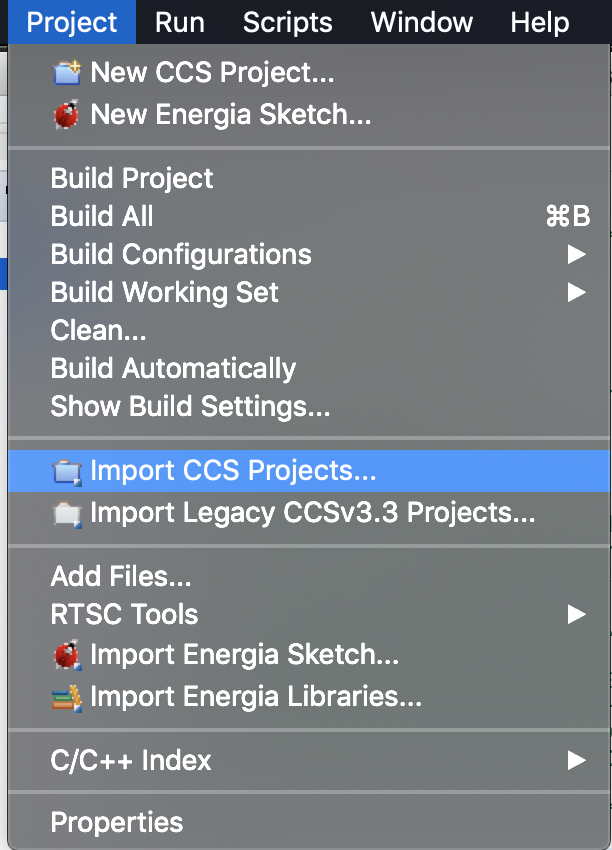
    The project menu in CCS should look like this:

    Note that if you are in the Debug perspective in CCS instead of the Edit perspective you will only see:

    I am guessing that you are seeing the second image.  To switch to the edit perspective go to the top right corner of CCS and click on the button for the "CCS Edit" perspective.

    The menus and buttons in CCS differ depending on if you are currently in build/edit mode or if you are debugging.

    Regards,

    John