Tool/software: Code Composer Studio
Hello,
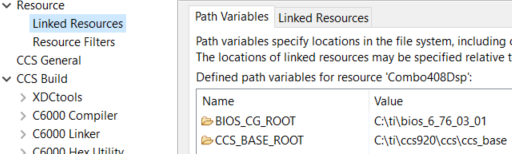
Is there a way to use a Windows environment variable, to take the place of the "Path Variables" in CCS Resource->Linked Resources?
Regards,
Robert
This thread has been locked.
If you have a related question, please click the "Ask a related question" button in the top right corner. The newly created question will be automatically linked to this question.
Tool/software: Code Composer Studio
Hello,
Is there a way to use a Windows environment variable, to take the place of the "Path Variables" in CCS Resource->Linked Resources?
Regards,
Robert
Hello Robert,
Robert Wolfe said:Is there a way to use a Windows environment variable, to take the place of the "Path Variables" in CCS Resource->Linked Resources?
Windows environment variables will appear as a "system variable" in CCS. You would need to explicitly re-add the variable as a general build variable to override the system variable one (even if the value is the same). Make sure the variable type is specified as a file, directory, or path type. If so, then the variable will also be defined as a Path Variable.
https://software-dl.ti.com/ccs/esd/documents/ccs_portable-projects.html#user-defined-variables
Thanks
ki
Ki,
Thanks. A little clarification please - even if it appears as a "system variable", that could not be used directly as a build variable, without explicitly adding it to the build variables as well. The idea was that each user would have their own system variable defining a project path, that CCS would automatically enlist as a build variable. But I guess, from your reply, that is not possible - it would always require manually adding it to the build variable (so wouldn't matter whether was defined as system variable, or not).
Robert
With CCS 9.2 confirm that you can't use an environment variable as a reference in a linker resource.Robert Wolfe said:The idea was that each user would have their own system variable defining a project path, that CCS would automatically enlist as a build variable.
However, you can use an environment variable to specify other project path settings, e.g. compiler search paths.
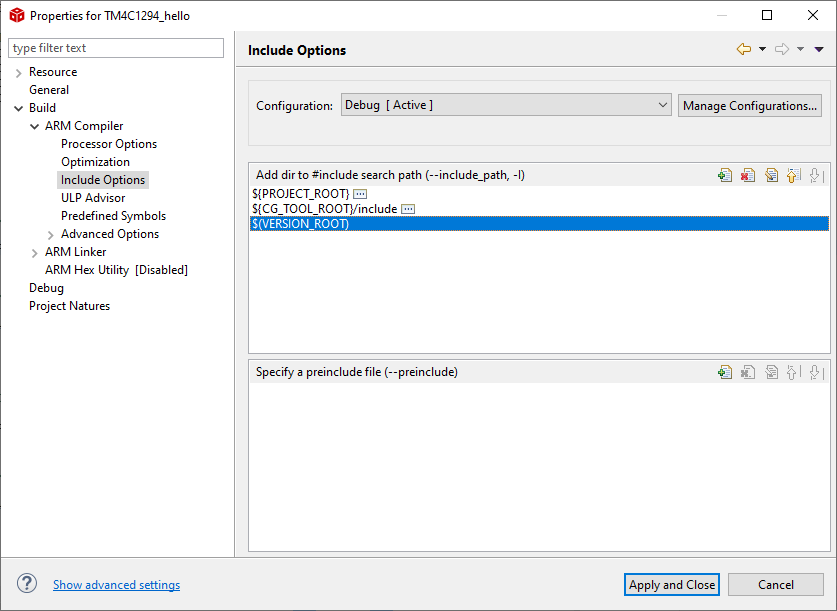
In the following example added the VERSION_ROOT environment variable to the compiler include path:
Where round brackets are used to reference an environment variable.
With the VERSION_ROOT environment variable set before starting CCS:
C:\Users\mr_halfword>set VERSION_ROOT=%USERPROFILE%\my_version C:\Users\mr_halfword>c:\ti\ccs920\ccs\eclipse\ccstudio.exe
When a build was performed in CCS the environment variable was used to populate the include path to the compiler:
Invoking: ARM Compiler"C:/ti/ccs920/ccs/tools/compiler/ti-cgt-arm_18.12.4.LTS/bin/armcl" -mv7M4 --code_state=16 --float_support=FPv4SPD16 -me --include_path="C:/Users/mr_halfword/workspace_v9_2/TM4C1294_hello" --include_path="C:/ti/ccs920/ccs/tools/compiler/ti-cgt-arm_18.12.4.LTS/include" --include_path="C:\Users\mr_halfword\my_version" --define=ccs="ccs" --define=PART_TM4C1294NCPDT -g --gcc --diag_warning=225 --diag_wrap=off --display_error_number --abi=eabi --preproc_with_compile --preproc_dependency="tm4c1294ncpdt_startup_ccs.d_raw" "../tm4c1294ncpdt_startup_ccs.c"
This seems to be a limitation in Eclipse rather than just CCS. E.g. with a stock Oxygen 4.7.3a under Linux I have also been unable to get an environment variable to used under Resource->Path Variables.Robert Wolfe said:Just to be clear, a environment variable could not be used in the Resource->Path Variables, per attached picture.
The following Stack Overflow threads report the same problem:
- Eclipse project linked resources by environment variable
- Is it possible to use an environment variable instead of a “linked resource”?
Ok Chester, thanks for the follow-ups. We'll write it off for now, then.
Robert
Robert Wolfe said:it would always require manually adding it to the build variable (so wouldn't matter whether was defined as system variable, or not).
Note that you can also try using a macro.ini to define the variable and add it to the project. On project import, CCS would read the file and add the variable as both build variable and path variable. However, the user would still then need to manually modify the path to match their environment. Not a perfect solution but maybe still useful to a degree
https://software-dl.ti.com/ccs/esd/documents/ccs_portable-projects.html#sharing-variables-file
Thanks
ki