This thread has been locked.

If you have a related question, please click the "Ask a related question" button in the top right corner. The newly created question will be automatically linked to this question.

CCS/66AK2H14: Problem with the XDS200 drivers

Part Number: 66AK2H14


Tool/software: Code Composer Studio

Hi,

there is the problem with the JTAG connection bethween PC with Windows 7 and 66AK2H14 evaluation module. 

I suppose, it's the problem with the XDS200 driver. 

In this topic I found this picture:
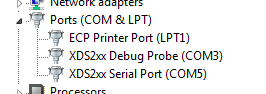
It's correct names of the devices. But my Windows can't find appropriate driver. 
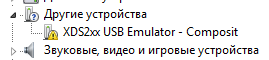
I can manually choose this variant:
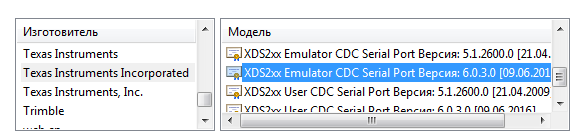
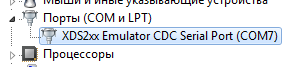
And as the result I have the only one device:
If I start the "Test Connection" in Target configuratio menu, it returns this error after 1 minute process:
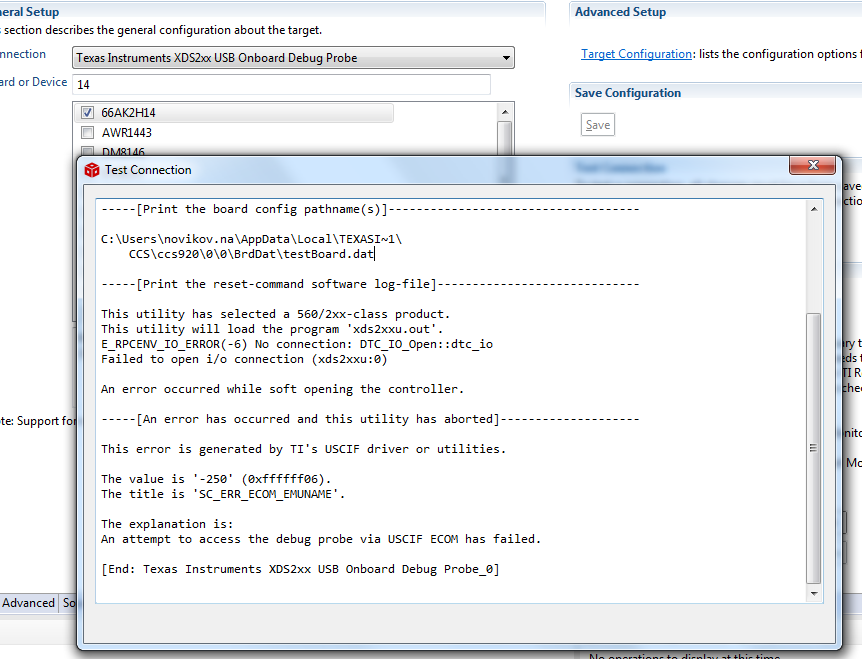
If I delete drvers for devoce and let it stay unknown "Test Connection" returns the same error but without 1 minute "thinking".

Somewhere in forums I found the way to test JTAG connection by xds2xx_conf.exe running. 

There are the results: 

The first case: without driver (unknown device) and the second - with it.

Also I've tried to do it in Ubuntu 18.04 using the VMWare virtual machine. The result is the same. 

I use CCS 9.

I really need your help,

Nikolay

  • Nikolay,

    The best person to help with this one is out for the Holidays.  I have flagged the thread for them so that they will see it in their queue.

    Do you have access to a different debug probe that you could try.  On that board I believe the XDS200 is a separate card sitting on top and that you can remove it and access the JTAG header underneath.

    Regards,

    John

  • Thank you, John. 

    But the problem is exactly not in the JTAG card or cable, because my colleague tested it yesterday and everything was OK. He have two COM-ports in Device Manager and drivers work correctly. There is the difference bethween our OS: he have Win10 and me - Win7.

    Regards,

    Nikolay

  • Nikolay,

    Were you able to make this work in your host? 

    There is a known issue with a specific USB3.0 controller that affects the XDS200 - this is reported in the section Troubleshooting of the XDS200 page.

    https://software-dl.ti.com/ccs/esd/documents/xdsdebugprobes/emu_xds200.html 

    You can also check the other details there for possible issues that may be getting in the way of a good connection. 

    Also, the Windows drivers shown in your third screenshot above seem quite outdated - the thread you linked talks about the difference between the names of the control panel drivers. I would then manually reinstall the drivers shipped with your CCSv9.2.0 following the procedure on the Troubleshooting section of the page above. 

    Hope this helps,

    Rafael

  • Rafael,

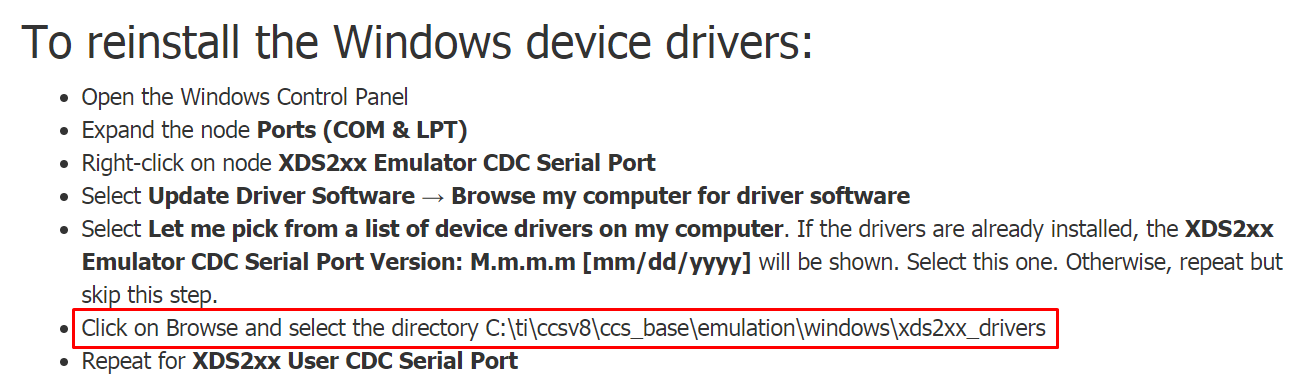
    If I understand you correctly, you adviced to do this:

    I've done it, but it was failed. Windows said something like this: "There are no drivers in this directory". It couldn't find them. 

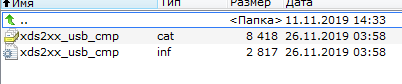
    In this directory I have this:

    Nikolay

  • Nikolay,

    Please apologize for the delay; the directory contents match what I have here. In my particular case, they work just fine to install the XDS200 drivers. 

    At this point I am really unsure what may be happening in your environment - I have both Windows 7 and Windows 10 here and the drivers install perfectly fine using the method I indicated above. 

    I will keep an eye on other reports and hopefully another developer with a simiar scenario can comment on this thread. 

    Regards,

    Rafael

  • Rafael, 

    Thank you for help. I suppose the problem was in my Windows 7. Now I use Windows 10 and don't have the driver problem.

    Nikolay.