This thread has been locked.

If you have a related question, please click the "Ask a related question" button in the top right corner. The newly created question will be automatically linked to this question.

CCS/LAUNCHXL-F280049C: Target configuration connection fails

Part Number: LAUNCHXL-F280049C

Tool/software: Code Composer Studio

I got this new LaunchXL-F280049C and want to test some code on it.

When I connect this board to my PC via the USB with the cable provided, the LEDs on board all lit or flashed correctly as described in "spruii7a - F28004x LaunchPad Kit.pdf".

However, my computer does not recognize the device. The USB port shows no XDS110 symbol.

I have used "xdsdfu -e", I got the message:

Scanning USB buses for supported XDS110 devices...

The requested device was not found on the bus.

I have tested CCS target connections with the Docking station using USB X100v2, with F28335, F28035, F28027, and F28069. All works well.

I have tested all 3 USB ports and got the same result.

I have used 3 different cables and got the same results. I have tested all 3 cables and they work properly with other devices.

Please help.

  • Hi,

    In light of the details you provided, the common point of problems seems to be the host itself and its installed drivers (or lack thereof). 

    In this case, can you follow the instructions mentioned in the section Troubleshooting of the XDS110 page below? 

    https://software-dl.ti.com/ccs/esd/documents/xdsdebugprobes/emu_xds110.html

    Hope this helps,

    Rafael

  • Hi, Rafael,

    Thank you for respond to my question. I am a bit desperate.

    I am using a Dell Inspiron laptop with Windows 10. 

    I have followed the step in the "emu_xds110.html" before asking the question.

    Which XDS110 is right for me?

    I am using LAUNCHXL-F280049C, so, I tried to read the content of all 4 links. Followed as many steps as applicable.

    The Launchpad is still in the same condition as I opened the box. I did not change any switch or jumper from their default position

    Now, I am following this link again, and here are the facts:

    1, Trouble Shooting:
    I have not seen any of the highlighted drivers on my computer's device manager. So, you are right, the driver is not properly installed. But I have tried many ways to find/install drivers without success.

    2. Installation Instructions: 

    I have installed, and uninstalled, and reinstalled CCS9.3 several times, but when plugging in the Launchpad, the system still would not recognize it.

    3. Firmware update:
    I have used both xdsdfu -e and xdsdfu -m, and got the same message: 

    Scanning USB buses for supported XDS110 devices...

    0 device found.

    4. Debug and Trace Usage Modes:
    I set the "Target Configuration"  as below 

    but the "Test Connection" fails,

    An error occurred while hard opening the controller.

    -----[An error has occurred and this utility has aborted]--------------------

    This error is generated by TI's USCIF driver or utilities.

    The value is '-260' (0xfffffefc).
    The title is 'SC_ERR_XDS110_OPEN'.

    The explanation is:
    An attempt to connect to the XDS110 failed.
    The cause may be one or more of: no XDS110 is connected, invalid
    firmware update, invalid XDS110 serial number, or faulty USB
    cable. The firmware and serial number may be updated using the
    xdsdfu utility found in the .../ccs_base/common/uscif/xds110
    directory of your installation. View the ReadMe.txt file there
    for instructions.

    [End: Texas Instruments XDS110 USB Debug Probe_0]

  • Hi,

    Thanks for providing additional details. The issue with the device drivers will prevent CCS and its utilities such as xdsdfu and the "Test Connection" from properly acknowledging the Launchpad.

    Specifically for number 2) above, can you confirm you followed the procedure below? 

    https://software-dl.ti.com/ccs/esd/documents/xdsdebugprobes/emu_xds110.html#to-reinstall-the-windows-device-drivers  

    If you did, what was the outcome? Did Control Panel report a failure installing the drivers? Does Control Panel show the Stellaris Device Firmware Upgrade entry instead? (shown in the screenshot right below the section I highlighted above). 

    If all this fails to work, I would definitely try on a different host to isolate the issue completely. 

    Hope this helps,

    Rafael

  • Thank you Rafael. 
    I have followed the instructions in the link you provided, before and after your reply.

    I have tested this LaunchXL-F280049C pad on different computers, one with Windows7 and CCS8, another with Windows8 and CCS8, and another with Windows10 and CCS9.3 and CCS8.3. All had the same failure.

    I also swapped the cable connecting the launch pad and the computer. The cables all work with other devices, but not with this Launch pad.

    I have NO PROBLEM using CCS8 or CCS9 to connect with other TI MCU targets such as the Docking Station mounted with F28335, F28035, and F28027 cards. 

    Here below, the pictures shows the outcome: :

  • Rhonda,

    Thanks for the very detailed post. At this point the root cause shifted from the host to the boards themselves.

    Just one additional step before declaring your boards faulty is to verify if they have the bootloader programmed. 

    The procedure below to re-flash the bootloader may bring the boards back to life:

    https://software-dl.ti.com/ccs/esd/documents/xdsdebugprobes/emu_xds110.html#flashing-the-bootloader 

    As I said above, this is the last attempt to confirm if the boards are faulty beyond repair. If you can't bring them back to life, I would contact the store/distributor you purchased them and asked to issue a return or exchange. 

    I apologize for the inconvenience,

    Rafael

  • Thanks, Rafael.

    In my "Device Manager" list, I don't even have "Stellaris DFU entry".

    My question is in the picture below.

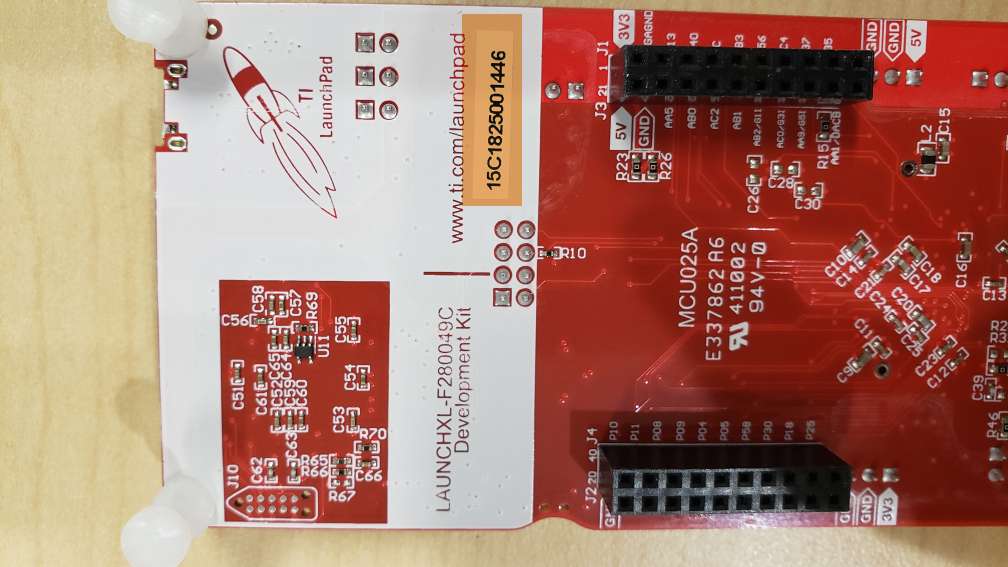
    I found J10 at the back of the Launch pad PCB. It is not mounted. only 10 solder points in its place.

  • Rhonda,

    These are the pins to be joined. However, don't solder them - simply make a momentary contact while powering up the board. 

    Another person soldered the pins and let the board plugged for long periods, eventually damaging the TM4C1294 device. 

    Regards,

    Rafael

  • Hi, Rafael,

    Thank you very much for your patience.

    I finally got the connection to target working. I have tried several USB cables and finally got one cable which works.

    It seems that the cable came with the launch pad does not have the data lines connected. It has only the voltage power lines.

    My other cables, some of them are for chargers without data lines, only one has the data lines. And this one works for the launch pad.

    Sincerely,

    Rhonda

  • Rhonda, 

    Thanks for letting me know. The use of power only cables is something that tricked me in the past as well - nowadays I label them in a very visble way. 

    If you don't mind, would you share the serial numbers of the boards you purchased that have this cable?  

    If there is a production problem, this may help us track further intormation. 

    I apologize for the inconvenience,

    Rafael