Tool/software: Code Composer Studio
Hi,
I am using AM5718,and CCS version is 8.2.How we enable trace on CCS?..I am using bare metal codes.Can i able to turn on trace for a non OS environment??
This thread has been locked.
If you have a related question, please click the "Ask a related question" button in the top right corner. The newly created question will be automatically linked to this question.
Tool/software: Code Composer Studio
Hi,
I am using AM5718,and CCS version is 8.2.How we enable trace on CCS?..I am using bare metal codes.Can i able to turn on trace for a non OS environment??
Hi,
You can enable trace by going to menu Tools --> Hardware Trace Analyzer and select the Trace Job you need.
In this case, that will depend on the selected CPU and the available hardware.
Additional details about Trace can be found at the two references below:
https://www.ti.com/jp/lit/pdf/spruhm7
Hope this helps,
Rafael
Hi Rafael,
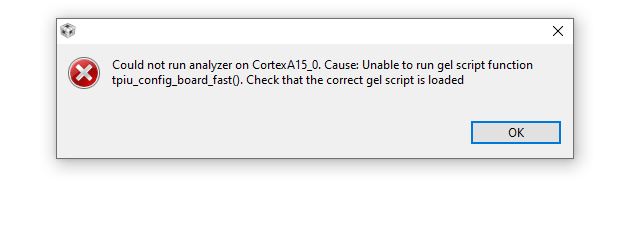
I tried to enable trace in my project as per you mentioned in your reply.But it shows an error message like these.
I have that gel file (AM571x_tpiu.gel that was commented in your gel file) and i loaded it initially.Is it necessary to run those function prior to enabling trace ?? How i run that gel script function tpiu_config_board_fast()??
Hi,
I had a vague recollection of seeing this error and found the post below.
https://e2e.ti.com/support/tools/ccs/f/81/p/618902/2280714#2280714
If your configuration is set for the "pure" device and not a board, please follow the directions above to properly configure the device.
Hope this helps,
Rafael
Hi,
The Code Coverage is possible but, if you do not have a board with the full MIPI-60 connector and a XDS ProTrace, the limited size Embedded Trace Buffer (ETB) will present a very narrow snapshot of the various function transitions of the system. This will present itself as a coverage full of gaps during the times the buffer is being offloaded to the host.
Regards,
Rafael