This thread has been locked.

If you have a related question, please click the "Ask a related question" button in the top right corner. The newly created question will be automatically linked to this question.

CCS/TMS320C6654: Creating New Platform - Device Family - Linux Ubuntu

Part Number: TMS320C6654

Tool/software: Code Composer Studio

I am trying to create a new platform to customize cache and RAM for my custom board.

In CCS : Project -> RTSC tools -> New

In the device family drop down list I can only see three entries "arm - cortexm3 - cortexm4". No entries for C6000 family.

I tried reinstalling CCS and selecting all the device family in the installation, I tried to reinstall the processor rtos sdk. But the problem is still the same.

I have access to a windows machine, and on the windows machine the drop down dialog box shows normally with a much bigger list.

Code Composer Studio
Version: 9.3.0.00012

OS: Linux, v.4.15.0-74-generic, x86_64 / gtk 3.22.30
Java version: 1.8.0_112

processor_sdk_rtos_c665x_6_00_00_07

  • Hi,

    Let me install CCS on my Linux machine first. I'll get back to you after I give it a try.

    Rex

  • Hi,

    Instead of using RTSC Tools->New, could you try ->Edit/View Platform? and see if that's what you want?

    Rex

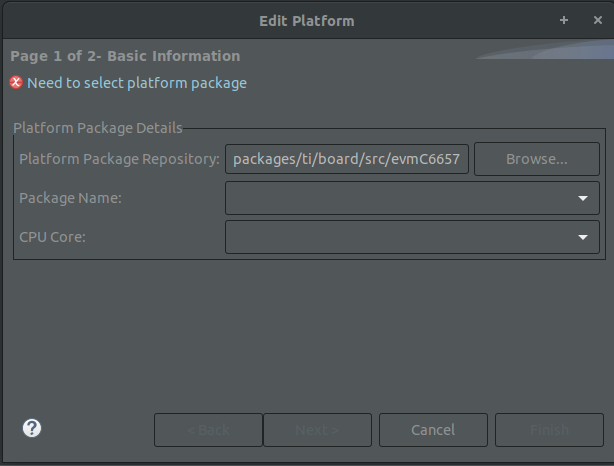
  • "Need to select platform package"

    Maybe I am missing something

    I tried the following paths "~/ti/pdk_c665x_2_0_14/packages/ti/board/src/evmC6657"

     "~/ti/pdk_c665x_2_0_14/packages/ti/board"

  • Hello,

    What is your Ubuntu version?

    regards,

    David

  • Distributor ID: Ubuntu
    Description: Ubuntu 18.04.3 LTS
    Release: 18.04
    Codename: bionic

  • Dear LazyHD,

    Apologize for my delayed reply. I was able to try the same Ubuntu and CCS version as you have and here is my findings:

    1) Install CCS

    2) When you try at this point: even though you have selected all devices, the platform won't showing C6000. This matches your observations.

    Then close CCS.

    3) Install Processor SDK for C665x

    4) Then run CCS again. At this point, CCS should detect the new products and prompt you to install it? Did you remember seeing this?

    On my side, after the new products were installed and CCS were restarted and then when I tried the RTSC platform, C6000 shows up now.

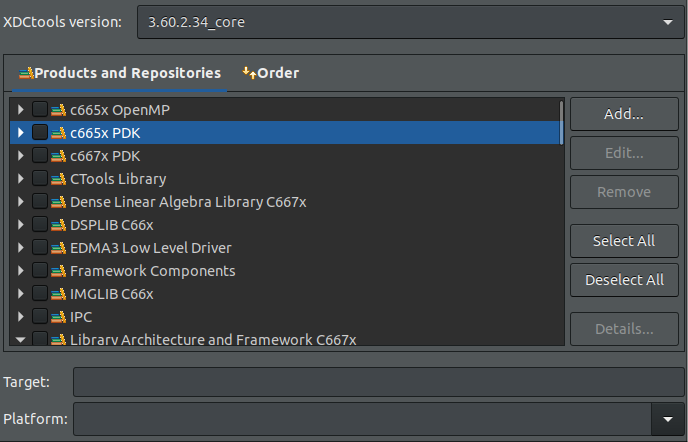
    In case if your CCS is not detecting the new product, optionally, in CCS, click "Window", then "Preferences", then "Code Composer Studio", then Products", then "RTSC", then click "Products" and then click "Add" and if you install Processor SDK in its default path, it will be something like this: /home/someusername/ti. Anyway, point it to the path where you have the Processor SDK installed. Then click "Apply".

    Please let me know if this helps.

    best regards,

    David Zhou

  • I am sure it prompted me about the new products discovery. 

    I tried anyways to follow your steps and I can see the in the Products and Repositories section the products related to it.

    Since this is a new machine, I am going to try a fresh install and follow the same steps.

  • Clean install and things are working fine. Don;t know what was going on.