This thread has been locked.

If you have a related question, please click the "Ask a related question" button in the top right corner. The newly created question will be automatically linked to this question.

CCS/AWR1243BOOST: Cascaded radar- The windowing function setting for EVE

Part Number: AWR1243BOOST

Tool/software: Code Composer Studio

Hi TI team,

According to our knowledge, the ADC data should be multiplied by the windowing function before 1-D and 2-D FFT separately to eliminate the side lobe level.

There are  windowing types selection for DSP, however only apply for 2-D FFT.

As our knowledge, there is not  windowing type selection for EVE.

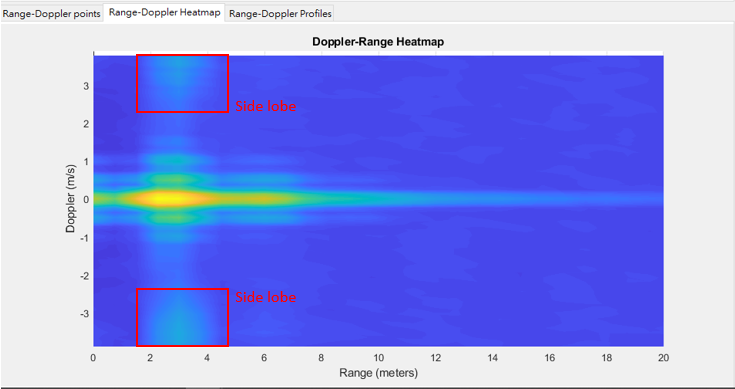
So we assume the windowing type is initialized as rectangle window and it is also why we see the high side lode level.

Is there any windowing type selection or setting on EVE that we can use it to eliminate the side lobe level ?

Please help us to figure out this problem.

Thank you so much.

Best regards,

Jacki Hsu
  • Hi 

    Please refer the "ChainsCommon_ar12xxSetFFTParams" function.

    Here we are setting the window coefficient such as

    pFFTParams->algCreatePrm[0].windowCoeffAddr[RADAR_FFT_NUM_POINTS_1024] = (UInt32) gFftWindowx1024;
    pFFTParams->algCreatePrm[0].windowCoeffAddr[RADAR_FFT_NUM_POINTS_512] = (UInt32) gFftWindowx512;
    pFFTParams->algCreatePrm[0].windowCoeffAddr[RADAR_FFT_NUM_POINTS_256] = (UInt32) gFftWindowx256;
    pFFTParams->algCreatePrm[0].windowCoeffAddr[RADAR_FFT_NUM_POINTS_128] = (UInt32) gFftWindowx128;
    pFFTParams->algCreatePrm[0].windowCoeffAddr[RADAR_FFT_NUM_POINTS_64] = (UInt32) gFftWindowx64;
    pFFTParams->algCreatePrm[1].windowCoeffAddr[RADAR_FFT_NUM_POINTS_1024] = (UInt32) gFftWindowx1024;
    pFFTParams->algCreatePrm[1].windowCoeffAddr[RADAR_FFT_NUM_POINTS_512] = (UInt32) gFftWindowx512;
    pFFTParams->algCreatePrm[1].windowCoeffAddr[RADAR_FFT_NUM_POINTS_256] = (UInt32) gFftWindowx256;
    pFFTParams->algCreatePrm[1].windowCoeffAddr[RADAR_FFT_NUM_POINTS_128] = (UInt32) gFftWindowx128;
    pFFTParams->algCreatePrm[1].windowCoeffAddr[RADAR_FFT_NUM_POINTS_64] = (UInt32) gFftWindowx64;

    Thanks

    Gaviraju

  • Hi Gaviraju,

    Thank you for your replying.

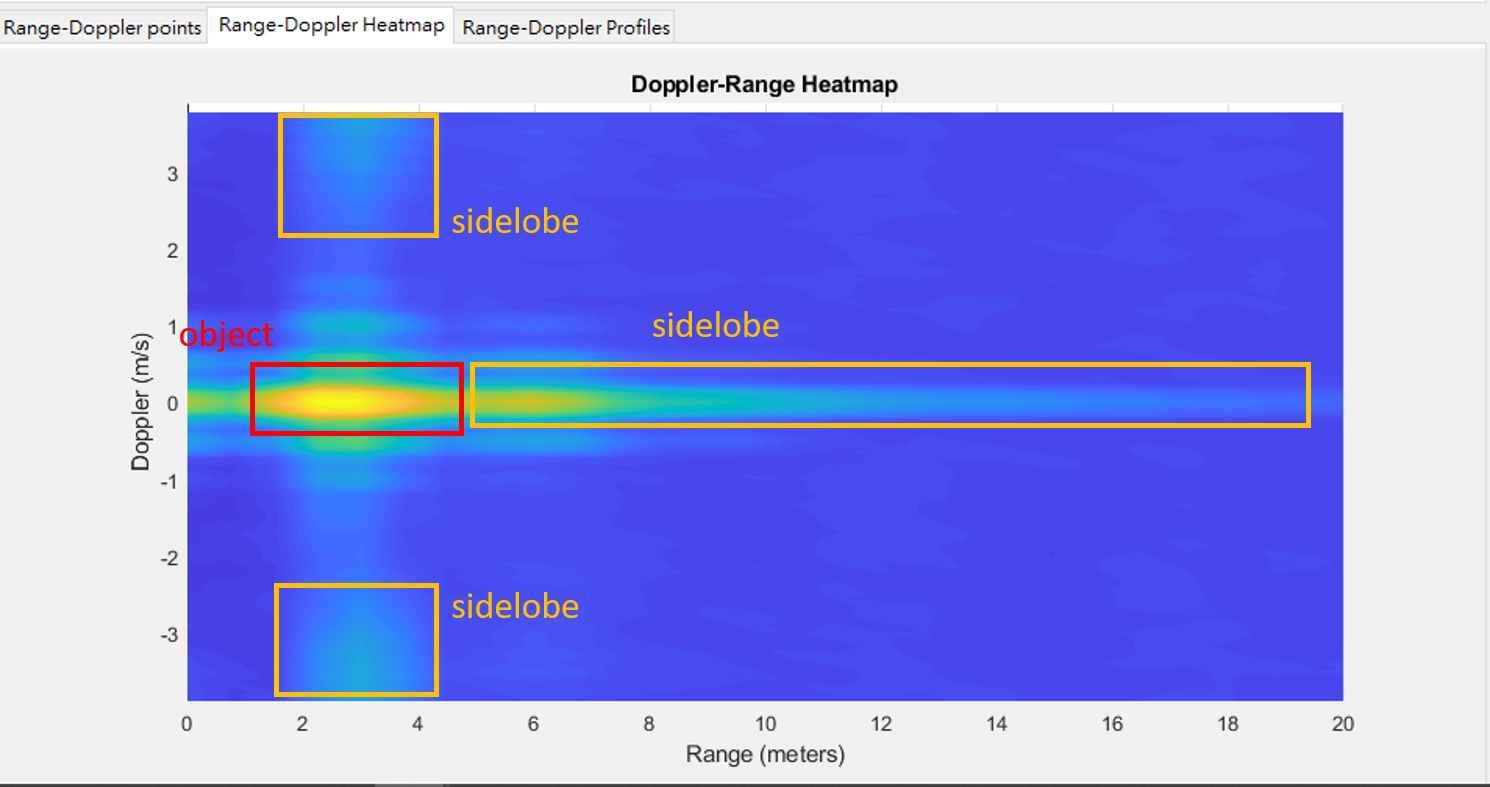
    And we are still confused why the side lobe level in the both end of doppler axis.

    As our knowledge, it seems that it's not caused by the difference of window type.

    Thank you.

    Jacki Hsu

  • Hi Jack

    You can choose which windowing operation you would like to select by defining your own gFftWindowx and then pointing the EVE algorithm code to take this as an input as shown in ChainsCommon_ar12xxSetFFTParams.

    You can see if the windowing is taking effect, by first setting enableWindowing = 0 and see the output and then enableWindowing = 1 and then see the output again.

    Thanks and Regards

    Piyali