This thread has been locked.

If you have a related question, please click the "Ask a related question" button in the top right corner. The newly created question will be automatically linked to this question.

Compiler/TM4C1230C3PM: Code Composer Studio™ forum

Part Number: TM4C1230C3PM
Other Parts Discussed in Thread: UNIFLASH

Tool/software: TI C/C++ Compiler

Hi all,

I'm trying to generate an hex (intel format) file from .out. [my intent is to transfer it's content to re-program my board, at first using uniFlash].

In the picture below there's the set up of ARM Hex utility 
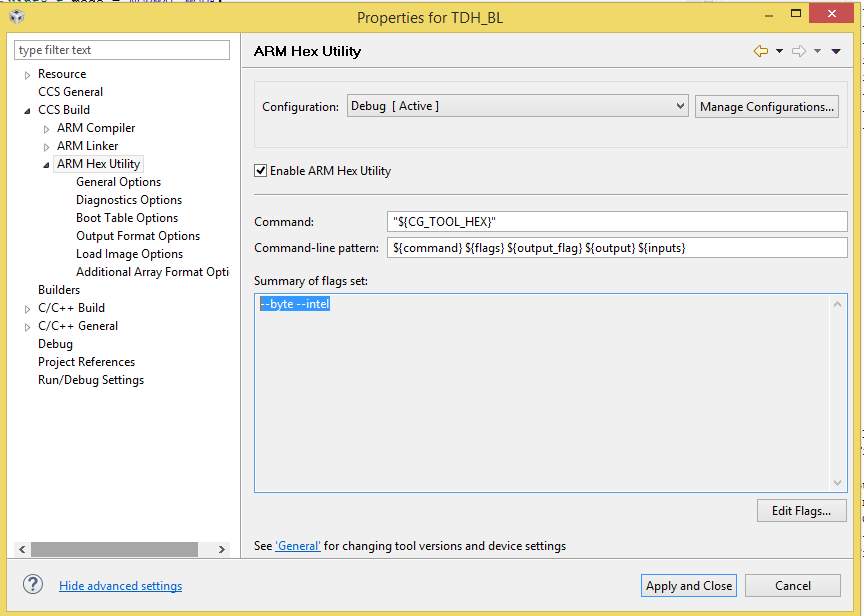
But if I try to read with notepad the hex file generated, and compare it with the flash content read by the debugger in CCS the data are not what I'm expecting.

The code to read flash is simple, made in this way:

uint32_t datoInFlash[10] = {0}; // init
...
...
datoInFlash[0] = *((uint32_t*) (0x0000)); 
datoInFlash[1] = *((uint32_t*) (0x0004));
datoInFlash[2] = *((uint32_t*) (0x0008));
datoInFlash[3] = *((uint32_t*) (0x000c));
datoInFlash[4] = *((uint32_t*) (0x0010));
datoInFlash[5] = *((uint32_t*) (0x0014));
datoInFlash[6] = *((uint32_t*) (0x0018));
datoInFlash[7] = *((uint32_t*) (0x001c));
datoInFlash[8] = *((uint32_t*) (0x0020));
datoInFlash[9] = *((uint32_t*) (0x0024));
..
..

For example:

  • The first byte in the editor (0x50) matches with the LSB of data[0] in the debugger
  • The second byte in the editor (0xCB) matches with the LSB of data[0] in the debugger
  • ... and so on 

But where are the other bytes? For exemple 0x20000A50, 0x000026CB. I'm expecting to read this byte in the .hex file, somewhere..

What I'm missing?

Thanks for the answers,

Marco.

  • Ok, for now I solved my issue specifing the ROM width=8 as parameter for the HexUtility

  • I'm confused.  I expect the solution would be to use not --romwidth=8, but --romwidth=32.  To understand why, please search the ARM assembly tools manual for the sub-chapter titled Understanding Memory Widths.

    Thanks and regards,

    -George

  • Hi George,

    thanks for the answer, but now I'm confused too:

    • If I Build with romwidth = 8, the values in hex and read from debugger are the same
    • If I Build with romwidth = 32, the values in hex and read from debugger are different. (the hex size is smaller than romwidth=8)
    • If I transfer the hex generated by (point 1) using UniFlash, the code runs fine. (I'm saying that because in my program I drive a GPIO to turn on a LED)
    • If I transfer the hex generated by (point 2) using UniFlash, the code doesn't run 

    In addition looking at 12.3.3 of the ARM Assembly Language Tools User'sGuide I tried to:

    • set romwidth = memorywidth = 32 --> I have only 1 .hex
    • set romwidth = 8 ; memorywidth = 32 --> I have only 1 .hex, but I'm expecting 32/8 = 4 files

    What's the problem?

    Thanks,

    Marco.

  • The only way I can understand what happened is to run the hex utility exactly as you do.

    Please show exactly how the hex utility is invoked.  Copy-n-paste the text of the invocation of armhex from the Command view.  Please put the file(s) that are input to hex utility in a zip and attach that to your next post.  This is usually the .out file created by the linker, and maybe a command file.  

    If you are not comfortable with attaching the zip file to this thread, you are welcome to send it to me privately.  Hover your mouse over my screen name or avatar. A box will pop up. Click on Send a private message. In the message compose interface which comes up, use the paper clip icon to attach the zip file.

    Thanks and regards,

    -George

  • Hi George,

    thanks for the answer. I sent you a private message.

    Best regards,

    Marco.

  • Thank you for the test case.  

    I presume the hex file you sent in your test case works correctly when you flash it and run it.  I discovered I get nearly the same output with this command ...

    % armhex --intel --romwidth=32 --order=MS -o=output_r32_ms.hex ProgettoCheNonFaNiente.out
    Translating to Intel format...
       "ProgettoCheNonFaNiente.out" .intvecs ==> .intvecs
       "ProgettoCheNonFaNiente.out" .text ==> .text
    warning: section ProgettoCheNonFaNiente.out(.text) was padded by 2 to a
       size of 5172 to satisfy the specified memory width of 4
       "ProgettoCheNonFaNiente.out" .const ==> .const
       "ProgettoCheNonFaNiente.out" .cinit ==> .cinit

    The only difference is that the last record for the .text section is padded with 2 bytes of 0.  I doubt this causes any problems.

    Note the option --order=MS.  This means you require the bytes to be in big endian order for it to work.  But the .out file is built with little endian order.  Because this is a system level question, I cannot explain why the endianness does not match.  Perhaps you should build the .out file in big endian order?

    By using --memwidth=8, you force the ordering to always be big endian.  I suggest it is better to know you need big endian order, and to explicitly choose it.  That is why, for cases like this, I suggest that --romwidth be set to match the default memory width.

    Thanks and regards,

    -George