This thread has been locked.

If you have a related question, please click the "Ask a related question" button in the top right corner. The newly created question will be automatically linked to this question.

CCS/CC3235S: Not able to link external library files in my CCS program , I am getting linking error.

Part Number: CC3235S


Tool/software: Code Composer Studio

Hi team !!!

I need your help to resolved my error that is coming in CCS, when i am adding external library file in my program. library file and is

1) ADE9153AAPI.cpp

2) ADE9153A.h

3) ADE9153AAPI.h

previously these files were in C++ programming but now i have changed code into C it self. but i got another linking issue that is giving me error. i added these files by right click on the project and Add Files. still i am not able to find out how to add files. is this possible to add external files in CCS. or should i add all the code in main file of the project.

please guide as soon as possible

waiting for your response

Thanks in advance

Sarju Bhatnagar

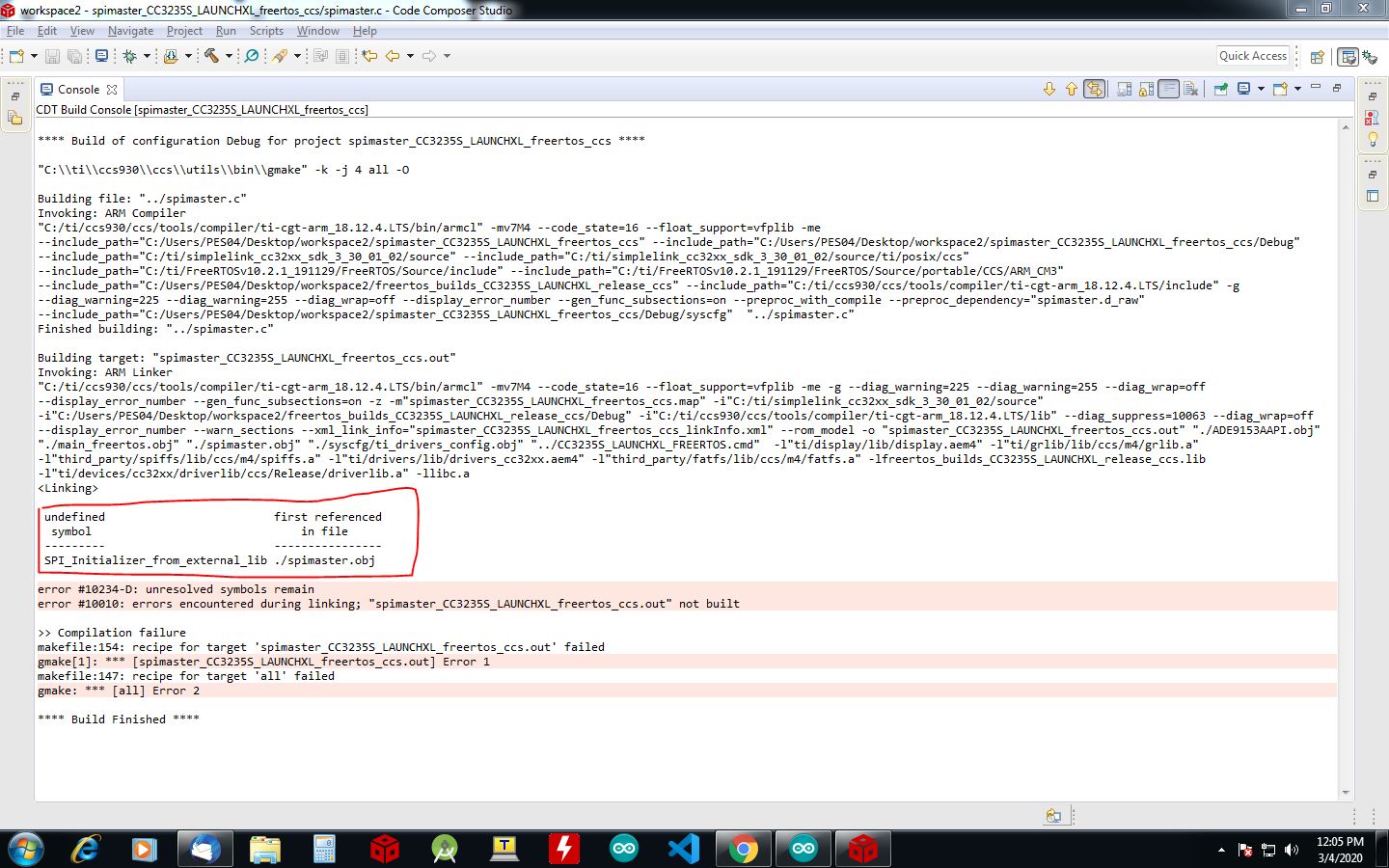
  • Screen shot for your reference..

    thanks 

    sarju bhatnagar

  • Sarju,

    Were you able to build prior to adding those files?  SPI_Init(), SPI_Initializer() are all used by the standard example.  Something has been changed to prevent the linker from finding those functions.  

    Lets start over

    Delete these 2 projects from your workspace:

    Then go to Resource Explorer and import the spimaster project again.  You will be required to define the FREERTOS_INSTALL_DIR variable in each of the projects to point to where you have freertos installed.

    Then build the spimaster project.

    That should work.  

    Next add the ADE9153AAPI.cpp file to your project.  Right click on the project.  Select Add Files.  Browse to the file.  Check the box to copy the file into the project.

    Repeat with the 2 .h files.

    If you copied the .h files into a subfolder in the project you will need to add that subfolder to the include search path.  For now I would suggest just adding them to the main folder of the spimaster project.

    Now try to build.

    If you could zip and attach the 3 files I could try to reproduce here.

    Note that this version of the SDK states that it requires CCSv9.3.0.  I noticed that you are using CCSv9.2.0.  I was able to build the project in 9.2 but I would suggest using 9.3.

    Regards,

    John

  • Thanks you so much for your reply John,

    Prior adding these files i was able to build the project, and after adding the files also i am able to build the project , problem is coming only when i am trying to call any function (e.g. Energy_Measurement() ) from spimaster.c and this function is declared in ADE9153AAPI.cpp , and defined in ADE9153AAPI.h. no matter wherever i am defining this function i am getting Undefined symbol error. why i can't call any function that is in included library.

    whatever you told i tried like i deleted the (spimaster_CC3235S_LAUNCHXL_freertos_ccs) and (freertos_builds_CC3235S_LAUNCHXL_release_ccs) as well and re-import the project and build it no error , after including library i build no error, but when i called then i got error undefined symbol. i think problem i coming from linker , is there any setting that i have to do?

    library files after conversion ADE9153AAPI libray.zip

    Again thanks you so much for your reply

    waiting for your further response 

    sarju bhatngar

  • i am glad that error has been resolved , actually  i changed whole c++ code into c for my use but i forgot to changed the extension of the file itself. i didn't think this would be that much easy , 

    Thanks you so much for your valuable support

    sarju bhatnagar

  • Sarju,

    Good to hear that you have been able to resolve this.

    Regards,

    John