This thread has been locked.

If you have a related question, please click the "Ask a related question" button in the top right corner. The newly created question will be automatically linked to this question.

CCS/TMS320F280049C: Breakpoints not reliable

Part Number: TMS320F280049C

Tool/software: Code Composer Studio

I am trying to write an SPI driver. I have started with spi_ex1_loopback.c which I have imported from the C2000 folder on my iMac. I'm running Catalina latest version.

What I see is that not all breakpoints cause the code to break. In my screen shot below, the first breakpoint is never triggered but the bottom 3 are currently working. I believe no breakpoints worked yesterday. Recently I also worked on ePWM and on SCI (UART) drivers and breakpoints worked fine with those peripherals. 
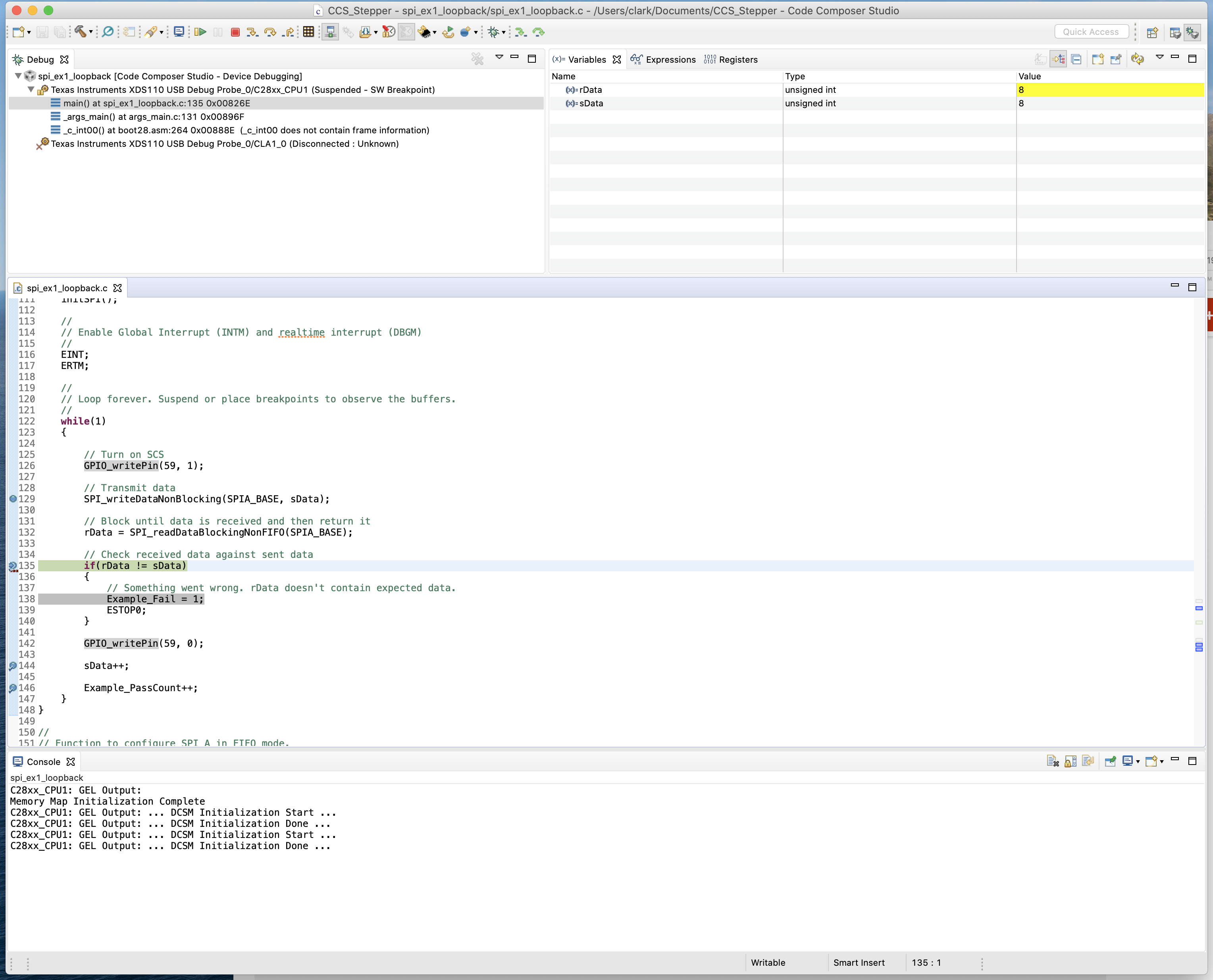
Any thoughts?

  • Hi Clark,

    Looks like you are using a modified version of the driverlib based example. Please provide the your modified project (project + source file + executable).

    Thanks

    ki

  • Ki,

    I have attached a zip of my complete project.spi_ex1_loopback.zip

    Please let me know if there is any other information I need to provide. Thank you for your help!

    Clark

  • Thanks Clark. I ran your example. I hit all 4 breakpoints, including the one on line 129.

    What exact version of CCS are you using? And can your provide a screenshot of your Breakpoints view with all your breakpoints set?

    Thanks

    ki

  • Ki,

    I am sorry to have to report that my breakpoints are now working perfectly. I just rebooted the iMac, started up CCS, and loaded the app, which has no changes from what I sent you....and everything worked.

    I cannot explain why CCS never hit the first breakpoint during my testing yesterday. I know the breakpoint was not disabled...that changes the color of the dot in the gutter from blue to gray. I suppose it is possible that the breakpoint action was something other than "Remain Halted" although I don't know how it would have been changed.

    I'm sorry to have wasted your time. 

    One other thing I noticed is that after restarting the computer and loading CCS and my app, all my breakpoints were missing. I had to look back at my first posting to see exactly what lines I had put the breakpoints on. I expected the breakpoints would be in place when reloading the app. 

    Anyway, to answer your questions, CCS is version 9.3.0.00012. Here is a screenshot of my Breakpoints view:

    I think it will look exactly like yours.

    Thanks again for your help. 

    Clark

    PS: this thread is a perfect example of why I switched my embedded development hardware supplier from STM to TI. TI support is considerably better than STM and the other suppliers I had earlier used. As is TI's training and documentation. I can't say enough good things about TI's embedded solutions....it is the best in the industry.


  • Clark Sann said:
    I just rebooted the iMac, started up CCS, and loaded the app, which has no changes from what I sent you....and everything worked.

    Ahh, the good ol' reboot! Glad to hear that it helped.

    if you see that issue again, try some of the steps in the troubleshooting guide. Steps in 9.4.2 and 9.4.3 can be especially helpful.

    Clark Sann said:
    One other thing I noticed is that after restarting the computer and loading CCS and my app, all my breakpoints were missing. I had to look back at my first posting to see exactly what lines I had put the breakpoints on. I expected the breakpoints would be in place when reloading the app. 

    It typically does remember... the debug or workspace cache was cleaned up. Note sure exactly what happened, it could be that CCS was in some bad state (which a reboot cleared up)

    Clark Sann said:
    I think it will look exactly like yours.

    Yup, that is what I have also.

    Clark Sann said:
    PS: this thread is a perfect example of why I switched my embedded development hardware supplier from STM to TI. TI support is considerably better than STM and the other suppliers I had earlier used. As is TI's training and documentation. I can't say enough good things about TI's embedded solutions....it is the best in the industry.

    Thanks for the kind words! It is much appreciated. Our support/docs/collateral are always a work in progress but we are always striving to improve. Glad to hear that we are doing some things right!

    ki