Part Number: TM4C1294NCPDT
Other Parts Discussed in Thread: EK-TM4C1294XL,
Tool/software: Code Composer Studio
Hi there,
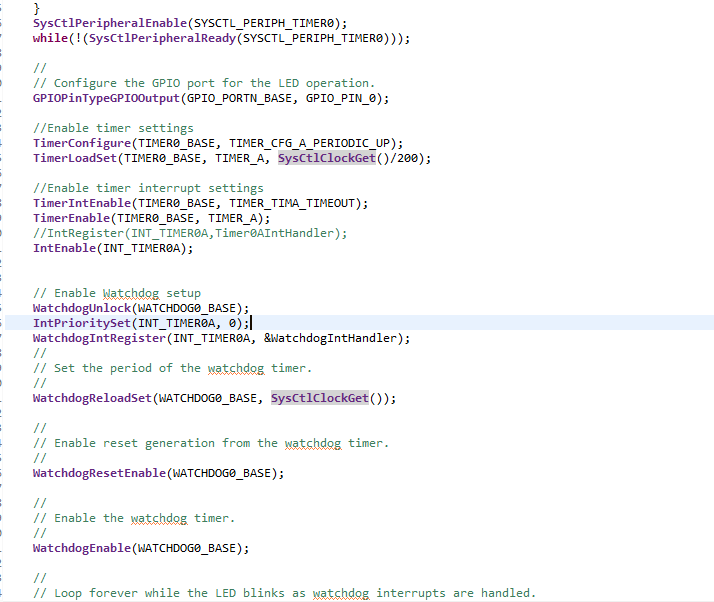
Recently i have a gotten a example code for a watchdog timer from this forum. I am trying to learn more about implementing the watchdog and set myself to do some modification with the code. From the code Watchdog_timer2 is a code that i modified. My end goal was to do a blinking LED with a watchdog that will reset the mcu after a certain time. I did quite a alot of trial and errors and i couldn't think of a way forward. I am wondering if anyone can point me to the right direction or areas that i can read-up more about. Currently, when i debug, it will show the error that i attached here as well
watchdog_timer2 code -> my attempt to implement this to do a blinking LED with a watchdog that will reset the mcu after a certain time [For learning purpose]
watchdog-> is the example code that was given to me by someone in the forum. I am trying to not go with a hardware switch interrupt and also to really understand the code itself
error -> is error message when i debug watchdog_timer2
Wondering if anyone can help
Much appreciated !
//*****************************************************************************
//
// watchdog.c - Watchdog timer example.
//
// Copyright (c) 2019-2020 Texas Instruments Incorporated.  All rights reserved.
// Software License Agreement
//
// Texas Instruments (TI) is supplying this software for use solely and
// exclusively on TI's microcontroller products. The software is owned by
// TI and/or its suppliers, and is protected under applicable copyright
// laws. You may not combine this software with "viral" open-source
// software in order to form a larger program.
//
// THIS SOFTWARE IS PROVIDED "AS IS" AND WITH ALL FAULTS.
// NO WARRANTIES, WHETHER EXPRESS, IMPLIED OR STATUTORY, INCLUDING, BUT
// NOT LIMITED TO, IMPLIED WARRANTIES OF MERCHANTABILITY AND FITNESS FOR
// A PARTICULAR PURPOSE APPLY TO THIS SOFTWARE. TI SHALL NOT, UNDER ANY
// CIRCUMSTANCES, BE LIABLE FOR SPECIAL, INCIDENTAL, OR CONSEQUENTIAL
// DAMAGES, FOR ANY REASON WHATSOEVER.
//
//*****************************************************************************

#include <stdint.h>
#include <stdbool.h>
#include "inc/hw_ints.h"
#include "inc/hw_memmap.h"
#include "inc/hw_types.h"
#include "driverlib/debug.h"
#include "driverlib/fpu.h"
#include "driverlib/gpio.h"
#include "driverlib/pin_map.h"
#include "driverlib/interrupt.h"
#include "driverlib/sysctl.h"
#include "driverlib/uart.h"
#include "driverlib/watchdog.h"


//*****************************************************************************
//
//! \addtogroup example_list
//! <h1>Watchdog (watchdog)</h1>
//!
//! This example application demonstrates the use of the watchdog as a simple
//! heartbeat for the system.  If the watchdog is not periodically fed, it will
//! reset the system.  Each time the watchdog is fed, the LED is inverted so
//! that it is easy to see that it is being fed, which occurs once every
//! second.  To stop the watchdog being fed and cause a system reset, press
//! the SW1 button.
//!
//! UART0, connected to the Virtual Serial Port and running at 115,200, 8-N-1,
//! is used to display messages from this application.
//
//*****************************************************************************

//*****************************************************************************


//*****************************************************************************
//
// The error routine that is called if the driver library encounters an error.
//
//*****************************************************************************
#ifdef DEBUG
void
__error__(char *pcFilename, uint32_t ui32Line)
{
}
#endif

//*****************************************************************************
//
// The interrupt handler for the watchdog.  This feeds the dog (so that the
// processor does not get reset) and blinks the blue LED.
//
//*****************************************************************************
int cycle;
void
WatchdogIntHandler(void)
{

    if(cycle>=10){
        return;
    }
    WatchdogIntClear(WATCHDOG0_BASE);
    cycle++;


}


//*****************************************************************************
//
// This example demonstrates the use of the watchdog timer.
//
//*****************************************************************************
int
main(void)
{

    volatile uint32_t ui32Loop;
    //
    // Enable lazy stacking for interrupt handlers.  This allows floating-point
    // instructions to be used within interrupt handlers, but at the expense of
    // extra stack usage.
    //
    //FPULazyStackingEnable();

    //
    // Set the clocking to run directly from the crystal.
    //
    SysCtlClockSet(SYSCTL_SYSDIV_1 | SYSCTL_USE_OSC | SYSCTL_OSC_MAIN |
                       SYSCTL_XTAL_16MHZ);


    //
    // Enable the peripherals used by this example.
    //
    SysCtlPeripheralEnable(SYSCTL_PERIPH_WDOG0);
    SysCtlPeripheralEnable(SYSCTL_PERIPH_GPION);
    while(!SysCtlPeripheralReady(SYSCTL_PERIPH_GPION))
    {
    }

    //
    // Configure the GPIO port for the LED operation.
    //
    GPIOPinTypeGPIOOutput(GPIO_PORTN_BASE, GPIO_PIN_0);


    WatchdogUnlock(WATCHDOG0_BASE);
    IntPrioritySet(INT_WATCHDOG, 0);
    WatchdogIntRegister(WATCHDOG0_BASE, &WatchdogIntHandler);
    //
    // Set the period of the watchdog timer.
    //
    WatchdogReloadSet(WATCHDOG0_BASE, SysCtlClockGet());

    //
    // Enable reset generation from the watchdog timer.
    //
    WatchdogResetEnable(WATCHDOG0_BASE);

    //
    // Enable the watchdog timer.
    //
    WatchdogEnable(WATCHDOG0_BASE);

    //
    // Loop forever while the LED blinks as watchdog interrupts are handled.
    while(1)
    {
        //
        // Turn on the LED.
        //
        GPIOPinWrite(GPIO_PORTN_BASE, GPIO_PIN_0, GPIO_PIN_0);

        //
        // Delay for a bit.
        //
        for(ui32Loop = 0; ui32Loop < 200000; ui32Loop++)
        {
        }

        //
        // Turn off the LED.
        //
        GPIOPinWrite(GPIO_PORTN_BASE, GPIO_PIN_0, 0x00);

        //
        // Delay for a bit.
        //
        for(ui32Loop = 0; ui32Loop < 200000; ui32Loop++)
        {
        }
    }
}
 1145.watchdog.zip