This thread has been locked.

If you have a related question, please click the "Ask a related question" button in the top right corner. The newly created question will be automatically linked to this question.

CCS5 debug not saving and rebuilding


We are using CCS 5.0.1.00026 with a TMS570 and an XDS510 USB debugger.

This may be a "feature" of the latest Eclipse version but on CCS4, if the debug button was pressed, all edits were saved and a compilation took place before starting the debug session. On CCS5, edits are not automatically saved if the debug button is pressed (edited files still have a * against them in the debug perspective).

Another feature that we found useful on CCS4 that seems to be missing on CCS5 is that during a debug session on CCS4, you can switch back to the C/C++ perspective without terminating the debug session, make an edit, click the compile button and have the program automatically loaded when compilation is complete. On CCS5 it appears that you have to exit the debug session, then compile then start another debug session which takes a lot longer.

I can't see any options that would appear to affect this behaviour.

Regards,

Richard

  • Hi Richard, 

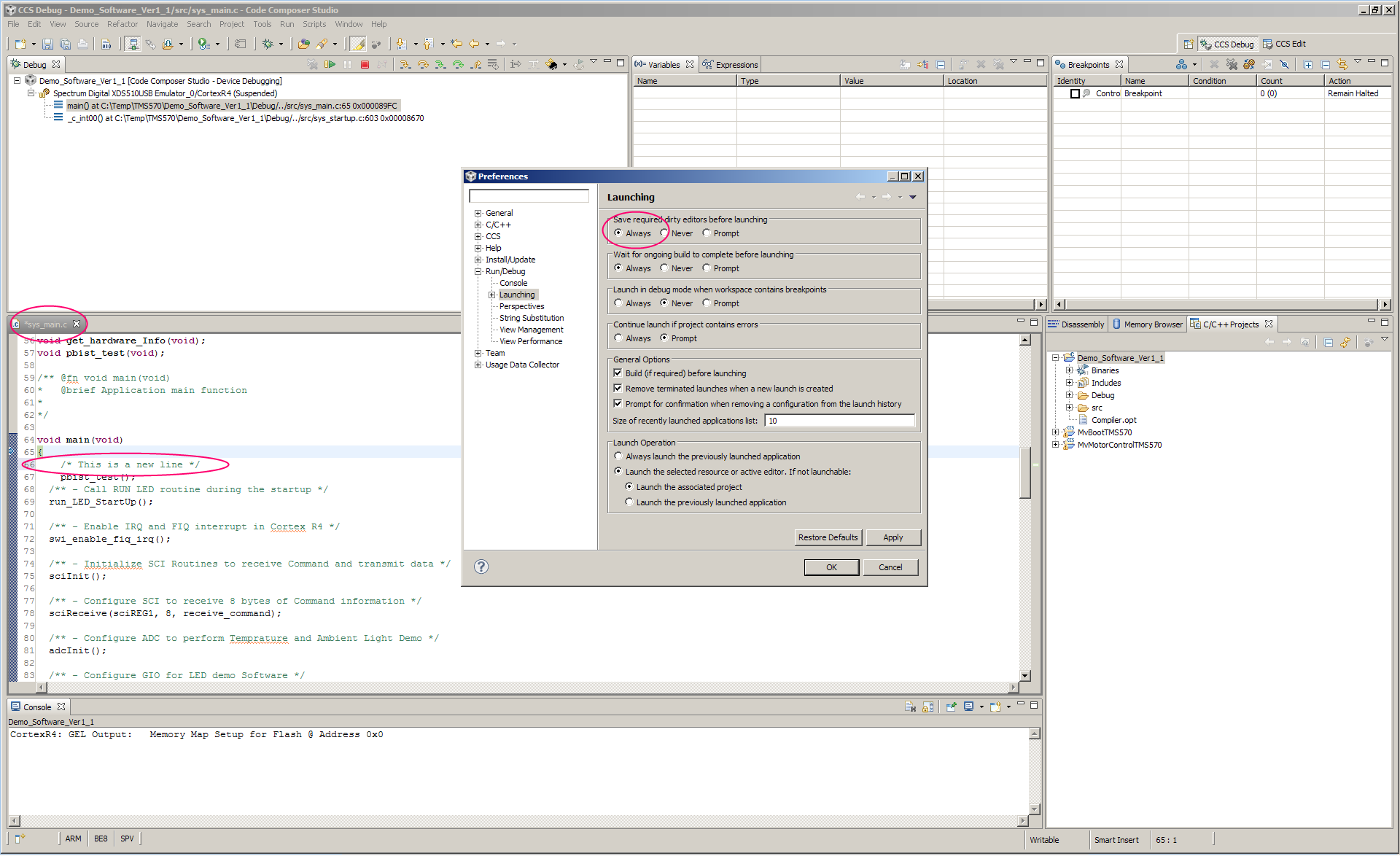
    First issue: You should be getting asked if you would like to save your files. This should happen if you are doing a debug project action(a project is selected or a source file belonging to a project is active and in focus). This prompt will not happen if you are trying to debug a project that contains no modified files. If another project contains modified files then you will also not get prompted. i.e. You will get asked only if files needed for debug session start are dirty. The other possibility is that the option that controls this behaviour has been changed (you would need to go to WIndow menu; Preferences; then expand Run/Debug and click on Launching ) At the top there are options that control what to do when dirty editors exist during Launching (i.e. starting of a debug session). 


    Second issue: this functionality is coming, it is not in v5 yet. One suggestion that I have that might be simpler than stopping a debugger and re-starting  is to open C/C++ Projects view (in debug perspective from View menu). Select your project, right click and choose Build project. This will update .out with your modifications and then reload the program(Run menu->Load->Reload Program), there is also a toolbar button on main toolbar that has this option (it is an open folder icon with curly braces inside). Click on drop down arrow beside that button and choose Reload  Program. 


    Martin


  • Hi Martin,

    Thanks for the quick response. Your second suggestion is useful although not quite as convenient as the feature in CCS4 :(

    However, the first issue still appears to be present despite setting the options in CCS5. I have attached a screenshot. Am I missing something?

    If I hit the build button rather than the debug button any changes are automatically saved.

    Regards,

    Richard

    If

  • Hi Richard, 

    Yes, it is definitely not as nice. We are planning on resolving the auto build/reload in next month or two. 

    I can't figure out what might be going wrong with the other issue. Everything looks very similar to my setup and I do get prompted to save. Could you attach couple more screen captures? Beside "bug" button used to start debug session, there is a drop down arrow, could you click on it and select "Debug Configurations...", then click on "Demo_Software_v1_1" node under "Code Composer  Studio - Device Debugging" and do two screen captures when "Main" tab is in focus and then "Program" tab . 

    Martin

  • Hi Martin,

    Attached are the two screenshots you requested.

    Regards,

    Richard

  • Hi Richard, 

    Unfortunately, things look ok here as well. Would you be able to share your project? If you don't want to post your project publicly then you could start a private conversation with me. 


    Martin


  • Hi Martin,

    The example I sent was actually from the safety demos CD although the project had been automatically converted from CCS4 format. That said, we had had the same problem with a CCS5 project that has been created from scratch.

    The project is attached to this post.

    Regards,

    Richard

    1832.Demo_Software_Ver1_1.zip

  • Hi Richard, 

    I can't seem to be able to reproduce the issue that you are experiencing. Would you be available for a webex(http://www.webex.com/) session to show your sequence of steps to reproduce the problem? Please let me know what would be a convenient time. I'll setup the meeting once I hear from you. 


    Martin