This thread has been locked.

If you have a related question, please click the "Ask a related question" button in the top right corner. The newly created question will be automatically linked to this question.

CCS/CC2640R2F: Application size optimisation

Part Number: CC2640R2F
Other Parts Discussed in Thread: CC2640

Tool/software: Code Composer Studio

Hello all,

I have some questions about size optimization for embedded software.

My application is based on ProjectZero sample program that comes with CC2640R2 LaunchXL kit.

This app is based on two projects :

- the main application 

- the library (ble5_simple_central_cc2640r2lp_stack_library)

As I modified the main application I need to reduce the embedded code size.

So, I did the same things on both application and library, build parameters settings. These consists to suppress debug informations, and set maximum code optimizations for size. I have set two build configurations :

- DEBUG with minimal optimization and all debug options

- RELEASE with maximum code size optimizations but no debug options

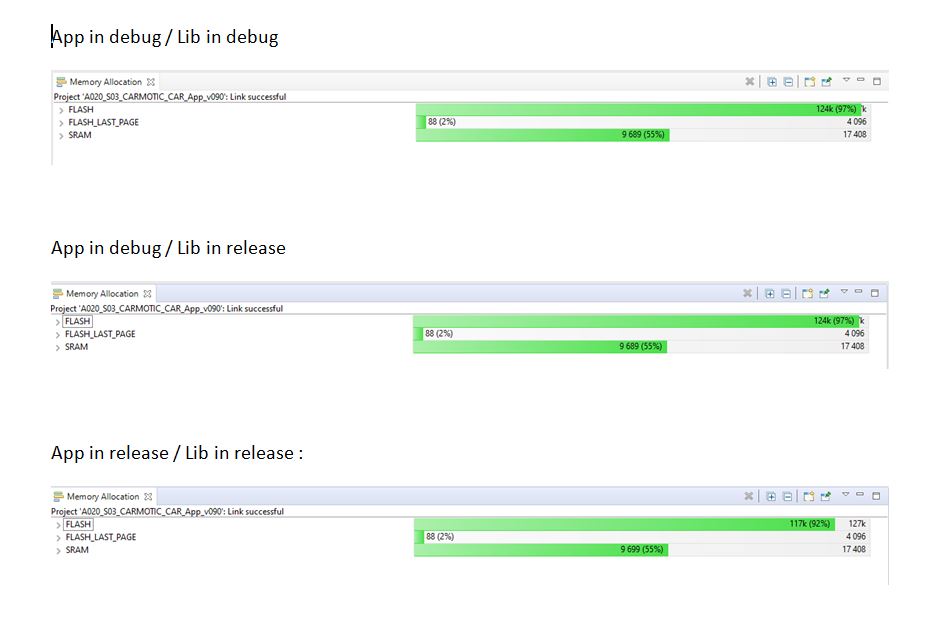
I can see a global application  (compiled and linked with .lib) little size gain, from 124k to 117k on the whole FLASH area of 127k.

But, this gain is not as important that what I can see ater library generation....

Here are some values :

- Library .LIB as DEBUG = 6 403 118  bytes

- Library .LIB as RELEASE = 577 976  bytes

- Application .HEX as DEBUG = 300 226  bytes

- Application .OUT as DEBUG = 3 701 584  bytes

- Application .HEX as RELEASE = 283 153  bytes

- Application .OUT as RELEASE = 2 518 704  bytes

I already checked my build configuration to be sure that it takes tha right files and that's Ok on this side.

To check that, I made an intermediate configuration using library in RELEASE and only the application in DEBUG :

- Application .HEX = 300 226  bytes

- Application .OUT = 3 394 812  bytes

I have tried to check the .MAP files... but it seems to be very complicated to interpret...

So, two questions :

1/- Do someone an help me in understanding why the final whole size doesn't decrease in the same proportion than the library ?

2/- Since the size I can read in generated files properties is not the same that I can see in the Memory Allocation window from CCS, I have many doubts... Am I checking the right files ?

Thank you in advance for any help.

I wish you a nice day, and to stay safe.

Regards

Patrick

  • To understand the basic differences of sizing between object (or .OUT) files, hex files, and actual memory used, please see the article A Brief History of TI Object File Formats.  

    To gain a better understanding of how much memory is being used, and where that comes from, try using the Memory Allocation View in Code Composer Studio (CCS).

    In theory, you get the smallest code size by maximizing compiler optimization with the build option --opt_level=4, and telling the compiler you care most about size with the build option --opt_for_speed=0.  In practice, it is best to experiment with different settings of those options.  CCS has a feature named Optimizer Assistant which makes it easy to do that experiment.  However, it is designed to work on an application project, and not a library project.  Nonetheless, experimenting with the application project should give you a sense of how you might change the build option settings for the library project.

    Please let me know if these suggestions were helpful.

    Thanks and regards,

    -George

  • Hello

    Thank you for this first answer.

    I well understand that the file size may be different depending on the extension.

    Also, I checked the size using both file manager and memory allocation view from CCS.

    All the optimizations I set in the build configuration are already at the values you suggest, and I ran the optimizer assistant which reported that teese settings are the best for a lowest size.

    My questions remains !

    - Why the whole size shown in memory allocation view doesn't change even if I buils the library as release, meaning without any debug information (this is what I tried to set) and with maximum optimizations for size ? For this I can see that event OBJ and HEX files size reduced, but not the size shown in memory allocation window.

    - Do the Memory allocation window shows the code memory region ? I mean, do the FLASH used size includes both the application and the library binaries ? For remind, I use the example based on sample ProjectZero which is made of an application subproject and a stack which is built as a library (.LIB). 

    - If the LIB is not in the FLASH area, where is it ? Maybe in the ROM area and this one is not shown in Memory Allocation Window ?

    THank's again for a little more help !!

    Patrick

  • Patrick COMBETTE said:
    Why the whole size shown in memory allocation view doesn't change even if I buils the library as release, meaning without any debug information (this is what I tried to set) and with maximum optimizations for size ?

    Because whether the compiler emits debug information has no effect on the size of the instructions generated.

    Patrick COMBETTE said:
    Do the Memory allocation window shows the code memory region ? I mean, do the FLASH used size includes both the application and the library binaries ?

    Yes to both questions.

    Thanks and regards,

    -George

  • Hi again,

    Ok, you says that debug information generated by compiler has no effect on the size of the instructions code generated.

    But in that case there is something different between application and library :

    - Application compiled as release without debug information, allows to save more than 7kB

    - Library compiled as release doesn't change any thing...

    See image below, it looks like is debug change the generated size of the application code but not for library code ?

    Why this difference ?

    As another working direction, what would you recommend to save space in flash code area ?

    I started my application from the ProjectZero example that came with "LAucnch XL CC2640" and will need to free some space for my close future developpment.

    Thank's.

    Patrick 

  • Patrick COMBETTE said:

    - Application compiled as release without debug information, allows to save more than 7kB

    - Library compiled as release doesn't change any thing...

    There must be more differences in these builds than whether the debug information is emitted or not.  We need to compare all of the compiler options for these two builds.

    For background on CCS build configurations like Debug and Release, please see this article.  

    For each project and build configuration, please perform these steps.  Rebuild all of the source files in the project.  Right click on the name of the project and choose Rebuild Project.  In the Console (not Problems) view, save off all the build commands and system response.  Use the icon Copy Build Log.  When naming the log file, be sure to use the file extension .txt.  

    That creates 4 text files.  Name them after the project and configuration.  Maybe app_debug.txt, app_release.txt, etc.  Attach all the files to your next post.  Or, if you prefer, put them all in one zip file and attach that to your next post.

    Thanks and regards,

    -George

  • Hi George,

    Thank's a lot for helping me again !

    I followed th steps you recommended but have made 5 configurations, mixing both App and Lib as debut or release.

    Please find here enclosed a ZIP file containing build console trace.

    In case of need I also included the corresponding MAP files.

    In fact, I guess that in the library are many unused functions. I tried to simplify by suppressing some of them but I'm not very confident with this job !

    Such useless functions may come from the fact that I started developping from the "SimpleCentral" sample project ?

    Here is the list of my usefull functions and drivers :

    - All running with TIRTOS

    - BLE5 stack

    - PIN driver (actualy ising GPIO but need to change)

    - SERIAL driver

    - PWM (not for the moment but I will need)

    - AES crypto (not for the moment but I will need)

    - TRNG (not for the moment but I will need)

    So here is the data :

    SizeOptimization.zip

    Have a nice day, and thank you for your support.

    regards

    Patrick

  • Your debug builds use no optimization, while our release builds use level 4 optimization.  As expected, this difference causes a large reduction in code size.

    As an example, the first C file compiled in the log file AppDebug_LibDebug.txt and the log file AppRelease_LibRelease.txt is named flash_spi_ll.c.  The debug build use the option -Ooff while the release build uses the option -O4.  This pattern is repeated for all the other C files.

    Thanks and regards,

    -George

  • Hello !

    If I well understand, my configurations for release are good ?

    Alright, but in this case I was exepecting a code size reduction also on the library, and it seems not to be the case. I can't see any size reduct even if I compile the library as debug or release. I checked in the AppDebug_LibRelease.txt file, around line 100 and can see that the linker takes the library in its release folder where i compiled it with all optimisations. For me this is abnormal : If the library was really compiled with optimisations, it should have an effect on the whole size ?

    Am I wrong ?

    Is ther something I don't understand ?

    Regards

    Patrick

  • Just another point I checked comparing Lib_Debug.txt and Lib_Release.txt !

    It seems that in bith case, all optimisations are already ON...

    Could you have a look ?

    Right ?

    If such, does it means that the library size is already optimized, and cannot be reduce no more ?

    If so, I would really appréciate some ideas to optimize this code !

    Just for reminder, my application was based on Simple_Central project that came with the LauncXL kit, and I don't know hot to do with that to obtain a lighter library.

    THanks a lot.

    Patrick

  • Patrick COMBETTE said:
    does it means that the library size is already optimized, and cannot be reduce no more ?

    Both the debug and release builds use -O4, which is the highest level of optimization.  So, while you might experiment some more, it is likely the size will change very little.  One experiment to consider ... Try different settings of the --opt_for_speed option.

    Thanks and regards,

    -George

  • THank's again !

    So, unfortunately that's what I supposed....

    And finally the only remaining solution to reduce code size seems to be directly both in application and in the library.

    Am I right ?

    On your side do you have knowledge on how are built sample programs from TI such as "SimplePeripheral" project ?

    Regards

    Patrick

  • Patrick COMBETTE said:

    And finally the only remaining solution to reduce code size seems to be directly both in application and in the library.

    Am I right ?

    Yes

    Patrick COMBETTE said:
    On your side do you have knowledge on how are built sample programs from TI such as "SimplePeripheral" project ?

    I presume this example is a CCS project that is comes from a software development kit. The best way to see the compiler options is to import the project into CCS, right-click on the name of the project, and choose Show Build Settings.

    Thanks and regards,

    -George

  • Hello,

    Ok, all is clear now on this side !

    THank you for all your help, I close this topic.

    Have a nice day.

    Regards

    Patrick