This thread has been locked.

If you have a related question, please click the "Ask a related question" button in the top right corner. The newly created question will be automatically linked to this question.

Compiler/TDA4VMXEVM: Gateway-demo CAN-2-CAN on TDA4VM

Part Number: TDA4VMXEVM
Other Parts Discussed in Thread: DRA829, TDA4VM

Tool/software: TI C/C++ Compiler

Hi Ti members:

I Just follow the 4.1.1.10.4.2. OSPI Boot to boot the EVM board.

And I already see below log form mcu_uart / main uart.
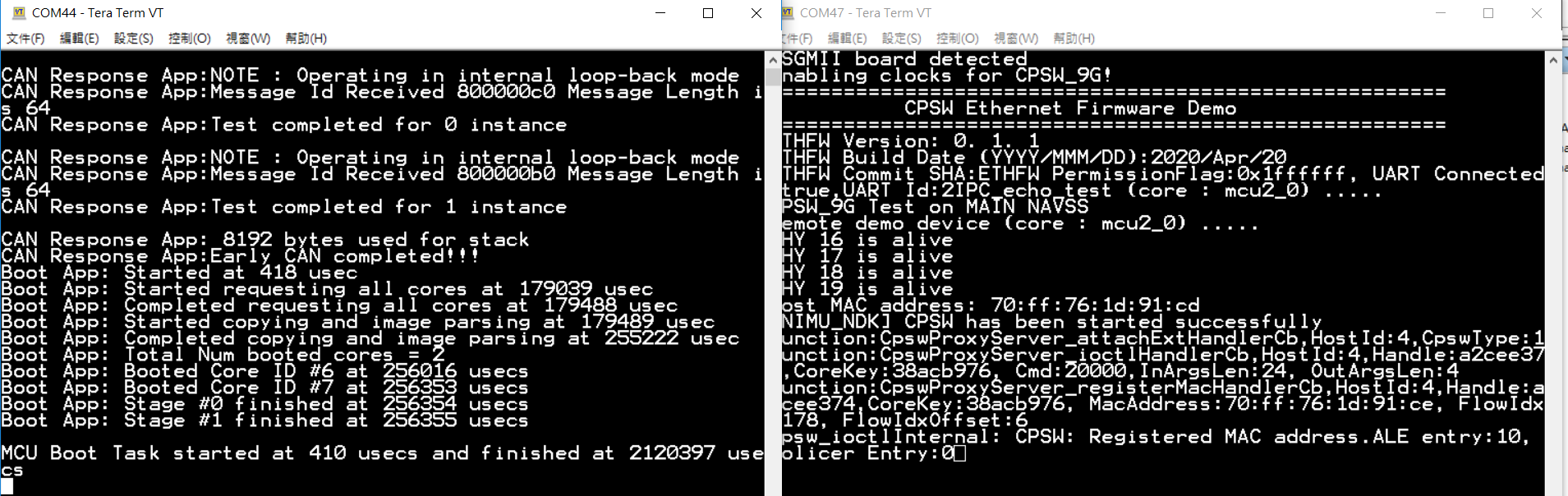
after this, I try the CAN-to-CAN test by pcanfdtst

the result seem tx already send.

but pcanfdtst rx can't receive any data

Q1: Can you help to check my test steps is correct? 

Q2: When I try pcanfdtst tx, there is one error "failed to open CAN_ONLY (err -2)",  is it effect?

BR

Sentinen Chen

  • Hi TI members:

    Update one information, because I didn't have GESI board, 

    so my PCAN tool connect to EVM board J30(MCU_CAN0)/J31(MCU_CAN1).

    Is the CAN-ID 0xD0/0xE0 still work on MCU_CAN0/MCU_CAN1? 

    BR

    Sentinen Chen

  • Hi Chen,

    Sorry, this demo requires GESI card. If you want to use MCU CAN ports then you can run the gateway demo from 6.1 SDK (older).

    Regards

    Vineet

  • Hi Vineet:

    Thanks your information. 

    I will try to use 6.1 SDK first.

    BR

    Sentinen Chen

  • Hi Vineet:

    I build the 6.1 SDK's gateway-demo finished.

    And use two ways to test

    1. SPL: copy can_eth_gateway_app_mcu1_0_release.xer5f to sdcard rootfs partition's /lib/firmware/, and create link j7-mcu-r5f0-0-fw -> can_eth_gateway_app_mcu1_0_release.xer5f

    2. SBL: copy can_eth_gateway_app_mcu1_0_release.appimage to sdcard boot partition and rename to app. and copy SBL's tiboot3.bin and sysfw.bin to boot partition too.

    But I all get below log form 2nd mcu-uart instance by two ways.

    Do you have any idea about this situation? 

    BR

    Sentinen Chen

  • Hi Vineet:

    Update one new test result.

    I still test 2. SBL way,

    but this time I use tiboot3.bin & sysfw.bin which build / cp form 6.1 SDK.

    and the result is better than before,but ethfw still failed.   

    Do you have any idea on this situation? 

    BR

    Sentinen Chen

  • Hi Vineet:

    Update the latest test result of 2. SBL way.

    After I connect the LAN Cable to my notebook and bridge the Ethernet port to my VirtualBox Ubuntu,

    I can boot this app successfully

    and I also build the pctools (send_1722.out / recv_1722.out)

    below is my send_1722.out log

    those result almost like the document describe.

    But I still can't receive any data form PCAN1 or PCAN2.

    And I also test below situation

    1. PCAN1 -> MCAN0 -> Gateway -> Eth + MCAN1 -> PCAN2

    2. PCAN2 -> MCAN1 -> Gateway -> Eth + MCAN0 -> PCAN1

    but my ubuntu or the other one of PCAN port all can't receive the CAN data. 

    Do you have any suggestion how can I debug this situation? 

    BR

    Sentinen Chen

  • Hi Chen,

    Sorry, I missed it. Let's make sure that CAN is working properly.

    1. First step is to check the wiring, make sure the wires are connected as per the diagram in the user guide. For both PCAN and Board. (CAN_H, CAN_L and GND)

    2. Second step is to check that the USB PCAN's are working. Can you check if the filter setting in PCAN-View is set to extended ? Also let me know what is the clock frequency you have configured (should be 80Mhz). Speed and bit rate look OK.

    3. Also try connecting the PCAN's back to back (remove the EVM) and try sending and receiving something.

    4. If nothing works then we will need to debug via CCS and JTAG and see what's going on.

    Regards

    Vineet

  • Hi Sentinen,

    Any updates ?

    Regards

    Vineet

  • Hi Vineet:

    I already use can_profiling_app to test my PCAN-Pro USB. 

    Tx/RX are all OK on both MCU_CAN0/MCU_CAN1.

    Recently I try the CCS and JTAG.

    I meet below error message after I load the .xer5f file on MCU_Cortex_R5_0.

    MCU_Cortex_R5_0: Trouble Writing Memory Block at 0x70040000 on Page 0 of Length 0x7ff0: (Error -2130 @ 0x70040000) Unable to access device memory. Verify that the memory address is in valid memory. If error persists, confirm configuration, power-cycle board, and/or try more reliable JTAG settings (e.g. lower TCLK). (Emulation package 9.1.0.00001) 
    MCU_Cortex_R5_0: File Loader: Verification failed: Target failed to write 0x70040000
    MCU_Cortex_R5_0: GEL: File: X:\TI-BSP\psdk_rtos_auto_j7_06_01_01_12\gateway-demos\binary\can_eth_gateway_app\bin\j721e_evm\can_eth_gateway_app_mcu1_0_release.xer5f: Load failed.
    MCU_Cortex_R5_0: Error: (Error -1170 @ 0x0) Unable to access the DAP. Reset the device, and retry the operation. If error persists, confirm configuration, power-cycle the board, and/or try more reliable JTAG settings (e.g. lower TCLK). (Emulation package 9.1.0.00001) 
    MCU_Cortex_R5_0: Unable to determine target status after 20 attempts
    MCU_Cortex_R5_0: Failed to remove the debug state from the target before disconnecting.  There may still be breakpoint op-codes embedded in program memory.  It is recommended that you reset the emulator before you connect and reload your program before you continue debugging
    

    I still check what happen on this. 

    BR

    Sentinen Chen

  • Is this the first time you have run a binary via CCS and JTAG ? Did you load and run the System Firmware ?

    Regards

    Vineet

  • Hi Vineet:

    Yes, this is my first time to try CSS & JTAG. 

    Do you mean the step?

    There is no information about which launch script or system firmware I can use.

    BR

    Sentinen Chen

  • Hi Vineet:

    I found my miss steps form PSDKRA

    But after I try on my EVM board

    I get below error 

    js:> loadJSFile ("X:\TI-BSP\psdk_rtos_auto_j7_06_01_01_12\pdk\packages\ti\drv\sciclient\tools\ccsLoadDmsc\j721e\launch.js")
    Connecting to DMSC_Cortex_M3_0!
    Loading DMSC Firmware ... X:/TI-BSP/psdk_rtos_auto_j7_06_01_01_12/pdk/packages/ti/drv/sciclient/soc/V1/ti-sci-firmware-j721e-gp.bin
    DMSC Firmware Load Done...
    DMSC Firmware run starting now...
    Connecting to MCU Cortex_R5_0!
    Running the board configuration initialization from R5!
    com.ti.debug.engine.scripting.Target.run(): Timed out after 200000ms (X:\TI-BSP\psdk_rtos_auto_j7_06_01_01_12\pdk\packages\ti\drv\sciclient\tools\ccsLoadDmsc\j721e\launch.js#129)
    js:> 

    Do you have any idea on this error? 

    BR

    Sentinen Chen

  • Hi Sentinen,

    Sorry for the delay in reply, looks like the Init script is timing out.

    • Check your boot pin settings, it should be set to no boot mode. SW8 (1000_1000), SW9 (0111_0000).
    • In "ti/ccs930/ccs/ccs_base/emulation/gel/J721E_DRA829_TDA4VM/gel/J721E.gel" change DMSC_FLOW variable to 1

    Regards

    Vineet

  • Hi Vineet:

    I compare the two items 

    1. boot mode

    2. J721E.gel" change DMSC_FLOW variable to 1

    But I still meet the timeout situation.

    BR

    Sentinen Chen

  • Hi Sentinen,

    Perhaps the problem is more basic. Let's start from the beginning.

    1. I am assuming that your CCS version is 9.3 or higher. Is that correct ? if not then please switch since it comes pre-packaged with emulation pack.

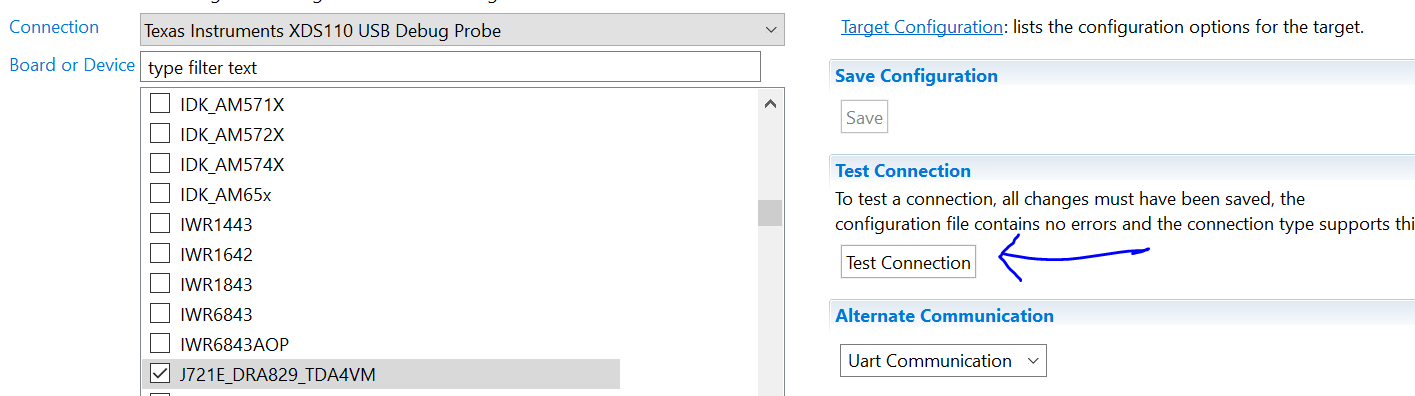
    2. Which JTAG are you using ? XDS 110 or XDS 560 ? Can you test your connection ? See screenshot below.

    3. Are you pointing the Cortex M3 core to the correct GEL file ? See screenshot below

    4. Are you pointing the CCS js file to the correct pdk path ? In "pdk/packages/ti/drv/sciclient/tools/ccsLoadDmsc/j721e/launch.js" you need to set the variable "pdkPath"

    5. If all of this checks out then try the same with SDK 6.2.

    6. If it still doesn't work then I it could probably be some kind of board or JTAG issue.

    Regards

    Vineet

  • Hi Vineet:

    After I check your suggested items.

    The root cause of timeout is item 3.

    3. Are you pointing the Cortex M3 core to the correct GEL file ? 

    I set the GEL file manually, and I can load launch.js successfully.

    Now I already see the boot log on UART by CSS boot

    But when I send the 0xC0 data on mcu_CAN0 or 0xB0 data on mcu_CAN1, I still can't receive any data form another CAN Port.

    This result seem just like early test by SDCard boot. 

    BTW, I also use can_profiling_app TX_only to test EVM board again, it seem HW connect is Ok.

    BR

    Sentinen Chen

  • Hi Sentinen,

    Good to know that you are able to run the binary now.

    >>But when I send the 0xC0 data on mcu_CAN0 or 0xB0 data on mcu_CAN1, I still can't receive any data form another CAN Port.

    Check two things

    1. What happens when you try to send a packet via Ethernet as per User Guide ? Does it send out via CAN ?

    2. Build the application in debug mode with. "make all BUILD_PROFILE=debug", load the app and put a breakpoint inside the function gatewayApp_processCAN(). See if it hits when you send a CAN frame.


    Regards

    Vineet


  • Hi Vineet:

    Sorry for so late to reply you,

    because we pay attention to aother thread, we will reduce this one's periorty.

    So I would like to close this thread first until I have time to test your suggestion.

    Thanks your help.

    BR

    Sentinen Chen