


Part Number: SIMPLELINK-CC2640R2-SDK
Tool/software: Code Composer Studio
This question is with regard to the CC2640R2 Scanning and Advertising Tutorial, which worked perfectly upto Scanning Task 2 - Printing scanning results. Below is the output after implementing solutions for Scanning Task 2.
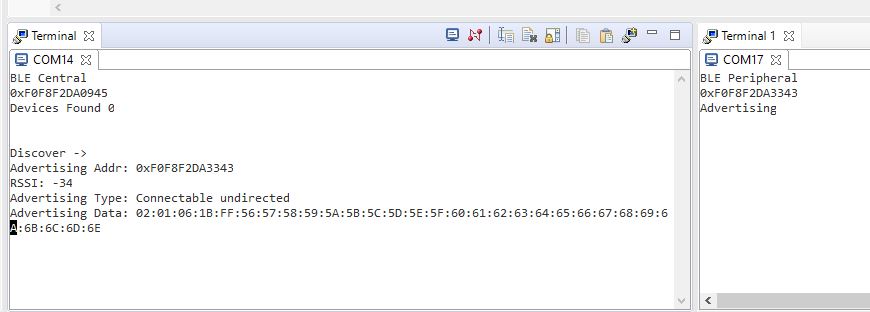
But after implementing Scanning Task 3 - Scan Indefinitely
    // === SOLUTION [Scan Indefinitely]===  (Scanning Task 3)
     #define DEFAULT_SCAN_DURATION                   0
    // === END SOLUTION [Scan Indefinitely]===  (Scanning Task 3)
the following error was observed.
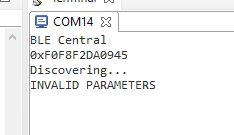
The respective code
    case GAP_DEVICE_DISCOVERY_EVENT:
      {
        if(pEvent->gap.hdr.status == SUCCESS)
        {
            // discovery complete
            scanningStarted = FALSE;

            // if not filtering device discovery results based on service UUID
            if ((DEFAULT_DEV_DISC_BY_SVC_UUID == FALSE) && (ENABLE_UNLIMITED_SCAN_RES == FALSE))
            {
              // Copy results
              scanRes = pEvent->discCmpl.numDevs;
              memcpy(devList, pEvent->discCmpl.pDevList,
                     (sizeof(gapDevRec_t) * scanRes));
            }

            Display_print1(dispHandle, 2, 0, "Devices Found %d", scanRes);

            if (scanRes > 0)
            {
#ifndef FPGA_AUTO_CONNECT
              Display_print0(dispHandle, 3, 0, "<- To Select");
            }

            // Initialize scan index.
            scanIdx = -1;

            // Prompt user that re-performing scanning at this state is possible.
            Display_print0(dispHandle, 5, 0, "Discover ->");

#else // FPGA_AUTO_CONNECT
              SimpleCentral_connectToFirstDevice();
            }
#endif // FPGA_AUTO_CONNECT
          }
        else
        {
            if(pEvent->gap.hdr.status == GAP_LLERROR_INVALID_PARAMETERS)
            {
                Display_print0(dispHandle, 3, 0, "INVALID PARAMETERS");
            }
            else if(pEvent->gap.hdr.status == GAP_LLERROR_COMMAND_DISALLOWED)
            {
                Display_print0(dispHandle, 3, 0, "COMMAND DISALLOWED");
            }
            // === SOLUTION [Add case for canceling operation] === (Scanning Task 1)
            else if (pEvent->gap.hdr.status == bleGAPUserCanceled){
                Display_print0(dispHandle, 3,0, "USER CANCELLED OPERATION");
                scanningStarted = 0;
            }
            // === END SOLUTION === (Scanning Task 1)
            else
            {
                Display_print0(dispHandle, 3, 0, "ERROR");
            }
        }
      }
      break;
Two CC2640R2 Launchpads are use with Simplelink_CC2640r2_sdk_4_10_01_02
References
.

