This thread has been locked.

If you have a related question, please click the "Ask a related question" button in the top right corner. The newly created question will be automatically linked to this question.

CCS/CC2640R2F: Simple eddystone beacon project unable to complie in CCS v9.3 Error: program make not found in PATH.

Part Number: CC2640R2F
Other Parts Discussed in Thread: BLE-STACK, , CC2650, CC2640

Tool/software: Code Composer Studio

I followed the steps as described in https://github.com/TI-LPRF-Software/CC2640_SimpleEddystoneBeacon in order to import the simple eddystone  beacon project. However, I am still unable to compile the project. It keep showing 'program make not found in PATH'. Can anyone help me here with the importing? is there any additional settings I have to consider? Is it has anythong to do with the CCS or BLE Sack version? The version of BLE stack I downloaded is BLE-STACK-2-2-4. 

Thanks

  • That project says it was created and built using CCSv6 and TI BLE-Stack 2.1. I see that you are using newer versions of both CCS and BLE-Stack. In many cases BLE projects tend to have strict requirements for compatibility, so if you have a need to use this specific project I would recommend starting with same versions o tools specified in the Readme.

    An alternative would be to find other/similar examples for the CC2640R2F device that is designed for newer CCS and SDKs. To that end, I would request that you start a new post in the Bluetooth forum so the experts there can guide you towards the appropriate examples.

  • Thanks for the response.

    I downloaded exact versions (CCS v6.1 and  BLE-Stack 2.1.) based on the details in the github page. And imported as a CCS project. But it still shows the error as below.

    make all
    Cannot run program "make": Launching failed

    Error: Program "make" not found in PATH
    PATH=[C:/ti/ccsv6/eclipse/jre/bin/client;C:/ti/ccsv6/eclipse/jre/bin;C:/ti/ccsv6/eclipse/jre/lib/i386;C:\Windows\system32;C:\Windows;C:\Windows\System32\Wbem;C:\Windows\System32\WindowsPowerShell\v1.0\;C:\Windows\System32\OpenSSH\;C:\Program Files\Git\cmd;C:\Program Files\PuTTY\;C:\Program Files (x86)\Nordic Semiconductor\nrf-command-line-tools\bin\;C:\Program Files (x86)\Riverbed\Steelhead Mobile\;C:\Program Files (x86)\GNU Tools Arm Embedded\9 2019-q4-major\bin;C:\Users\mkunnathedath\AppData\Local\Microsoft\WindowsApps;C:\cygwin64\bin;C:\MinGW\bin;C:\Users\mkunnathedath\AppData\Local\Programs\Python\Python38;C:\nRF5_SDK_16.0.0_98a08e2\examples\ble_central\ble_app_blinky_c\pca10056\s140\armgcc;C:\Program Files (x86)\GNU Tools Arm Embedded\9 2019-q4-major\bin;C:\Program Files\JetBrains\PyCharm Community Edition 2019.3.4\bin;C:\Users\mkunnathedath\AppData\Local\Packages\PythonSoftwareFoundation.Python.3.7_qbz5n2kfra8p0\LocalCache\local-packages\Python37\Scripts;c:\ti\ccsv6\eclipse;]

    12:36:38 Build Finished (took 121ms)

  • Mahroof shahnas Kunnathedath said:
    make all
    Cannot run program "make": Launching failed

    The build seems to be calling make instead of gmake which is the typical build command for CCS projects.

    I installed CCS 6.1, BLE-Stack 2.1 and was able to import and build the SimpleEddystoneBeacon projects without this error.

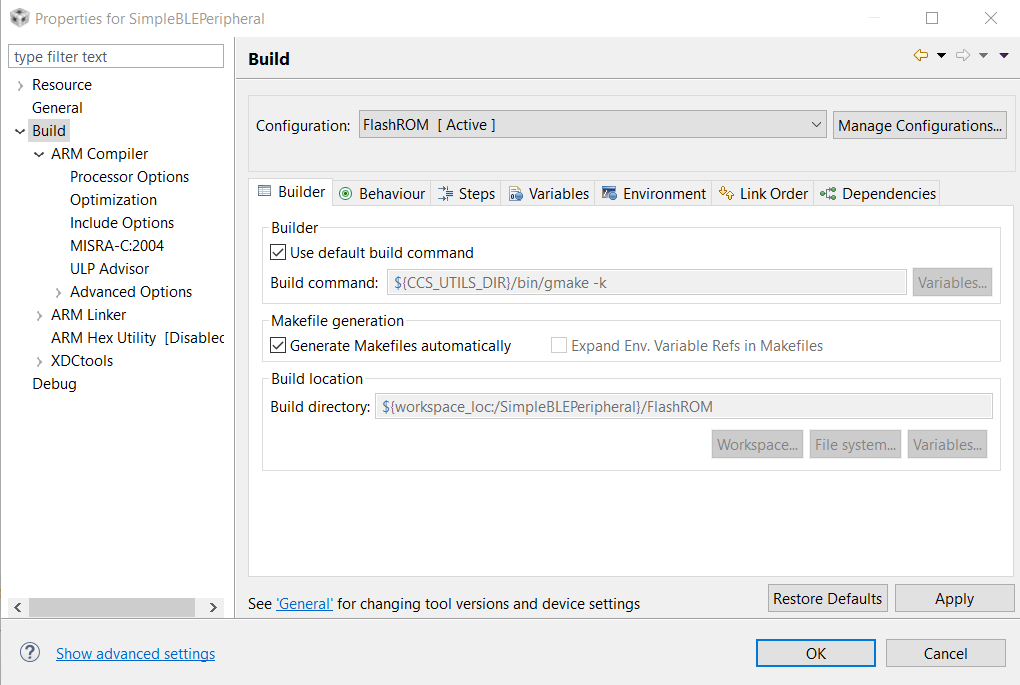
    Could you check that your project has the default build command enabled like this:

    Also do you have any anti-virus, security software or Windows firewall running that might prevent access to gmake? We have seen this to cause some issues in the past. If so, you could temporarily disable the offending software or to try whitelisting CCS and its build utilities.

    Are you able to import and build other example CCS projects, from newer SDKs for instance? If yes, then the issue could be something specific to this project. If not, then it could point to a more systemic issue. 

  • Sounds like that might be the issue. But I am not sure why i'm unable to click on that check box!


    In CCS v6.1 , no I can't import examples from newer SDK, Those examples works in CCSv9.2 though.

  • Mahroof shahnas Kunnathedath said:
    But I am not sure why i'm unable to click on that check box!

    That's odd. 

    Could you try importing into a new CCS workspace? 

    Mahroof shahnas Kunnathedath said:
    In CCS v6.1 , no I can't import examples from newer SDK,

    How about  any of the other examples from BLE-Stack 2.1? Those should import and build in CCS 6.1.

  • Yes I can import and build other examples from BLE-Stack 2.1.

    For those examples the project properties looks like this.

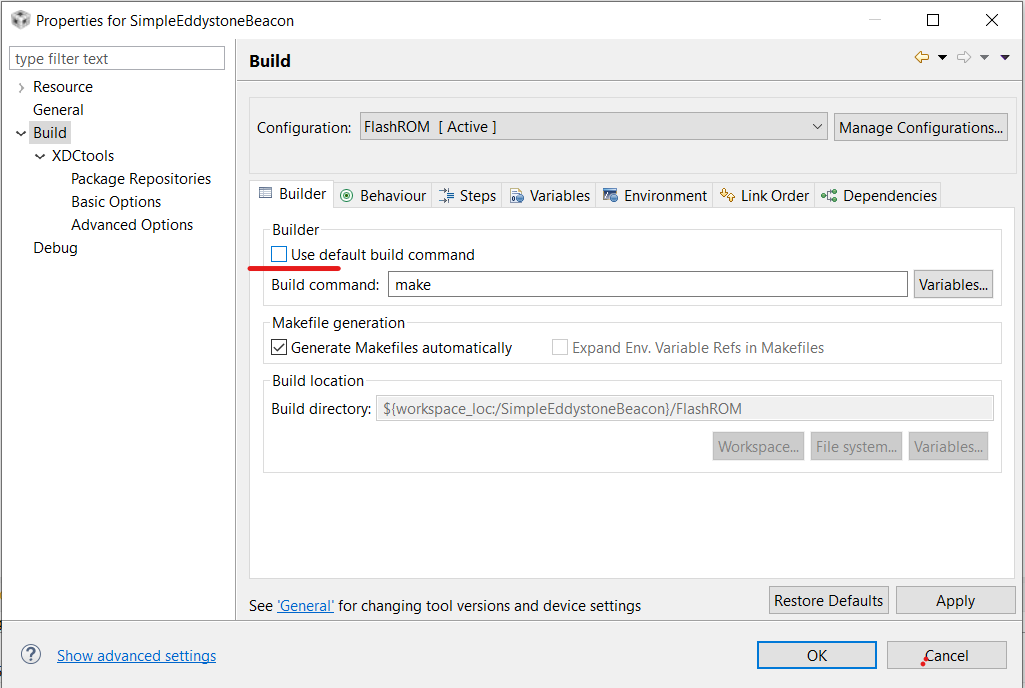
    But With the Simple eddystone project, the properties look likes this.

    I am unable to click on that Use default build command.

  • I wonder if some of the project files are missing or corrupted. Could you double-check that the SimpleEddystoneBeacon project directory contains the .ccsproject, .cproject and .project files? I also notice in your screenshot that the ARM Compiler and ARM Linker settings are missing under Build for this project. It might be worthwhile to download the project again from Github to be sure, and then import it into a new workspace.

  • Hi,

    The github simple eddystone beacon example program works for CC2640 or CC2650. It will not work for CC2640R2F. There is micro eddystone beacon example program at CC2640R2F SDK

    http://www.ti.com/tool/SIMPLELINK-CC2640R2-SDK

    -kel

  • The project finally compiled successfully. I downloaded the project again and imported into a new work space. I had to also change resource path for some of the files like board_key.c, eddystoneURLCfg.c, UTC_clock etc.

    However, I can't upload the code to the CC2640R2F Launch pad. Is this project not compatible with CC2640R2F but only with CC2640?

    Looks like this project is looking for XDS100 probe where as  CC2640R2F is XDS110.

  • True, I can't upload the code into cc2640R2F. 
    Micro eddystone beacon example is non-connectable beacon right? I wanted the beacon to be configured using a smart phone App.

  • Aarti is out today.

    You can change the debug connection type that is being used in the project properties here:

    However I am not sure that you can load a program for a CC2640 onto a CC2640R2.  There is a migration guide here:

    http://software-dl.ti.com/simplelink/esd/simplelink_cc2640r2_sdk/3.20.00.21/exports/docs/blestack/ble_user_guide/html/ble-stack-3.x-guide/cc2640-to-cc2640r2.html

    We may need to loop in the BLE team to assist.

    Regards,

    John