This thread has been locked.

If you have a related question, please click the "Ask a related question" button in the top right corner. The newly created question will be automatically linked to this question.

CCS/MSP430FR5994: Setting an Array[100] into absolute FRAM memory

Part Number: MSP430FR5994


Tool/software: Code Composer Studio

I'm migrating from IAR to CCS version 10 and I'm trying to place an array of 100-bytes in FRAM at address 0x20000

In IAR i would do this:

__no_init uint8_t config_buffer[100] @ 0x20000;

How do i do this with CCS. I've tried:
#pragma location=0x20000
uint8_t config_buffer[100];

and I get the following:

"../source/main.c", line 112: warning #17003-D: relocation from function "main" to symbol "config_buffer" overflowed; the 18-bit relocated address 0x20000 is too large to encode in the 16-bit field (type = 'R_MSP430X_ABS16' (15), file = "./source/main.obj", offset = 0x00000044, section = ".text:main")

How do I modify the C code or the lnk_msp430fr5994.cmd file?

Thanks,

-Jim

  • When I tried

    >#pragma NOINIT(config_buffer)
    >#pragma LOCATION(config_buffer,0x20000)
    >uint8_t config_buffer[100];

    I also had to set --near_data=none ("Build Settings->CCS Build->Compiler->Processor Options") to avoid that error.

  • Thanks so much for your help. I couldn’t have done it without your input. I’ve looked in the Code Composer V10.x which seems to be only online and not a PDF version, I’ve checked the “TI Linker Command File Primer”, I’ve check the “Advance Linker Techniques for Convenient and Efficient Memory Usage (AP Note SPRAA46A Dec2008)”, and I’ve check the CCS IDE v10.x for MSP430 – SLAU157AS and I could not find the information you’ve provided. This kind of question seems so basic and I feel stupid as a newbie CCS user that I could find this. If it's in these documents, I couldn't find the info. Where did you look find this? Anyway Thanks.

    Regarding the Error message, how did you know to change the MSP Compiler->Processor Option-> (--near_data) to none? Why would that matter?


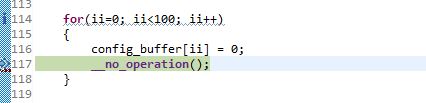
    But my next question is I’m trying to initialize the buffer to all zero’s inside a for loop - and I’m attaching screen shots to shot the memory never changes from 0xFF’s to 0x0’s. Could you or someone please help me in why this is so.

    Loop to initialize:


    Memory

    Notice the index is five and the first five memory addresses should have been initialized.

    Thanks, Jim

  • Jim Patten2 said:
    But my next question is I’m trying to initialize the buffer to all zero’s inside a for loop - and I’m attaching screen shots to shot the memory never changes from 0xFF’s to 0x0’s.

    The MSP430FR5994 has a MPU (Memory Protection Unit) which allows segments of FRAM to be given different permissions, e.g. write-protected. The idea is to protect the program from changing parts of FRAM which contain read-only data such at the code.

    When a new project is created the default is that the MPU is enabled, with the compiler handling the memory partitioning:

    With the MPU enabled and the compiler handling the memory partitioning, I think what could have happened is that your config_buffer at a fixed location ends up in a memory segment which is read-only, since the compiler / linker haven't handled the placement of the config_buffer.

    If the MPU is enabled in your project, can you try disabling it to see if the running program can them modify the config_buffer?

    Edit: This is just to see if the MPU is the cause of the issue; I haven't yet thought about how to leave the MPU enabled to connect the read-only FRAM contents while allowing write access to the config data.

  • Jim Patten2 said:
    Regarding the Error message, how did you know to change the MSP Compiler->Processor Option-> (--near_data) to none? Why would that matter?

    Not sure if had seen it, but the section 6.1.2 Data Memory Models in the MSP430 Optimizing C/C++ Compiler v20.2.0.LTS User's Guide explains that data pointers can be 16-bits or 32-bits. With your config_buffer at address 0x20000 a 32-bit data pointer is required to access the config_buffer.

    This is what the somewhat cryptic "the 18-bit relocated address 0x20000 is too large to encode in the 16-bit field" error message in your first post was about.

  • That did the trick! Just an add on, Is there a way to change or use the linker file to place the conf_buffer[100] at location 0x20000 instead of using #pragma statements in the C-code?

    Thanks for all your help. You guys are awesome!

    -Jim

  • Is it possible to do this in the linker file instead of the C code?

    Thanks,

    -Jim

  • Jim Patten2 said:
    Is there a way to change or use the linker file to place the conf_buffer[100] at location 0x20000

    Please see the article Linker Command File Primer.  Read through the first half.  The sub-chapter Allocate Output Sections to Memory has two examples of allocating an output section to a hard-coded address.

    Thanks and regards,

    -George

  • Thanks George. But that manual was not written for someone trying to learn CCS linker syntax, it was written for someone who already knows how the CCS linker works.

    Just my opinion as someone coming into CCS for the first time and using IAR for many years. IAR has very good documentation with good examples.

    Currently I'm trying to lock the JTAG using the JTAG Signature1 and Signature2.

    Here's how I did it in IAR. Could you guide me on how CCS does it?

    C-code file:

    const uint16_t jtag_signature1 @ "JTAG_SIGNATURE1" = 0xAAAA;
        const uint16_t jtag_signature2 @ "JTAG_SIGNATURE2" = 0x0004;
        const uint64_t jtag_password   @ "JTAG_PASSWORD"   = 0x0123456789abcdef;
    //-----------notes on how to use JTAG locked with password:
    //  88=ef, 89=cd ---> 8D=45, 8F=01       IAR JTAG PW: 0xcdef89ab45670123
    // cdef | 89ab | 4567 | 0123
    // 8988 | 8B8A | 8D8C | 8F8E <-- FF88 - FF8F

    #pragma required=jtag_signature1
    #pragma required=jtag_signature2
    #pragma required=jtag_password
    

    Best regards,
    -Jim


  • Let me answer my own question: This is how you do it in CCS

    #pragma RETAIN(JTAG_signatures)
    #pragma DATA_SECTION(JTAG_signatures, ".jtagsignature")
    const uint16_t JTAG_signatures[] = {0xAAAA, 0x0004};
    

    #pragma RETAIN(JTAG_password)
    #pragma DATA_SECTION(JTAG_password, ".jtagpassword")
    const uint8_t JTAG_password[] = {0xEF, 0xCD, 0xAB, 0x89, 0x67, 0x45, 0x23, 0x01};
    //JTAG PW: 0xcdef89ab45670123
    
    Put the JTAG PW in: