This thread has been locked.

If you have a related question, please click the "Ask a related question" button in the top right corner. The newly created question will be automatically linked to this question.

CCS/TIDA-01580: Code Composer Studio occurred the error.

Part Number: TIDA-01580


Tool/software: Code Composer Studio

Hi.

I am trying to develop TIDA-01580.

So, I am creating an environment for it.

But I have a problem. Firmware occured error, when i build TIDA-01580_firmware_tx.

Error was "Cannot build project. Referenced project 'TIDA-01580_firmware_tx_stack_library' contains build-errors." with 7 warning.

I attach picture about that.
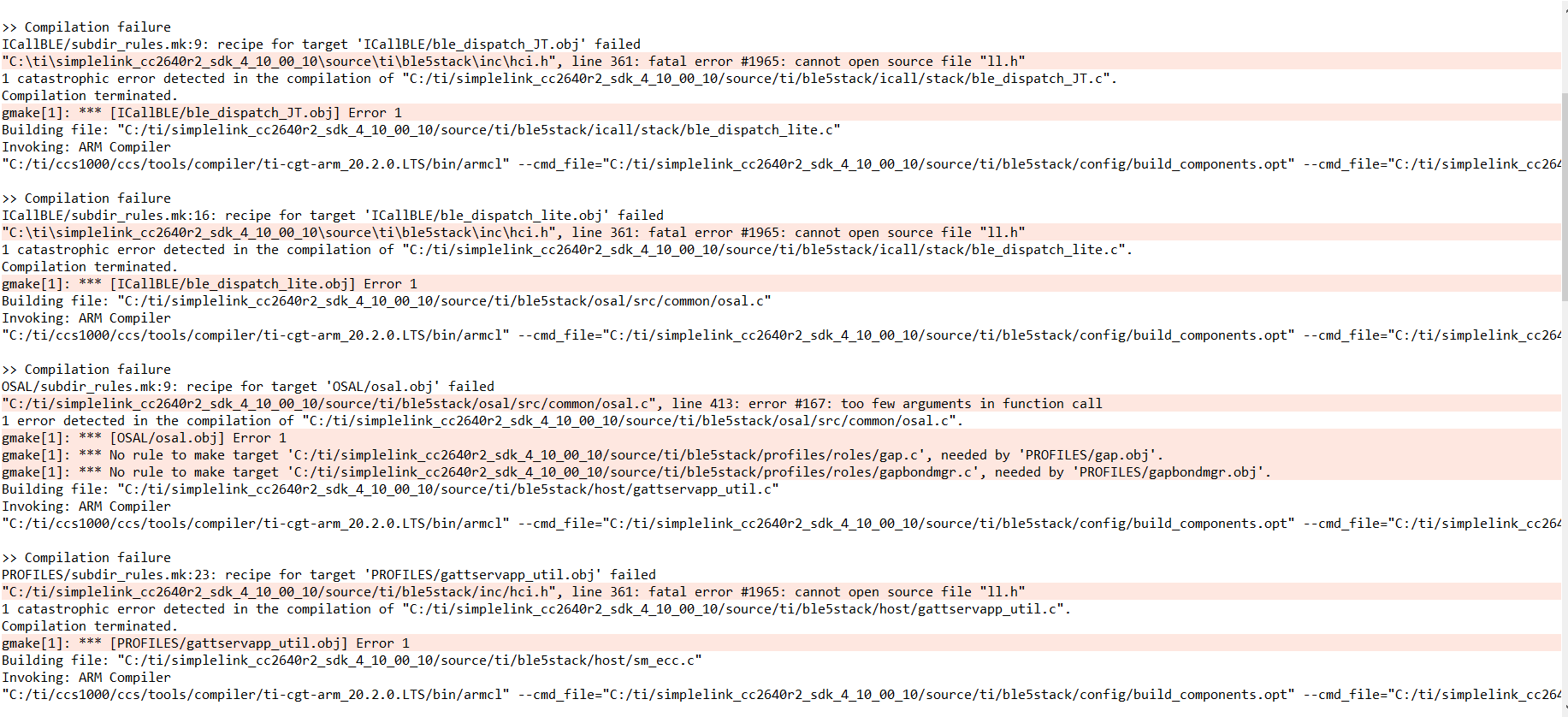
How can i get the solution?

Thank you.

Regard.

  • There are a coupl different issues here.  One issue is that the 4.10 SDK for CC2640R2 that you are using requires the 18.12.x ARM compiler.  CCSv10 ships with the 20.2.0 compiler.  You can install the older compiler by going to "Install Code Generation Compiler Tools" on the help menu.  After installing this it is necessary to refresh the compiler list in CCS so that it detects the new compiler.  Normally you would not have to do that refresh but there is a bug in CCSv10.0 (fixed in 10.1) that requires the refresh.  You can do the refresh here:

    The second error is that the build is not able to find ll.h.  This is interesting the errors are coming from other SDK header files.  I downloaded the projects for this design.  When I look at them I can see that these projects were made to work with a very old version of the SDK.  1.40.  

    I suspect that the structure of the SDK has changed between 1.40 and 4.10.  I am going to loop in the BLE team to help with this.  I suspect that the example is not compatible with this verison of the SDK.  

    Regards,

    John

  • Hello!

    The errors and warnings you are receiving seem to be due to the project being developed using a different SDK/compiler than the one you are using to build the project. I have run into similar issues when attempting to build projects using a newer SDK/compiler than the one the project was intended to be ran with. This project requires the SimpleLink CC2640R2 SDK (https://www.ti.com/tool/download/SIMPLELINK-CC2640R2-SDK/1.40.00.45). Install it and restart CCS. Afterwards, go to project properties in the affected project. In that menu click “General” and then click on the “Products” tab. Here you can ensure that the project is going to compile using the proper SDK. In this case, the project was developed using the CC2640R2-SDK 1.40. The compiler issue can be solved using the method posted by John in this thread. Once you have set up the compiler and the SDK to be the proper versions, the project should compile.

    However, you will be running on a very old SDK. If you would like to migrate your project over to the latest SDK, then you can do so by using the migration guides available for the CC2640R2 SDK in the User’s guide (http://software-dl.ti.com/simplelink/esd/simplelink_cc2640r2_sdk/3.40.00.10/exports/docs/blestack/ble_user_guide/html/ble-stack-3.x-guide/migration.html). If you could provide with more information about your use-case, then we may be able to provide further assistance. Are you trying to implement the TIDA-01580 design exactly as its described or are you only interested in implementing certain features?