


Part Number: CCSTUDIO-SITARA
Other Parts Discussed in Thread: SYSBIOS
Tool/software: Code Composer Studio
Hello,
Despite Gerald Belanger's post being locked, this is still broken.
https://e2e.ti.com/support/tools/ccs/f/81/t/651770?CCS-CCSTUDIO-SITARA-Search-functions-not-working
And I am on CCS 7.2. And my shortcut has "-clean" permanently as a start argument, because I've been told to do that when there are issues. Well, there are so many, I do that all the time.
I created a new project in a workspace, copying over some files.
*Some* of the things, I can press F3, or select "Find In Project" and it finds them. Other is does not. Despite them being clearly, and obviously defined.
The entire project builds with no errors, and only two warnings that come from SysBios generate stuff. So in my project, these are defined.
For example, I brought an EDMA.c file into the project. Here is a fragment:
    if (chNum < SOC_EDMA3_NUM_DMACH)
    {
        /* Enable the DMA channel in the enabled in the shadow region
         * specific register
         */
        EDMA3EnableChInShadowReg(baseAdd, chType, chNum);

        EDMA3MapChToEvtQ( baseAdd, chType, chNum, evtQNum);
        if (EDMA3_CHANNEL_TYPE_DMA == chType)
        {
            /* Interrupt channel nums are < 32 */
            if (tccNum < SOC_EDMA3_NUM_DMACH)
            {
            /* Enable the Event Interrupt                             */
                EDMA3EnableEvtIntr(baseAdd, chNum);
                retVal = TRUE;
            }
Place the cursor on "EDMA3_CHANNEL_TYPE_DMA" and press F3. It opens the edma.h file and identifies the marco... All good.
Place the cursor on "SOC_EDMA3_NUM_DMACH" and press F3. It does nothing. But this macro is defined in the same header file!
Hover over it, and a popup appears:
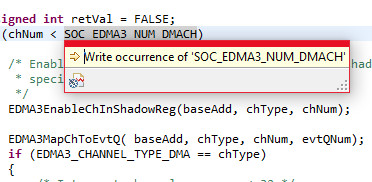
(whatever the heck "write occurrence" means...? )
Also, when the cursor is on "SOC_EDMA3_NUM_DMACH" the other ones don't even highlight And it's in the same source code file.
Our friendly little Ctrl-F search box will find it, but that is limited to open the file in focus. Also Ctrl-H will find it under "file search", but not under "C/C++ search" ??! But that search box is modal, so that's really annoying (the output isn't but the input is - so forget copy/paste while it's open).
It is annoying to have to use the Ctrl-H or even Notepad++ (but I do all the time, just like Gerald Belanger mentions) and have to filter through all teh hits to figure out which is the definition, over all the other uses.
