This thread has been locked.

If you have a related question, please click the "Ask a related question" button in the top right corner. The newly created question will be automatically linked to this question.

Compiler: High Speed data converter 5.00.02 newer version

Other Parts Discussed in Thread: ADS54J40

Tool/software: TI C/C++ Compiler

I am using High Speed data converter 5.00.02

Is there a newer version? This version is very slow when it comes to saving the data files.

Thanks,

Yaron

  • Yaron,

    A newer version should come out in about 1 month.

    Regards,

    Jim

  • Hi Jim,

    is it possible to get a beta version and start playing with it ?

    Thanks,

    Yaron

  • Yaron,

    You can download the pre-release from the link below.

    Regards,

    Jim

    txn.box.com/.../pej8epidh3xyvb6vlyutqisjp0tsjm5d

  • Hi Jim

    I have noticed that the beta version you have sent me was built on 18/10/2019 more than eight months ago.

    Don't you have a newer version?

    Thanks,

    Yaron

  • Yaron,

    This may be the fastest the software will be able to run no matter what version I send you. Please explain exactly what type of file you are saving, how large, and how long does it take to save. Any chance this may be related to your PC? I am also checking with our software team regarding this issue.

    Regards,

    Jim

  • Jim,

    We are saving a bin file. its size is 2GB. It takes data to be retrieved for more than 30 seconds. Saving the file is even longer.

    My PC in a new I7 with 16Gb and SSD drive. I have tried to save the data to RAM disk and the results were similar.

    In the new version, there is a new feature that allows you to retrieve the data directly using the two new Automation API's "Get_Capture_Data_16bits" and "Get_Capture_Data_32bits". They did not work for me but since the version you have sent me is an old build, I thought this problem could have been fixed by now.

    Thanks,

    Yaron

  •  Hi Jim,

    The new API functions "Get_Capture_Data_16bits" and "Get_Capture_Data_32bits" started working for me.

    But I am unable to retrieve a large amount of data, I have defined the "NumberOfSamplesPerChannel", "CaptureData", "ArrayLen" parameters with bigger sizes. I am getting a large array most of it with zero numbers 

    Python code:

    Number_Of_Samples_Per_Channel = 256000000;
    OffsetSamplePerChannel = 0;
    Capture_Data_Array_Len = 512000000; # Number_of_Samples_per_channel * Number_of_Channels
    CaptureData_16bits = (c_ulong*Capture_Data_Array_Len)() #Initializing the array for the total number of samplesErr_Status = HSDC_Pro.Get_Capture_Data_16bits(Number_Of_Samples_Per_Channel,OffsetSamplePerChannel,CaptureData_16bits,Capture_Data_Array_Len,TimeoutinMs)

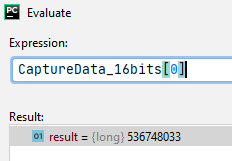
    Another question I have is how do I translate the data retrieve to actual values?  I am getting long values

    example: Attached

    Thanks,

    Yaron

  • Yaron,

    Our software team is looking into this. What is the largest size you can capture with no zero numbers? Is the download time much faster now?

    Regards,

    Jim

  • 65536 elements are working, after that, all the elements in the array are "0".

  • I figured out how to translate the values no need to explain.

    Thanks

  • Yaron,

    The Transfer of data from the TSW-Board to HSDC Pro application will take a significant amount of time, if the transfer size is large and this process is not optimized yet. As a workaround the time taken for exporting the captured data as bin file from the HSDC Pro Application can be reduced by directly accessing the channel wise Bin files that are created during the “Capture” process. The samples of each channels are stored separately for TSW14J56RevD as “ADC Temp0.bin” for Channel 1, “ADC Temp1.bin” for Channel 2 and so on in the below mentioned location when capture is completed.


    Channel Wise Bin Files Location: C:\Users\Public\Documents\Texas Instruments\High Speed Data Converter Pro\HSDCPro Data


    Points to be noted while processing the Channel wise bin files:

    1.       For ADC resolution less than or equal to 16 bits, read 2 bytes of data to form a sample and for ADC resolution greater than 16bits and less than or equal to 32bits read 4 bytes of data to form a sample.

    2.       The data representation of samples is  Offset Binary

    3.       The data format of the samples is Big-Endian


    We are currently looking into the issue reported for "Get_Capture_Data_16bits" and "Get_Capture_Data_32bits" automation APIs.

    Regards,

    Jim


  • Hi Jim,

    Thanks for the information, using the files created by the system is helpful and can save time. hopefully, the two API functions will be even quicker.

    In the meantime I have stumbled into another bug your development team should look at.

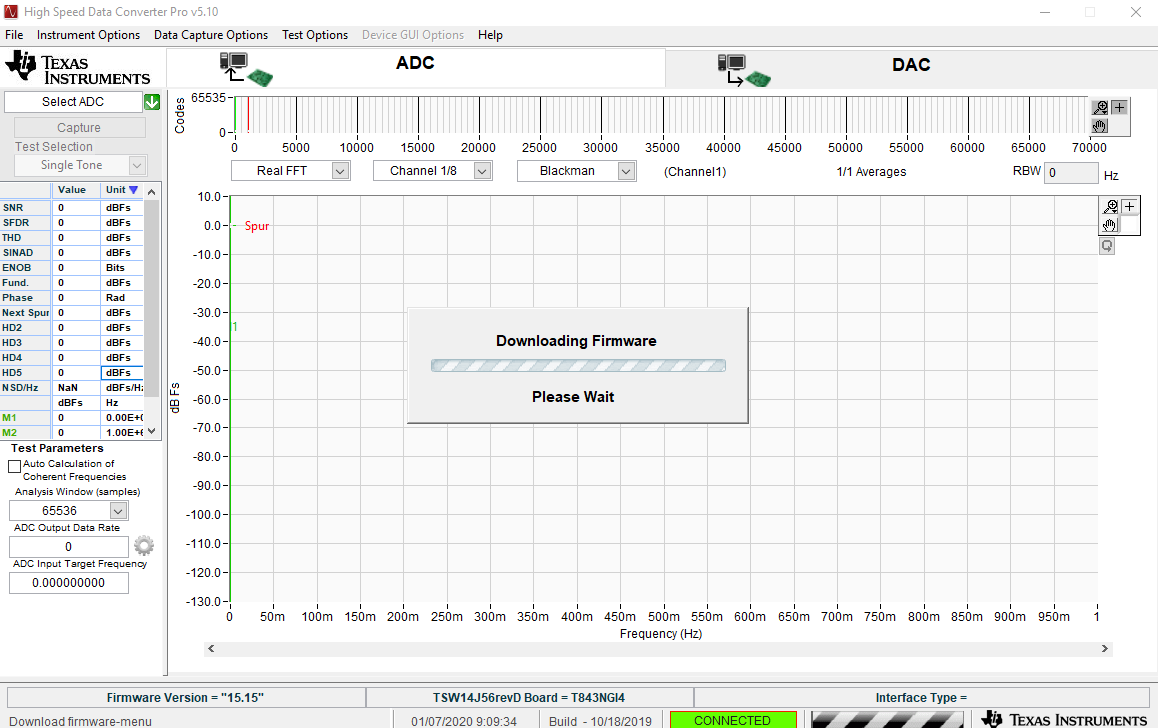
    Calling the API that selects the ADC device, causes the system to be stack in firmware download, python code:

    print "Selecting ADC Device : " + Devicename
    Err_Status = HSDC_Pro.Select_ADC_Device(Devicename,120000)
    print "Error Status = " + str(Err_Status)


    Thanks,
    Yaron
  • Yaron,

    1.       The “Get_Capture_Data_16bits” function will not trigger capture and it is only used to extract data that was already captured by HSDC Pro Software. We believe when using the “Get_Capture_Data_16bits” function, the trailing zeros in the “CaptureData_16bits” array after the 65536 elements is because of the capture was done only with 65536 samples in the HSDC Pro software before using this function. So kindly increase the number of samples per channel to capture, then do a capture and then use “Get_Capture_Data_16bits” function to extract the captured data. “Set_Number_of_Samples” automation function can be used to set the number of samples per channel to capture.

    2.       With regards to the issue faced when using the “Select_ADC_Device” automation function, try to download any Firmware manually from the menu option Instrument Options>>Download Firmware and see if that causes the same issue, if not kindly share the string value of “Devicename” variable used in the “Select_ADC_Device” automation function and share us the INI file with the same name as that of string value of “Devicename” variable, which will be present at the following location if you are using the “TSW14J56RevD” board:

    a.       INI Folder Path: C:\Program Files (x86)\Texas Instruments\High Speed Data Converter Pro\14J56revD Details\ADC files


    3.       There was a typo in the previous reply with regards to parsing data samples from the Channel wise bin files from C:\Users\Public\Documents\Texas Instruments\High Speed Data Converter Pro\HSDCPro Data, the data format of the samples is Little-Endian but it was wrongly mentioned as big-endian, apologies for the same


    Regards,

    Jim

  • Hi Jim

    1. I have tested the “Get_Capture_Data_16bits” with larger samples size, I got an out of memory message although my system has sufficient memory from labview (I am trying to get 512M elements). 

    I will attach the messages.

     2. Regarding the issue, I have tried to download the firmware manually. The system was stuck on download firmware, from this point it was impossible to select the ADC manually, each try ended with the system being stack. Only restarting the computer enabled me to select again the ADC manually.

    the ADC I am selecting manual and Automatically is: "ADS54J40_LMF_8224"

    3. Regarding the Indians, I figured it by myself.

    Thanks,

    Yaron

  • Yaron,

    To debug the issue try the following:

    HSDC Pro Software is running on LabVIEW 2014 32Bit Run Time Engine which can access only limited amount of virtual memory. When executing “Get_Capture_Data_16bits” automation function with larger samples size, the memory of the LabVIEW 2014 32Bit Run Time Engine gets overloaded and this causes the LabVIEW Memory Full Error. Instead, try accessing the channel wise binary files that are generated in the folder C:\Users\Public\Documents\Texas Instruments\High Speed Data Converter Pro\HSDCPro Data after completing the “Capture” process to avoid this memory full error.

    Regards,

    Jim