This thread has been locked.

If you have a related question, please click the "Ask a related question" button in the top right corner. The newly created question will be automatically linked to this question.

Extracting StellarisWare file dependencies

Is there a way to extract file depenencies from the StellarisWare code?

The situation is that I would like to isolate a specific application and thus migrate it to a new project without impacting the existing code base.

As an example, I copied the code for the USB-Serial application (usb_dev_serial.c) to a new project. I was able to get it to compile and link correctly, but it won't come up and enumerate under Windows. Note that when compiled in place, it works as advertised.

The reason I'd like to explicitly view the file dependencies, is that I may have copied the wrong file into the new project. This may satisfy the compiler and linker but not be correct for the USB interface.

Thanks.

  • I want to make sure I understand what you are looking for. Are you asking for a way to find out all the source files that are built as part of a project? I'm not sure of a clean easy way to generate this, but here are a couple of things I can think of:

    - take a look at the CCS build console to see which source files are being compiled and where they are located
    - take a look at the subdir.mk file generated by the Managed Make build in CCS. It will be in the \Debug sub-folder within the project folder. Note that if there are source files within folders other than the main project folder, there will be additional sub-folders that contain subdir.mk for those files.

    David Pfaltzgraff said:

    As an example, I copied the code for the USB-Serial application (usb_dev_serial.c) to a new project. I was able to get it to compile and link correctly, but it won't come up and enumerate under Windows. Note that when compiled in place, it works as advertised.


    If you wish to start with a Stellarisware example as your baseline, I would suggest making a copy of the entire Stellarisware folder for the board/target you are working with. After that you can always delete the examples you are not interested in if you wish to clear out some disk space. Then open CCS, go to Project->Import Existing CCS/CCE Eclipse Project, browse to the new copied location, select the desired example project, and import it into your workspace. Verify that it works, and then work on modifying it as needed.


  • The background to this question comes from a long history with uPs that are memory constrained, so it was always necessary to eliminate unused code. Maybe this is not so much of a concern with the Stellaris line...

    Also, part of this is that I'd like to place the new project into a version control system and be able to keep it "no larger than necessary." This also helps me in "wrapping my mind around" the entire code set.

    Anyway, I'll take a stab at the pruning approach you suggest. My opposition to it that I must cut and recompile in a recursvice manner until it doesn't work and then restore the last cut.

    Another approach that I tried but didn't get very far was to use libraries - driverlib, grlib, etc. Is there someplace where this approach would be documented for the CCS/Stellaris combination? If I can establish a library and use that during the link, it saves the headache of making each of the library modules.

    Thanks.


  • David Pfaltzgraff said:

    Another approach that I tried but didn't get very far was to use libraries - driverlib, grlib, etc. Is there someplace where this approach would be documented for the CCS/Stellaris combination? If I can establish a library and use that during the link, it saves the headache of making each of the library modules.

    You don't have to rebuild the libraries during each project build if you don't want to. The Stellarisware examples are set up such that the example projects have the driverlib, grlib etc as dependent projects, so each time the examples are built, they build the dependent projects as well and re-generate the libraries. If you want to eliminate this step, just don't specify those as dependent projects. If they are already specified as in the examples, you can remove them by going to Project Properties->CCS Build->Dependencies tab, and remove them from there. Just make sure that the library already exists and the path to it is specified in your project via the --library option (under Project Properties->C/C++ Build->Linker->File Search Path).


  • I've been working my way through the pruning of the files. Along the way, I think I've come across a secondary effect that is only confusing the issue.

    First the positive part... In going through the pruing process, I have been able to see and start to understand the methods of defining and using the library capabilities. This looks good to me.

    The confusing issue... My method of checking this out is that I started with the DK-LM3S9B96 USB-Serial application. I compile and then debug. If I am able to connect the USB port and have both the board and Widnows go through the enumeration process, all is well.

    The problem is that every once in a while, after I start the debug session it will go through the motions of downloading, etc, but when I click on the [Target] menu item, I won't get the usual options to run, etc. All of the usual icons are grey'ed out. Something has gone wrong and I need to do something external to get it back. I've tried various things from exiting CCS. to powering down just the board, to rebooting the whole mess (PC and board). This last usually works, but I have not been able to see a pattern at this point. The one thing I've noted is that when I unplug the ICDI, if all is normal, I get two Windows notifications (Ding-Dong). If it's in this failure mode, I get only one. Something has mucked up the USB system. (Just for reference, I'm on WinXP, SP3).

    One thing that I do when it seems that my new files are not performing as expected is that I'll just go back to the original files and try from there. The fact that on occasion I see the problem there indicates that it's not the pruing process that's causing the problems. Once it works with the original file system, I can go over to the new and continue the process.

    I'm hoping that by Monday morning, I will have my files pruned to the point that I'm happy with them. It may be that all this headache was caused by the USB issue outlined above.

  • David Pfaltzgraff said:
    The problem is that every once in a while, after I start the debug session it will go through the motions of downloading, etc, but when I click on the [Target] menu item, I won't get the usual options to run, etc. All of the usual icons are grey'ed out.

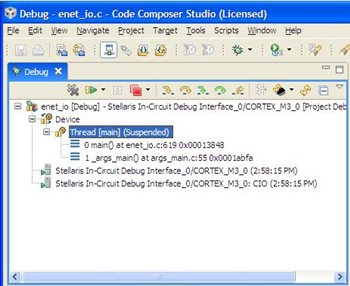
    This could happen if you accidentally closed the "Debug" view in CCS. Please see this FAQ:
    http://processors.wiki.ti.com/index.php/FAQ_-_CCSv4#Q:_I.27ve_successfully_started_a_debug_session_but_most_of_the_target_operations_under_the_.27Target.27_menu_are_grayed_out._How_do_I_get_access_to_them.3F

    Also make sure that within the Debug view you have highlighted the main thread, as shown below.


  • I'm not sure that was the problem, but it has not been prevalent enough to hold me back. So, to get back to the original question of determining file dependencies in a Stellaris project...

    What I did was to compile a project (usb_dev_serial for the DK-LM3S9B96) and test it out. Then I tried making (what should have been) a copy of that project and compiling that. I found a lot of missing files, unresolved references, etc. My first attempt was to resolve this using libraries. The compiler and linker were happy, but the program would not run. After displaying "Configuring USB..." it would hang on a FaultISR. My first thought was that it was an extraneous interrupt and pursued that for a while, but then it hit me that this was something like a bus fault.

    I could trace the execution to a point past where the USB interrupts were enabled, so I put a breakpoint on the first instruction of USB0DeviceIntHandler() - address 0x41bc. It never got there!

    Looking at the interrupt table, I see that the location for the USB interrupt (address of 0xf0) has an address of 0x41bd. Since this is an odd address, I can see why there would be a bus fault.

    Since this was pulling in a library that may have been compiled under a different set of directives, I built up a project from scratch and linked in all the Stellaris files needed to recolves all references. This compiles and links, but the results are the same. The address in the interrupt vector table is odd and it causes a bus fault.

    What am I doing wrong? (Should I open this up as a new issue?)

    The thought is still in the back of my mind that I may have linked to the wrong files in the Stellaris code as I see that some names are defined in more than one module. For example, defined in USB Host mode and in USB Device mode. I feel that I have been able to choose the right one based on the file name and other variables/routines defined. If there were a way to define (or extract) file dependencies this problem can be averted.

  • Just an update... I looked at the vector table for the application that runs from the StellarisWare distribution. It runs and the vector table contains the same odd addresses.

    So, the problem must be eslssewhere...

    Running out of ideas!


  • David Pfaltzgraff said:
    If there were a way to define (or extract) file dependencies this problem can be averted.

    Take a look at the .project file within the project folder. For example, for the usb_dev_serial, it will be in the folder C:\StellarisWare\boards\dk-lm3s9b96\usb_dev_serial\ccs assuming Stellarisware was installed in c:\Stellarisware. This file will list all the source files that are part of the build for the usb_dev_serial project. Note that to look at the source files within any of the libraries you would need to open the .project for that library.


  • Thanks for the pointer. The .project file verified what I had already deduced from the build process. However, your suggestions prodded me to start looking at some of the other files.

    Although there were some minor items regarding the understanding of the IDE, I found that the default link command file (.cmd) needed to be replaced by the file in the project area. Then, I also had to go into the Project->Properties and make the corresponding change for the linker and increase the stack size correspondingly.

    My presumption is that with a stack that was too small, the various interrupts clobbered memory and then memory changes clobbered information on the stack resulting in a 'return' to an invalid address.

    At this point, I have a new project that is not in the StellarisWare file structure that runs. This was my original objective.

    Thanks for the pointers.