This thread has been locked.

If you have a related question, please click the "Ask a related question" button in the top right corner. The newly created question will be automatically linked to this question.

CCS: Block selection editing & TAB's not operating correctly.


Tool/software: Code Composer Studio

I recently switched from CCS 9.0 to 10. I have had problems with using tabs while in block selection mode but I just lived with the annoyance.

After switching to CCS 10 the problem is now much worse.

Its all described in this video.;

https://youtu.be/78v-C64wgcE

Thanks.

Dave

  • David,

    Thanks for posting the video.  That really helps to see what you mean.  For me CCSv9.1, CCSv10.0 and CCSv10.1 are all behaving the same in that if I do the block selection and try to insert a tab it does it at the start of the line (like what you see).  Also when I use your workaround of copying a tab, then selecting and inserting, that works for me in all versions

    Inserted a tab on the first line and copied to the clipboard

    Spot that I want to insert selected

    After paste

    Thus I think it is probably a setting somewhere that we need to find that must be different between your 9.x and 10.x

    I am guessing you found how to edit the code style of the formatter since you were able to change it to use tabs instead of spaces.  

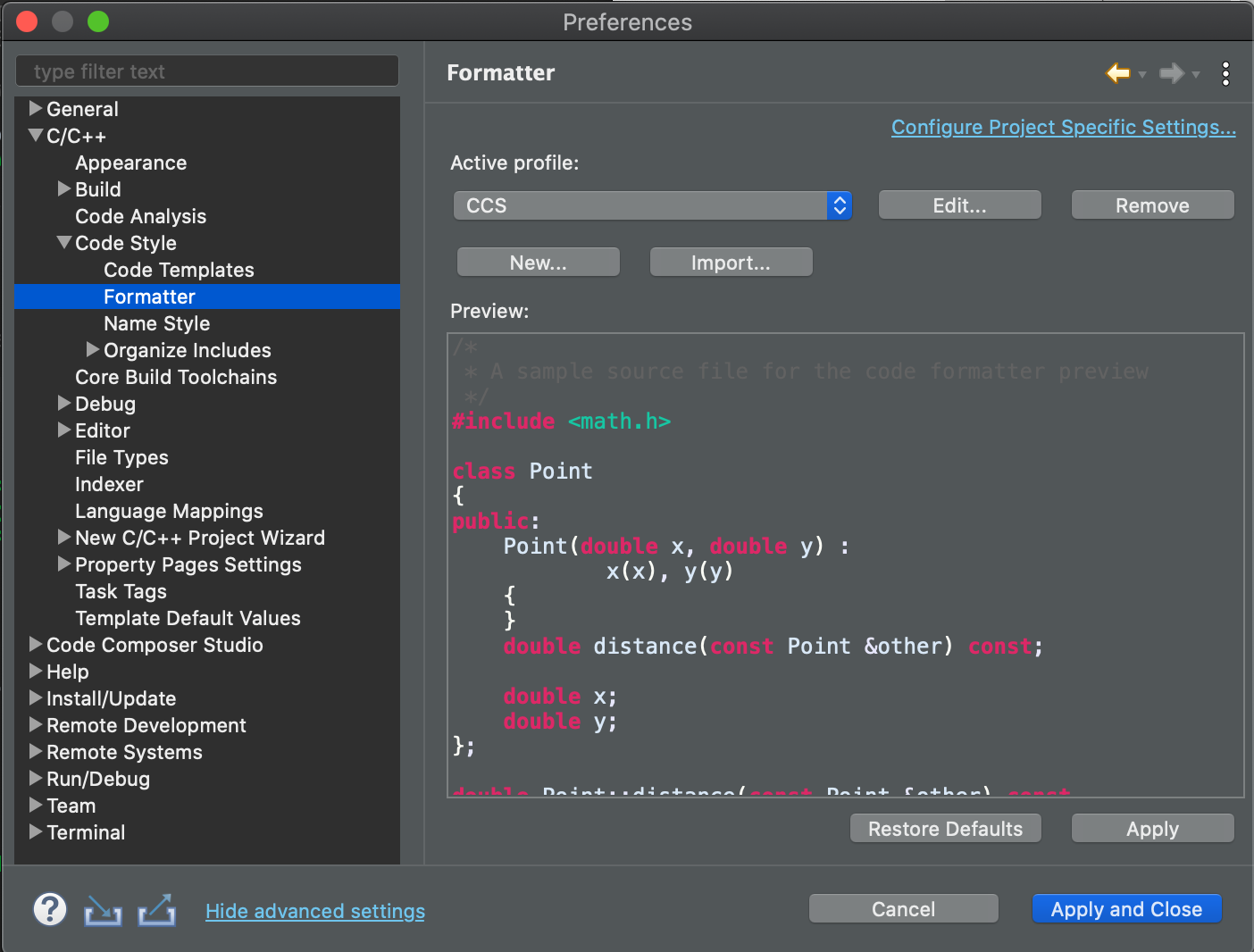
    In the preferences dialog you have to click show advanced settings on the bottom.  Then navigate to here and click the edit button beside the profile.

    What do these settings look like for you.

    I am also on a mac so maybe that makes a difference.

    Regards,

    John

  • Thanks John for reaching out.

    I have tweaked all the settings in the style formatter page as well as the 

    "General_.Appearance_Editors._text Editors" preference settings page and the 

    "C/C++_Editor_Typing" page. Nothing seems to make any difference.

    So is the issue where in block mode while trying to insert a column of TAB's they always end up at the beginning of the line by design or is that a bug?

    No other editor I have ever used does this. In CCS when you are in block mode or not you can insert a tab anywhere in the line as expected. But in block mode when inserting on anything more than 1 line the CCS acts differently. Seems to me that is not how one would expect it to work. It should act the same with 1 line or 10.

    Version 10.1 the insert of any character does what my video showed. It seems to scatter the inserted characters between existing characters on multiple lines.

    I have never seen that before. So column editing is totally useless to me now.

    The other thing that I mentioned briefly is the TAB alignment. My code is now "out of alignment". I have dyslexia and I line things up which helps me with that affliction. I often use other editors to work my code and the alignment is different between CCS and them now. Frustrating and time consuming.

    I played with  trying different fonts seeing if a mono spaced font would make a difference - but no luck.

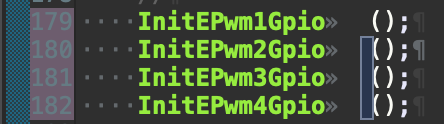
    The problem seems to be linked somehow to the double TAB indicator at I showed in the beginning the video. When that "double TAB" is anywhere on the line the alignment fails. Do you have any idea whats going on with that?

    I am using a 4K screen. Maybe that might have something to do with it?

    Thanks ... Dave

  • David,

    The tab being inserted at the beginning of the line no matter what is selected in block mode appears to be intentional.  I found a really old bug filed against Eclipse for it.  There is a lot of discussion regarding it in the comments.  At this point it is classified as won't fix.

    https://bugs.eclipse.org/bugs/show_bug.cgi?id=264168

    Here is a quick video of what I see when using the tab insert.  I am on a 4K screen as well.

    https://youtu.be/mR976dgu2BQ

    Here is another one with inserting text.

    https://youtu.be/YvBBpy6t-GE

    Things are definitely working differently for me.  That double TAB indicator is odd.  I have not see that before.  I am going to play around with the formatter and see if I can make that happen for me.

    Regards,

    John

  • No luck yet in reproducing the double tab character.

    One thing that I had come across in looking into this is tab size.  It actually relates to the whole debate on using spaces for tabs or not.  One of the arguments for spaces is that tabs are represented by different number of columns in different environments.  This may be why you are seeing things lookign differently in CCS and Notepad++ when it comes to alignment.  Whereas a space is always one column in every editor.

    The displayed tab width is 4 by default in CCS.

    I don't have notepad++ (can't install it).  Online it looks like that setting is here:

    In atom it shows the characters differnetly for me:

    Auto has it set to 2.  By default it has the tab type as auto which I believe most of the time uses spaces except for at the start of a line when it uses a hard or real tab.  I have switched it to hard now.

    based on the tab representation being different they end up looking a lot different in CCS and Atom.  I turned off the invisible characters here.

    I change the tabs in atom to 4 and they look to be aligned the same:

    I wonder if things would work better for you with having the editors set to use spaces for tabs  However that may be something that you don't want to change.

    Regards,

    John

  • Hello John,

    The problem seems definitely related to the double TAB. Any line that has that will be misaligned.

    I played a bit and found out that if I put a space before the tab after any text where you normally would not it seems to bring the alignment back.

    So I did some massive replaces putting a space before the first tab when there was a string of tabs. It worked I thought but not always. In some

    cases I would see the space then the double tab. The double tab definitely consumes some space. The cursor moves ever so slightly between the two tabs. Its like one of the tabs does not actually space like it should and the next tab does.

    The thing is I never had this problem in Version 9 of CCS. This is all new for 10.1.  I use a spacing of 3 for tabs. I have all my editors set to 3 and its been fine till I installed 10.1.

    I dont like  using spaces as in CCS because it takes 3 deletes to remove a "tab" made of spaces. It seems like I spend a lot of time just adding and subtracting spaces.

    I cant believe I a the only person on the planet having this problem. I thought for sure somebody had been down this road and the fix was in E2E.

    Anyway I will try the space method CCS and see how it works. Notepad++ has a feature that will turn tabs into spaces and vise versa. Easy quick conversion of my source files.

    One other feature I like in Notepad++ is the ability to sort a selection alphabetically or numerically. Very handy when you have hundreds of variables.

    Thanks for helping me with this.

    Dave...

  • John,

    I tried to use spaces instead of tabs but that does not seem to work either.

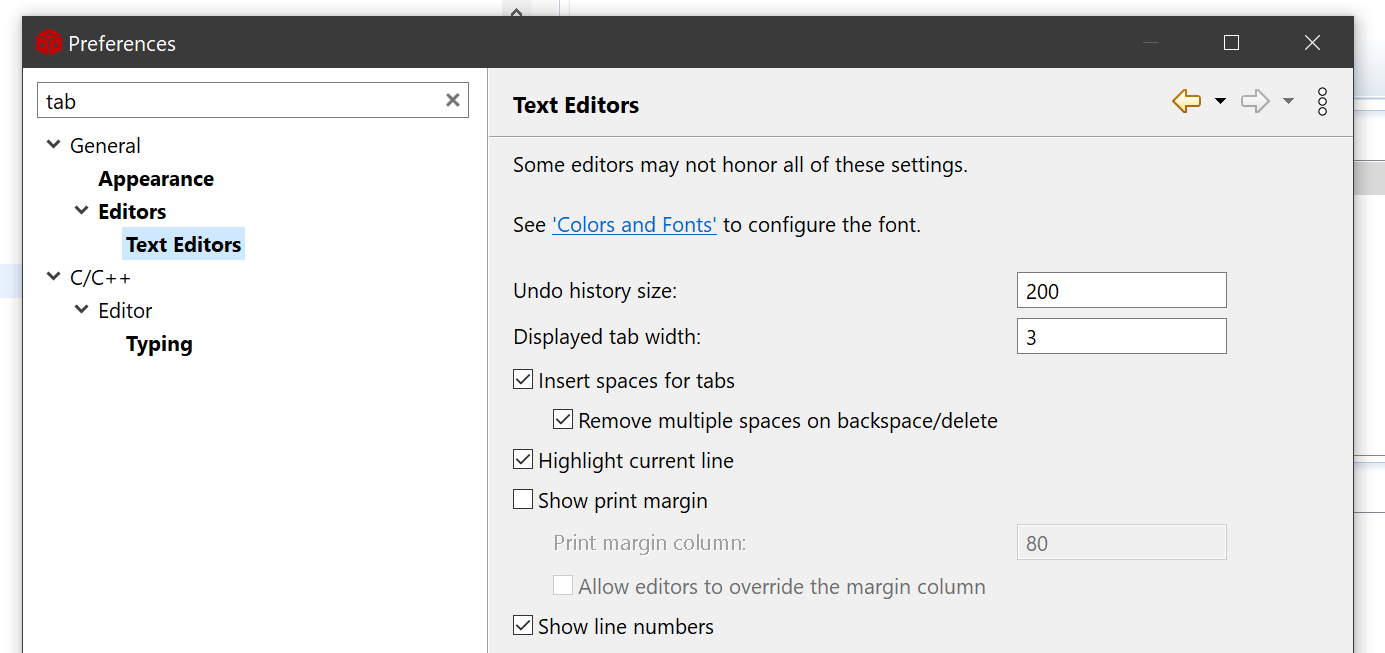
    My settings are as follows;

    The two check boxes "insert spaces for tabs" and "remove multiple..." when checked I assume

    when I press the TAB key I should see 3 spaces inserted into the code. It inserts a TAB character.

    Checking that box does not seem to change the way CCS reacts to pressing the TAB key.

    Deleting also only deletes 1 space character not multiples. It would be nice if it removed the "displayed TAB width" number of spaces.

    It seems that using TABs is trouble ridden and extra work because it will not insert 3 spaces when I press TAB.

    I have tried all the settings I could find related to this subject and nothing yet seems to produce the desired response.

    All of these settings are just helter skelter scattered around. They should be in one concise place.

    Why am I having so much trouble with this version of CCS?

    Thanks    Dave...

  • Dave,

    Changing that first setting should control if CCS uses spaces or tabs.  You change that and it still uses tabs????  That is nuts.   Could you try creating a new workspace? This won;t delete the old one and you can always switch back to it.  

    Go to File -> Switch Workspace -> Other

    specify a new workspace name

    Open a file.

    Try doing a tab to see what happens.

    By default CCS should be using spaces for tabs.

    If that works lets try switching back to the old workspace.

    The only other thing that I can think of is that you have "project specific settings".

    Go to the project properties

    Check "Show advanced options" at the bottom

    Go to the formatter options

    Is the box to enable project specific settings checked at the top?

    Regards,

    John

  • Good morning John,

    To answer your question - yes the "Enable project specific settings" is checked.

    Should it be?

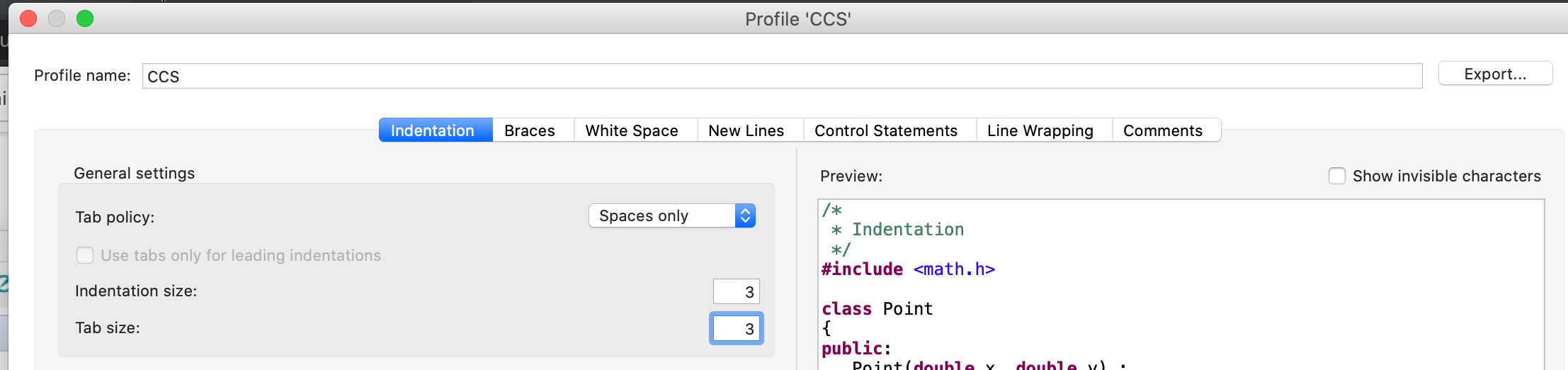
    I make a new empty project as you suggested and these settings set as shown;

    However the "remove multiple spaces...." does not work. Delete or backspace only removes 1 space not a TAB's worth of spaces.

    Should it?

    Thanks Dave.

  • OK so I switched back to this;

    And CCS is still putting in 4 spaces when I press the TAB key.

    And still not deleting more than 1 space.

    Does CCS 10.1 behave properly for you?

    Dave...

  • Dave,

    "Enable Project Specifc Settings" means that the project will have its own settings independent from what you have set in the preferences dialog in CCS.

    That option for removing multiple spaces does not work for me either.   That displayed tab width is to control how tab a tab looks when a tab character is inserted.

    To change the number of space characters that are inserted in place of a tab you need to do that in the formatter.  In your case that will actually be set in the project as project specific settings are enabled.  Personally I would go into the project and disable the project specific settings and then you can go back to changing them globally for the workspace in the preferences dialog.

    To clear the project specific settings go to the properties for the project. Click show advanced settings at the bottom left.  Then navigate to here and uncheck the box to enable project specific settings.  Then click apply and close to save the change.

    Next go to the preferences dialog and change the settings to have spaces only.

    Regards,

    John

  • Hey John,

    I get what the settings are intended to do. Its just that they do not do so. (some of them)

    Check out his video related to the tab alignment issue. It almost seems font related.

    I have changed the "TAB size and it works correctly. I use 3 for my personal settings.

    How about the "remove spaces" thing not working. Is that a bug or is that intended.

    If it is not functional as implied why have a check box? Or does it relate to some other obscure feature?

    Let me know if your system does what is shown on the new video.

    Thanks   Dave...

  • Dave,

    I think the video is set as private.

    The "remove multiple spaces..." function does not work for me.  I guess is that this is something Eclipse put in there for Java but has not been picked up by the C editor yet.  It looks to be a recent addition.

    Regards,

    John

  • Sorry about that John.

    Try this;   https://youtu.be/Kil0dpGCYLc

  • Thanks I can view it now.

    Those overlapping tab characters are really odd.  I am not able to reproduce that.  It is a pain for sure.

    I tried zooming in and out.  No luck.

    What font do you have set?  Maybe the font doesn't handle zooming in and out?

  • I am using Consolas 12 as default.

    Recently I tried about 20 different fonts trying to find one that was acceptable visually and did not exhibit this phenomenon.

    I was just running down the list trying to find the magic one. Everything I tried had the same problem. I came to the conclusion

    that somehow it was TAB related and not font related. Even the mono spaced fonts showed the problem. I gave up before getting

    to the end of the list.

    I will try the one you are using since it seems to work for you.

    I will let you know how it goes.

    thanks,

    Dave...

  • I do not have the font you are using.

    I tried all of them but no difference when change the zoom size.

    I guess there is no solution. I am surprised that no one else has these problems.

    Dave...

  • Dave,

    Unfortunately for tabs I don't see a solution.  That overlapping tab character is really odd.  I am not able to reproduce it, I have searched to see if other Eclipse users have the issue but no luck. 

    Is the spaces for tabs option a little better?  It has the drawback that you have to manually delete all spaces but at least the alignment should be good with a monospace font.  I suppose another issue with that is that if you are also using notepad++ that it would have to be set to do the same or you could end up with a mix.

    Regards,

    John