Tool/software: Code Composer Studio
Hi
AFAIR You don't have a dedicated bug reporting setup, sorry if I remember wrong.
But in working with getting the CCS installer wrapped into a Chocolatey package for our CI setup. I found there is missing something in registry for CCS 10 an onwards.
- the displayname value does no longer contain the version
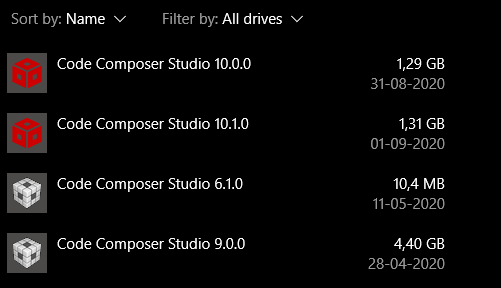
- This means that when having more than one version installed (not that uncommon) the list under "App & features" in setting will just contain more entries with "code composer studio" but no chance to see what version it refers to.
- Also for me it means the standard way to uninstall in Chocolatey does not work properly, as this searches for the key with the correct display name, and uses the "UninstallString", but because like the use case described above the scripts cannot distinguish between version 10.0 amd 10.1 (and if not fixed any future versions), and thus might uninstall the wrong version.
- There is an obvious bug in the "DisplayIcon" value it reads "***unknown variable final_install_path***/doc/ccs.ico"
- This is most likely the cause of the icon in "Apps & Features" is a default windows icon icon for a program and not the CCS logo as is seen for older versions, if I figure out how i will attach a screenshot.
Just for info here is the registry entries for CCS 9 and CCS10 to compare
[HKEY_LOCAL_MACHINE\SOFTWARE\Microsoft\Windows\CurrentVersion\Uninstall\Code Composer Studio 9.0.0 9.0.0.00018]
"DisplayVersion"="9.0.0.00018"
"Publisher"="Texas Instruments"
"DisplayName"="Code Composer Studio 9.0.0"
"UrlInfoAbout"=""
"HelpLink"=""
"Comments"=""
"Contact"=""
"VersionMajor"=dword:00000009
"MajorVersion"=dword:00000009
"VersionMinor"=dword:00000000
"MinorVersion"=dword:00000000
"DisplayIcon"="c:/ti/ccs900/ccs/doc/ccs.ico"
"UninstallString"="\"C:\\ti\\ccs900\\ccs\\uninstall_ccs.exe\""
"InstallLocation"="\"c:/ti/ccs900/ccs\""
"NoModify"="1"
"NoRepair"="1"
"EstimatedSize"=dword:00465f77
"InstallDate"=dword:5e4e8bdc
[HKEY_LOCAL_MACHINE\SOFTWARE\Microsoft\Windows\CurrentVersion\Uninstall\Code Composer Studio 10.0.0.00010]
"DisplayVersion"="10.0.0.00010"
"Publisher"="Texas Instruments"
"DisplayName"="Code Composer Studio"
"UrlInfoAbout"=""
"HelpLink"=""
"Comments"=""
"Contact"=""
"VersionMajor"=dword:0000000a
"MajorVersion"=dword:0000000a
"VersionMinor"=dword:00000000
"MinorVersion"=dword:00000000
"DisplayIcon"="***unknown variable final_install_path***/doc/ccs.ico"
"UninstallString"="\"C:\\ti\\ccs1000\\ccs\\uninstall_ccs.exe\""
"InstallLocation"="C:\\ti\\ccs1000"
"NoModify"="1"
"NoRepair"="1"
"EstimatedSize"=dword:0014a974
"InstallDate"="20200831"
Edit: found the "picture button" :-)
This is how Apps&programs" look now
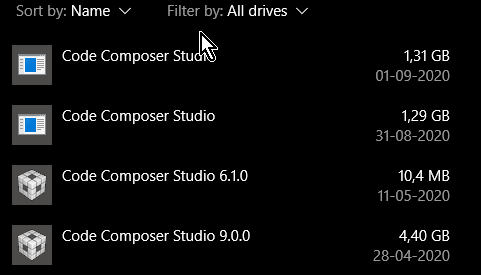
I tried fixing the registry by manually editing the displayname and the icon path. Now it looks much better