This thread has been locked.

If you have a related question, please click the "Ask a related question" button in the top right corner. The newly created question will be automatically linked to this question.

Error Connecting XDS510 to EK-LM3S9B92

Other Parts Discussed in Thread: EK-LM3S8962

Hello,

We have a customer experiencing an error when connecting to CCSv4 with Spectrum Digital XDS510 emulator and the EK-LM3S9B92.  So far, steps have been followed according to the wiki "How to set up CCSv4 with SD XDS510 for TI Stellaris M3".  Please see the details of the error below.  There are a few similar forum posts which point to the wiki, I am wondering if someone may have additional suggestions regarding the error below.
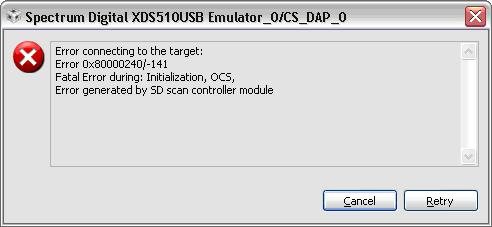
  

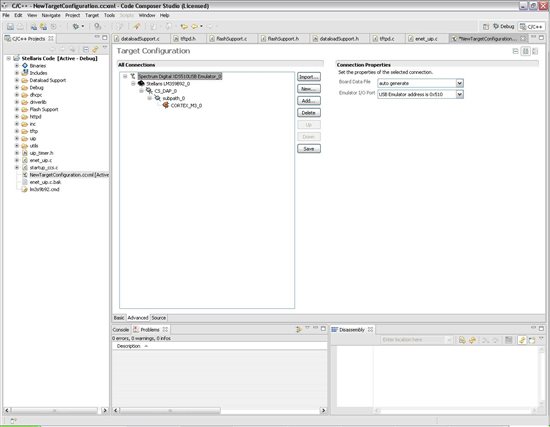
"I am currently using an XDS510USB emulator with the 14 pin to 20 pin JTAG adaptor connected.  I am connecting the emulator to the EK-LM3S9B92 to the JTAG SWD 20 pin connector on the BD-ICDI-B connector card.  I have shorted pins 9 and 11 on the 14 pin JTAG connector as shown on the wiki page.  I also modified the sdopts.cfg file changing the EmuJclkMode from Counter to CounterITckr.  I also changed the EmuTckDiv from 1 to 2 as recommended. " 
 Thanks,

Devin

  • Devin

    Can they verify that the basic JTAG connection is good by running SDConfigEx v4 to test/reset emulator and run diagnostics?

    Which version of CCS 4 are they using? And is it a XDS510USB or USB+?

    If the JTAG connection is verified to be good, another thing to check is that the 'Access Port Designator' option is set correctly as mentioned at the bottom of the page: http://processors.wiki.ti.com/index.php/JTAG_configuration_for_CCS_and_Stellaris

  • Aarti,

      I did an emulator test and received the following error:

    JTAG IR scan test failed.

    I am not sure why it is failing.


  • So if the basic JTAG scan tests itself are failing, the connection to CCS is not going to work. To start off, the following Spectrum Digital troubleshooting pages might be helpful:

    http://support.spectrumdigital.com/guides/troubleshooting_guide/
    http://support.spectrumdigital.com/guides/JTAG_Emulator_guide/#4.1

    In the meantime, I'll also contact Spectrum Digital and see if they have additional suggestions.

  • So when looking at the NewTargetConfiguration.ccxml file, There isn't a board specific to the EK-LM3S9B92.  There is the LM3S9B92 device.  Is it possible that I am unable to connect to the Stellaris Dev board using the XDS510USB with 14 pin JTAG adaptor?  Would it work just fine if I connected directly to the target device on our own platform vs using the devlopment kit?

  • William Resnick said:
    There isn't a board specific to the EK-LM3S9B92.  There is the LM3S9B92 device

    You are right, there isn't a Ek-LM3S9B92 in the board selection. When creating the target configuration file, select Spectrum Digital XDS510 USB Emulator and LM3S9B92 device.

    I contacted Spectrum Digital and they said that if you have shorted pins 9 and 11, do not set the loopback. Set it back to standard counter mode and see if it works. They confirmed that the JTAG scan works with standard counter mode when pins are shorted, and fails if the software loopback is also set.

  • This did not fix the problem.  I also tried using an example project from the stellaris folder "blinky".  I still get the same error when setting the couter mode back to counter.

  • Sorry about the delay, but we are testing a few configurations here. So far, I have not been able to get the JTAG test to scan the device properly on a EK-lM3S9B92 using a XDS510USB emulator and 20-pin ARM to 14-pin TI adapter (similar to what you see). The connection does work fine on a EK-LM3S8962.

    When I contacted Spectrum Digital though they said they were able to connect fine with a 9B92. We are still doing some more tests at our end and will post an update when we have additional information. In the meantime, I hope you are able to continue your development and debug using the ICDI and on-board emulation provided with the kit.

  • Thanks for the update.  I appreciate your help.

    Will

  • Will,

    We investigated this issue and now know the reason for the XDS510USB not working, thanks to Spectrum Digital's help. The information we had earlier on the wiki was incorrect. The pins you actually need to short are pins 9 and 11 on J1, (ie) the ARM20 connector on the bottom of the TMDSADPEMU-20A 20-Pin ARM Adapter to 14-pin TI Emulation adapter board. Please check the wiki page again - we have updated the information and posted a new picture as well.

    We verified that with this modification, the XDS510USB emulator works with the Ek-LM3S9B92. Please give this a try and let us know if you still have problems.