This thread has been locked.

If you have a related question, please click the "Ask a related question" button in the top right corner. The newly created question will be automatically linked to this question.

CCS/LAUNCHXL-F28379D: Can I debug & load with only CPU1 ?

Part Number: LAUNCHXL-F28379D


Tool/software: Code Composer Studio

Hello,

I would like to build a target & debug it only on cpu1.
To shorten the loading time, is it possible to disable some options to skip the loading of CPU2?

Thank you!

George

  • Hi George,

    Sure, you can choose to just work with one core. When debugging a project, you should be given the option to choose which core to load to. You can choose CPU1, or CPU2, or both. If you don't see that option anymore, try deleting the launch configuration for the project.

    Thanks

    ki

  • Dear Ki,

    Thanks for rapid response, I have seen the options in the Debug->Debug configurations.

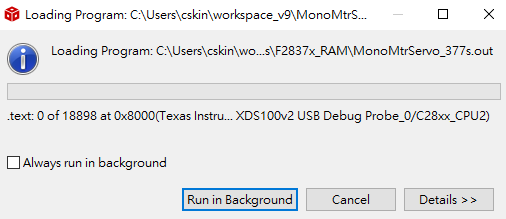
    However I still see the loading progress of CPU2 while debug session is launching.

    Have I missed other important options?

    Thanks!

    George 

  • George,

    The "Main" tab is for which CPUs to show in the Debug view.

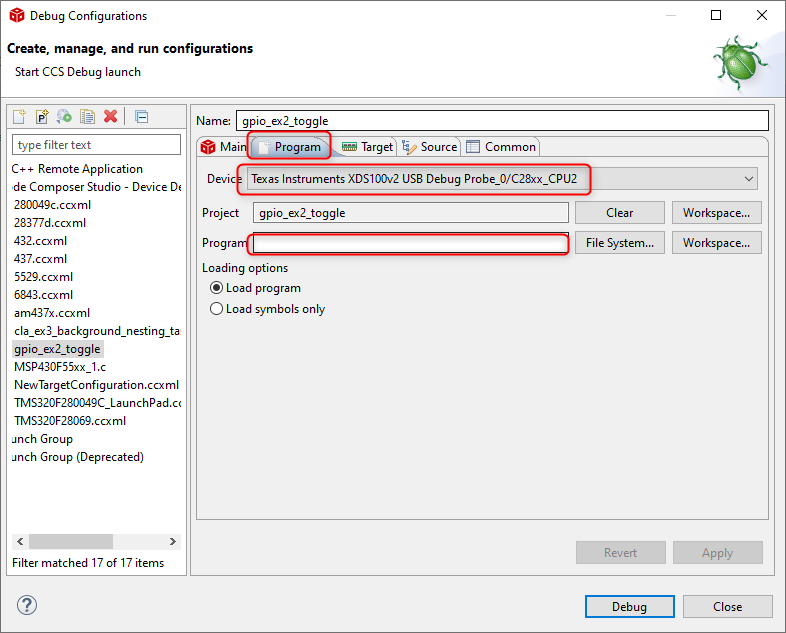
    To control which programs are loaded for each core, got to the "Program" tab:

    And select CPU2 in the "Device" field and make sure the "Program" field is empty.

    Thanks

    ki