This thread has been locked.

If you have a related question, please click the "Ask a related question" button in the top right corner. The newly created question will be automatically linked to this question.

CCS/CC2640R2F: How to use Execution Analysis with simple_peripheral project?

Part Number: CC2640R2F
Other Parts Discussed in Thread: SYSBIOS, , CC2640

Tool/software: Code Composer Studio

I've gone through the TI-RTOS basics tutorial and seen the use of the Tools → RTOS Analyzer → Execution Analysis tool.  However, this only worked in the hello project because the project included the hello.cfg file which was used to enable the logging.

I want to see the time spend in each task in the simple_peripheral project to understand how long the processor spends in active vs. idle/sleep modes.  But opening the Execution Analysis tool brings up a window asking me for a custom UIA file.  Where can I generate or find a file that will allow me to proceed and view the tool?  Thank you.

  • Hi,

    Here are some guidelines I wrote for CC26X2/CC13X2 a few months ago, maybe you could leverage it a bit:

    1.Download and unzip UIA in C:\ti\ (UIA is available here)
    2.Start CCS and install the new product found. Restart CCS when prompted.
    3.In your project add a product dependency to UIA
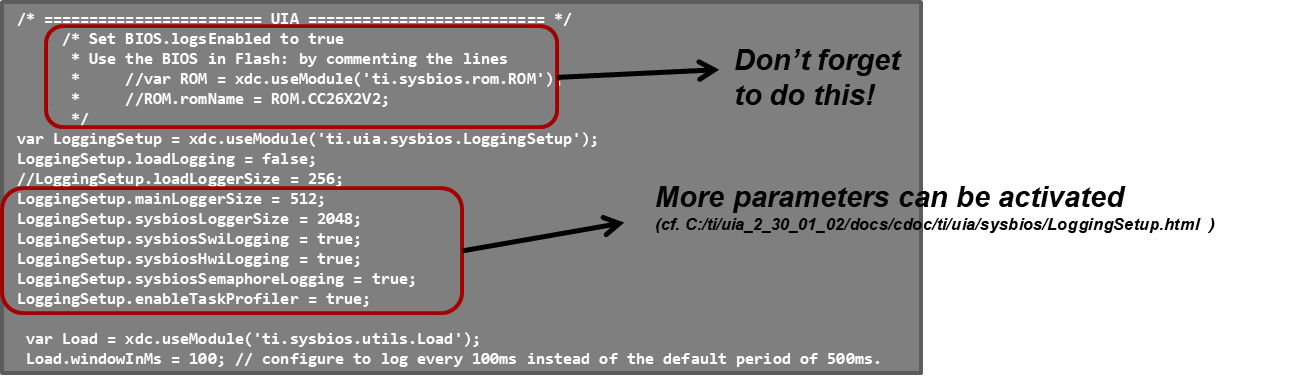
    4.Modify the .cfg (or .xscfg)  file by adding the following lines at the end of it:
    For CC2640R2F, the things are slightly different and you will have to modify kernel\tirtos\packages\ti\uia\sysbios\LoggingSetup.xdc
    Let us know how it goes!
    Kind regards,
  • I'm trying to follow this, I have downloaded and installed UIA.

    How do I add a dependency to my project?  The only place it seems to show UIA is under Project Properties->General there are two Product tabs, and I can check the box for System Analyzer (UIA target) on both tabs.  Is this correct?

    Next, I do not know which .cfg file to edit, there is a file called app_ble.cfg in the TOOLS folder of the project, but all this file does is import a couple other files from the SDK.  One is called "cc2640_r2_csdk.cfg" and when I find this file it looks to be the right place to add the lines of code you mentioned.

    I set BIOS.logsEnabled = true; I also commented out the code block to use BIOS in flash (as explained in the TI-RTOS basics tutorial) and then added the lines of code at the bottom. (I have looked at the file you mentioned called LoggingSetup.xdc but didn't see what I should do with it)

    After all this, the Execution Graph tool still just tells me that my project is not setup correctly:

  • It looks like the images didn't show up:

    First image where I'm trying to add a dependency: Second image of incorrect UIA setup:

  • Hi,

    What you have done seems correct to me.

    Are you running the program in debug mode when trying to open the RTOS Analyzer? At least, I manage to reproduce your issue when trying to open the RTOS Analyzer without running the debug session.

    Best regards,

  • Yes I am in debug mode.  I actually found this thread which helped some: https://e2e.ti.com/support/wireless-connectivity/bluetooth/f/538/t/646420?RTOS-CC2640R2F-Could-not-detect-UIA-configuration

    Now I can open the Execution Graph and the Live Session view.  But they do not populate with data.  I read in this thread: https://e2e.ti.com/support/microcontrollers/c2000/f/171/t/773948?RTOS-TMS320F28069-UIA-is-not-showing-any-data-in-Live-Session-Execution-graph-and-CPU-Load that I should check the ROV to see if there are records in LoggerStopMode.  I checked and SYSBIOS system logger has no records listed which indicates that I have a problem with my logging settings.  What could be my issue?

    I have included my .cfg file for reference.  I assume this is the correct file to change? 

     /******************************************************************************
    
     @file  cc2640_r2_csdk.cfg
    
     @brief TI RTOS Configuration file for CC26xx
    
            Imported Symbols
            Note: These symbols are defined following the --cfgArgs option.
            In IAR this is done at the end of the pre-build step.  In CCS, this
            is done in Properties->build->XDCtools-Advanced options->Configuration
            script arguments.  Multiple symbols can be used separating them by a
            comma (",").
    
            By default, TI RTOS builds with RTOS in ROM, interrupt vectors starting
            at address 0x0 and uses ROM only kernel modules.
    
            NO_ROM:     When set to a non-zero value, RTOS builds in Flash instead
                        of ROM
            OAD_IMG_A:  When set to a non-zero value, interrupt vectors are set to
                        their expected location for on-chip OAD Image A.
            OAD_IMG_B:  When set to a non-zero value, interrupt vectors are set to
                        their expected location for on-chip OAD Image B.
            OAD_IMG_E:  When set to a non-zero value, interrupt vectors are set to
                        their expected location for external flash OAD.
            USE_EVENTS: Build the RTOS Kernel Event module.
            SECURE_FW_IMG: When set to a non-zero value, interrupt vectors are set to
                           their expected location for secure firmware image.
    
     Group: WCS, BTS
     Target Device: cc2640r2
    
     ******************************************************************************
     
     Copyright (c) 2013-2020, Texas Instruments Incorporated
     All rights reserved.
    
     Redistribution and use in source and binary forms, with or without
     modification, are permitted provided that the following conditions
     are met:
    
     *  Redistributions of source code must retain the above copyright
        notice, this list of conditions and the following disclaimer.
    
     *  Redistributions in binary form must reproduce the above copyright
        notice, this list of conditions and the following disclaimer in the
        documentation and/or other materials provided with the distribution.
    
     *  Neither the name of Texas Instruments Incorporated nor the names of
        its contributors may be used to endorse or promote products derived
        from this software without specific prior written permission.
    
     THIS SOFTWARE IS PROVIDED BY THE COPYRIGHT HOLDERS AND CONTRIBUTORS "AS IS"
     AND ANY EXPRESS OR IMPLIED WARRANTIES, INCLUDING, BUT NOT LIMITED TO,
     THE IMPLIED WARRANTIES OF MERCHANTABILITY AND FITNESS FOR A PARTICULAR
     PURPOSE ARE DISCLAIMED. IN NO EVENT SHALL THE COPYRIGHT OWNER OR
     CONTRIBUTORS BE LIABLE FOR ANY DIRECT, INDIRECT, INCIDENTAL, SPECIAL,
     EXEMPLARY, OR CONSEQUENTIAL DAMAGES (INCLUDING, BUT NOT LIMITED TO,
     PROCUREMENT OF SUBSTITUTE GOODS OR SERVICES; LOSS OF USE, DATA, OR PROFITS;
     OR BUSINESS INTERRUPTION) HOWEVER CAUSED AND ON ANY THEORY OF LIABILITY,
     WHETHER IN CONTRACT, STRICT LIABILITY, OR TORT (INCLUDING NEGLIGENCE OR
     OTHERWISE) ARISING IN ANY WAY OUT OF THE USE OF THIS SOFTWARE,
     EVEN IF ADVISED OF THE POSSIBILITY OF SUCH DAMAGE.
    
     ******************************************************************************
     
     
     *****************************************************************************/
    
    var RTOS_IN_ROM;
    var OAD_IMG_TYPE;
    var USE_SECURE_FW_IMG;
    
    if(Program.build.cfgArgs != null)
    {
      if (typeof Program.build.cfgArgs.NO_ROM == 'undefined' ||
          (typeof Program.build.cfgArgs.NO_ROM != 'undefined' &&
            Program.build.cfgArgs.NO_ROM == 0))
      {
        RTOS_IN_ROM = true;
      }
      else
      {
        RTOS_IN_ROM = false;
      }
    
      if(typeof Program.build.cfgArgs.OAD_IMG_A != 'undefined' &&
          Program.build.cfgArgs.OAD_IMG_A == 1)
      {
        OAD_IMG_TYPE = "A";
      }
      else if (typeof Program.build.cfgArgs.OAD_IMG_B != 'undefined' &&
          Program.build.cfgArgs.OAD_IMG_B == 1)
      {
        OAD_IMG_TYPE = "B";
      }
      else if (typeof Program.build.cfgArgs.OAD_IMG_E != 'undefined' &&
          Program.build.cfgArgs.OAD_IMG_E == 1)
      {
        OAD_IMG_TYPE = "E";
      }
    
      if(typeof Program.build.cfgArgs.SECURE_FW_IMG != 'undefined' &&
          Program.build.cfgArgs.SECURE_FW_IMG == 1)
      {
        USE_SECURE_FW_IMG = true;
      }
    }
    else
    {
      RTOS_IN_ROM = true;
      USE_SECURE_FW_IMG = false;
    }
    
    /* ================ ROM configuration ================ */
    /*
     * To use BIOS in flash, comment out the code block below.
     */
    //if (RTOS_IN_ROM)
    //{
    //  var ROM = xdc.useModule('ti.sysbios.rom.ROM');
    //  if (Program.cpu.deviceName.match(/CC26/)) {
    //      ROM.romName = ROM.CC2640R2F;
    //  }
    //  else if (Program.cpu.deviceName.match(/CC13/)) {
    //      ROM.romName = ROM.CC1350;
    //  }
    //}


    /* ================ Boot configuration ================ */
    if (RTOS_IN_ROM)
    {
      var Boot = xdc.useModule('ti.sysbios.family.arm.cc26xx.Boot');
    }
    /*
     * This module contains family specific Boot APIs and configuration settings.
     * See the SYS/BIOS API guide for more information.
     */
    if (RTOS_IN_ROM)
    {
      Boot.driverlibVersion = 2;
      Boot.customerConfig = false;
    }
    
    /* ================ Clock configuration ================ */
    var Clock = xdc.useModule('ti.sysbios.knl.Clock');
    /*
     * When using Power and calibrateRCOSC is set to true, this should be set to 10.
     * The timer used by the Clock module supports TickMode_DYNAMIC. This enables us
     * to set the tick period to 10 us without generating the overhead of additional
     * interrupts.
     *
     * Note: The calibrateRCOSC parameter is set within the Power configuration
     *     structure in the "Board.c" file.
     */
    Clock.tickPeriod = 10;
    Clock.swiPriority = 5;
    
    
    /* ================ Types configuration ================ */
    var Types = xdc.useModule('xdc.runtime.Types');
    /*
     * This module defines basic constants and types used throughout the
     * xdc.runtime package.
     */


    /* ================ Defaults (module) configuration ================ */
    var Defaults = xdc.useModule('xdc.runtime.Defaults');
    /*
     * A flag to allow module names to be loaded on the target. Module name
     * strings are placed in the .const section for debugging purposes.
     *
     * Pick one:
     *  - true (default)
     *      Setting this parameter to true will include name strings in the .const
     *      section so that Errors and Asserts are easier to debug.
     *  - false
     *      Setting this parameter to false will reduce footprint in the .const
     *      section. As a result, Error and Assert messages will contain an
     *      "unknown module" prefix instead of the actual module name.
     *
     *  When using BIOS in ROM:
     *      This option must be set to false.
     */
    //Defaults.common$.namedModule = true;
    Defaults.common$.namedModule = false;
    
    /* Compile out all Assert's */
    //Defaults.common$.diags_ASSERT = Diags.ALWAYS_OFF;
    
    /* Allow Mod_create() and Mod_construct() but not delete() or destruct() */
    Defaults.common$.memoryPolicy = Types.CREATE_POLICY;


    /* ================ Error configuration ================ */
    var Error = xdc.useModule('xdc.runtime.Error');
    /*
     * This function is called to handle all raised errors, but unlike
     * Error.raiseHook, this function is responsible for completely handling the
     * error with an appropriately initialized Error_Block.
     *
     * Pick one:
     *  - Error.policyDefault (default)
     *      Calls Error.raiseHook with an initialized Error_Block structure and logs
     *      the error using the module's logger.
     *  - Error.policySpin
     *      Simple alternative that traps on a while(1) loop for minimized target
     *      footprint.
     *      Using Error.policySpin, the Error.raiseHook will NOT called.
     */
    //Error.policyFxn = Error.policyDefault;
    Error.policyFxn = Error.policySpin;
    
    /*
     * If Error.policyFxn is set to Error.policyDefault, this function is called
     * whenever an error is raised by the Error module.
     *
     * Pick one:
     *  - Error.print (default)
     *      Errors are formatted and output via System_printf() for easier
     *      debugging.
     *  - null
     *      Errors are trapped with a while(1) stub function. This option reduces
     *      code footprint.
     *  - non-null function
     *      Errors invoke custom user function. See the Error module documentation
     *      for more details.
     */
    //Error.raiseHook = Error.print;
    Error.raiseHook = null;
    //Error.raiseHook = "&myErrorFxn";
    
    /*
     * If Error.policyFxn is set to Error.policyDefault, this option applies to the
     * maximum number of times the Error.raiseHook function can be recursively
     * invoked. This option limits the possibility of an infinite recursion that
     * could lead to a stack overflow.
     * The default value is 16.
     */
    Error.maxDepth = 2;


    /* ================ Hwi configuration ================ */
    var halHwi = xdc.useModule('ti.sysbios.hal.Hwi');
    var m3Hwi = xdc.useModule('ti.sysbios.family.arm.m3.Hwi');
    /*
     * Checks for Hwi (system) stack overruns while in the Idle loop.
     *
     * Pick one:
     *  - true (default)
     *      Checks the top word for system stack overflows during the idle loop and
     *      raises an Error if one is detected.
     *  - false
     *      Disabling the runtime check improves runtime performance and yields a
     *      reduced flash footprint.
     */
    //halHwi.checkStackFlag = true;
    halHwi.checkStackFlag = false;
    
    /*
     * The following options alter the system's behavior when a hardware exception
     * is detected.
     *
     * Pick one:
     *  - Hwi.enableException = true
     *      This option causes the default m3Hwi.excHandlerFunc function to fully
     *      decode an exception and dump the registers to the system console.
     *      This option raises errors in the Error module and displays the
     *      exception in ROV.
     *  - Hwi.enableException = false
     *      This option reduces code footprint by not decoding or printing the
     *      exception to the system console.
     *      It however still raises errors in the Error module and displays the
     *      exception in ROV.
     *  - Hwi.excHandlerFunc = null
     *      This is the most aggressive option for code footprint savings; but it
     *      can difficult to debug exceptions. It reduces flash footprint by
     *      plugging in a default while(1) trap when exception occur. This option
     *      does not raise an error with the Error module.
     */
    //m3Hwi.enableException = true;
    //m3Hwi.enableException = false;
    m3Hwi.excHandlerFunc = null;
    
    /*
     * Enable hardware exception generation when dividing by zero.
     *
     * Pick one:
     *  - 0 (default)
     *      Disables hardware exceptions when dividing by zero
     *  - 1
     *      Enables hardware exceptions when dividing by zero
     */
    m3Hwi.nvicCCR.DIV_0_TRP = 0;
    //m3Hwi.nvicCCR.DIV_0_TRP = 1;
    
    /*
     * Enable hardware exception generation for invalid data alignment.
     *
     * Pick one:
     *  - 0 (default)
     *      Disables hardware exceptions for data alignment
     *  - 1
     *      Enables hardware exceptions for data alignment
     */
    m3Hwi.nvicCCR.UNALIGN_TRP = 0;
    //m3Hwi.nvicCCR.UNALIGN_TRP = 1;
    
    /* Put reset vector at start of Flash */
    if (OAD_IMG_TYPE == "A")
    {
      m3Hwi.resetVectorAddress  = 0x0001dfc0;
    }
    else if (OAD_IMG_TYPE == "E" || OAD_IMG_TYPE == "B")
    {
      m3Hwi.resetVectorAddress  = 0x00A8;
    }
    else if (USE_SECURE_FW_IMG)
    {
      m3Hwi.resetVectorAddress  = 0x0070;
    }
    else
    {
      m3Hwi.resetVectorAddress  = 0x0;
    }
    
    /* Put interrupt vector at start of RAM so interrupts can be configured at runtime */
    m3Hwi.vectorTableAddress  = 0x20000000;
    
    /* CC2650 has 50 interrupts */
    m3Hwi.NUM_INTERRUPTS = 50;


    /* ================ Idle configuration ================ */
    var Idle = xdc.useModule('ti.sysbios.knl.Idle');
    /*
     * The Idle module is used to specify a list of functions to be called when no
     * other tasks are running in the system.
     *
     * Functions added here will be run continuously within the idle task.
     *
     * Function signature:
     *     Void func(Void);
     */
    //Idle.addFunc("&myIdleFunc");
    /* Allow power management */
    Idle.addFunc('&Power_idleFunc');


    /* ================ Kernel (SYS/BIOS) configuration ================ */
    var BIOS = xdc.useModule('ti.sysbios.BIOS');
    /*
     * Enable asserts in the BIOS library.
     *
     * Pick one:
     *  - true (default)
     *      Enables asserts for debugging purposes.
     *  - false
     *      Disables asserts for a reduced code footprint and better performance.
     *
     *  When using BIOS in ROM:
     *      This option must be set to false.
     */
    //BIOS.assertsEnabled = true;
    BIOS.assertsEnabled = false;
    
    /*
     * A flag to determine if xdc.runtime sources are to be included in a custom
     * built BIOS library.
     *
     * Pick one:
     *  - false (default)
     *      The pre-built xdc.runtime library is provided by the respective target
     *      used to build the application.
     *  - true
     *      xdc.runtime library sources are to be included in the custom BIOS
     *      library. This option yields the most efficient library in both code
     *      footprint and runtime performance.
     */
    //BIOS.includeXdcRuntime = false;
    BIOS.includeXdcRuntime = true;
    
    /*
     * The SYS/BIOS runtime is provided in the form of a library that is linked
     * with the application. Several forms of this library are provided with the
     * SYS/BIOS product.
     *
     * Pick one:
     *   - BIOS.LibType_Custom
     *      Custom built library that is highly optimized for code footprint and
     *      runtime performance.
     *   - BIOS.LibType_Debug
     *      Custom built library that is non-optimized that can be used to
     *      single-step through APIs with a debugger.
     *
     */
    BIOS.libType = BIOS.LibType_Custom;
    //BIOS.libType = BIOS.LibType_Debug;
    
    /*
     * Runtime instance creation enable flag.
     *
     * Pick one:
     *   - true (default)
     *      Allows Mod_create() and Mod_delete() to be called at runtime which
     *      requires a default heap for dynamic memory allocation.
     *   - false
     *      Reduces code footprint by disallowing Mod_create() and Mod_delete() to
     *      be called at runtime. Object instances are constructed via
     *      Mod_construct() and destructed via Mod_destruct().
     *
     *  When using BIOS in ROM:
     *      This option must be set to true.
     */
    BIOS.runtimeCreatesEnabled = true;
    //BIOS.runtimeCreatesEnabled = false;
    
    /*
     * Enable logs in the BIOS library.
     *
     * Pick one:
     *  - true (default)
     *      Enables logs for debugging purposes.
     *  - false
     *      Disables logging for reduced code footprint and improved runtime
     *      performance.
     *
     *  When using BIOS in ROM:
     *      This option must be set to false.
     */
    BIOS.logsEnabled = true;
    //BIOS.logsEnabled = false;
    
    BIOS.swiEnabled = true;


    /* ================ Program configuration ================ */
    /*
     *  Program.stack is ignored with IAR. Use the project options in
     *  IAR Embedded Workbench to alter the system stack size.
     */
    if (RTOS_IN_ROM)
    {
      Program.stack = 1024;
      Program.argSize = 0;
    }
    else
    {
      Program.stack = 512;
    }


    /* ================ Semaphore configuration ================ */
    var Semaphore = xdc.useModule('ti.sysbios.knl.Semaphore');
    /*
     * Enables global support for Task priority pend queuing.
     *
     * Pick one:
     *  - true (default)
     *      This allows pending tasks to be serviced based on their task priority.
     *  - false
     *      Pending tasks are services based on first in, first out basis.
     *
     *  When using BIOS in ROM:
     *      This option must be set to false.
     */
    //Semaphore.supportsPriority = true;
    Semaphore.supportsPriority = false;
    
    /*
     * Allows for the implicit posting of events through the semaphore,
     * disable for additional code saving.
     *
     * Pick one:
     *  - true
     *      This allows the Semaphore module to post semaphores and events
     *      simultaneously.
     *  - false (default)
     *      Events must be explicitly posted to unblock tasks.
     *
     *  When using BIOS in ROM:
     *      This option must be set to false.
     */
    //Semaphore.supportsEvents = true;
    Semaphore.supportsEvents = false;


    /* ================ Events configuration ================ */
    var Events = xdc.useModule('ti.sysbios.knl.Event');


    /* ================ Swi configuration ================ */
    var Swi = xdc.useModule('ti.sysbios.knl.Swi');
    /*
     * A software interrupt is an object that encapsulates a function to be
     * executed and a priority. Software interrupts are prioritized, preempt tasks
     * and are preempted by hardware interrupt service routines.
     *
     * This module is included to allow Swi's in a users' application.
     */
    Swi.numPriorities = 6;


    /* ================ System configuration ================ */
    var System = xdc.useModule('xdc.runtime.System');
    /*
     * The Abort handler is called when the system exits abnormally.
     *
     * Pick one:
     *  - System.abortStd (default)
     *      Call the ANSI C Standard 'abort()' to terminate the application.
     *  - System.abortSpin
     *      A lightweight abort function that loops indefinitely in a while(1) trap
     *      function.
     *  - A custom abort handler
     *      A user-defined function. See the System module documentation for
     *      details.
     */
    //System.abortFxn = System.abortStd;
    System.abortFxn = System.abortSpin;
    //System.abortFxn = "&myAbortSystem";
    
    /*
     * The Exit handler is called when the system exits normally.
     *
     * Pick one:
     *  - System.exitStd (default)
     *      Call the ANSI C Standard 'exit()' to terminate the application.
     *  - System.exitSpin
     *      A lightweight exit function that loops indefinitely in a while(1) trap
     *      function.
     *  - A custom exit function
     *      A user-defined function. See the System module documentation for
     *      details.
     */
    //System.exitFxn = System.exitStd;
    System.exitFxn = System.exitSpin;
    //System.exitFxn = "&myExitSystem";
    
    /*
     * Minimize exit handler array in the System module. The System module includes
     * an array of functions that are registered with System_atexit() which is
     * called by System_exit(). The default value is 8.
     */
    System.maxAtexitHandlers = 0;
    
    /*
     * The System.SupportProxy defines a low-level implementation of System
     * functions such as System_printf(), System_flush(), etc.
     *
     * Pick one pair:
     *  - SysMin
     *      This module maintains an internal configurable circular buffer that
     *      stores the output until System_flush() is called.
     *      The size of the circular buffer is set via SysMin.bufSize.
     *  - SysCallback
     *      SysCallback allows for user-defined implementations for System APIs.
     *      The SysCallback support proxy has a smaller code footprint and can be
     *      used to supply custom System_printf services.
     *      The default SysCallback functions point to stub functions. See the
     *      SysCallback module's documentation.
     */
    //var SysMin = xdc.useModule('xdc.runtime.SysMin');
    //SysMin.bufSize = 128;
    //System.SupportProxy = SysMin;
    var SysCallback = xdc.useModule('xdc.runtime.SysCallback');
    System.SupportProxy = SysCallback;
    //SysCallback.abortFxn = "&myUserAbort";
    //SysCallback.exitFxn  = "&myUserExit";
    //SysCallback.flushFxn = "&myUserFlush";
    //SysCallback.putchFxn = "&myUserPutch";
    //SysCallback.readyFxn = "&myUserReady";


    /* ================ Task configuration ================ */
    var Task = xdc.useModule('ti.sysbios.knl.Task');
    /*
     * Check task stacks for overflow conditions.
     *
     * Pick one:
     *  - true (default)
     *      Enables runtime checks for task stack overflow conditions during
     *      context switching ("from" and "to")
     *  - false
     *      Disables runtime checks for task stack overflow conditions.
     *
     *  When using BIOS in ROM:
     *      This option must be set to false.
     */
    //Task.checkStackFlag = true;
    Task.checkStackFlag = false;
    
    /*
     * Set the default task stack size when creating tasks.
     *
     * The default is dependent on the device being used. Reducing the default stack
     * size yields greater memory savings.
     */
    Task.defaultStackSize = 512;
    
    /*
     * Enables the idle task.
     *
     * Pick one:
     *  - true (default)
     *      Creates a task with priority of 0 which calls idle hook functions. This
     *      option must be set to true to gain power savings provided by the Power
     *      module.
     *  - false
     *      No idle task is created. This option consumes less memory as no
     *      additional default task stack is needed.
     *      To gain power savings by the Power module without having the idle task,
     *      add Idle.run as the Task.allBlockedFunc.
     */
    Task.enableIdleTask = true;
    //Task.enableIdleTask = false;
    //Task.allBlockedFunc = Idle.run;
    
    /*
     * If Task.enableIdleTask is set to true, this option sets the idle task's
     * stack size.
     *
     * Reducing the idle stack size yields greater memory savings.
     */
    Task.idleTaskStackSize = 512;
    
    /*
     * Reduce the number of task priorities.
     * The default is 16.
     * Decreasing the number of task priorities yield memory savings.
     */
    Task.numPriorities = 6;


    /* ================ Text configuration ================ */
    var Text = xdc.useModule('xdc.runtime.Text');
    /*
     * These strings are placed in the .const section. Setting this parameter to
     * false will save space in the .const section. Error, Assert and Log messages
     * will print raw ids and args instead of a formatted message.
     *
     * Pick one:
     *  - true (default)
     *      This option loads test string into the .const for easier debugging.
     *  - false
     *      This option reduces the .const footprint.
     */
    //Text.isLoaded = true;
    Text.isLoaded = false;


    // Remaining Modules
    var Diags = xdc.useModule('xdc.runtime.Diags');
    var Main = xdc.useModule('xdc.runtime.Main');
    var Reset = xdc.useModule('xdc.runtime.Reset');
    
    var LoggingSetup = xdc.useModule('ti.uia.sysbios.LoggingSetup');
    LoggingSetup.enableTaskProfiler = true;
    LoggingSetup.sysbiosLoggerSize = 2048;
    LoggingSetup.loadLogging = false;
    

  • Hi,

    Here are all the lines I am using:

    var LoggingSetup = xdc.useModule('ti.uia.sysbios.LoggingSetup');
    LoggingSetup.loadLogging = false;
    //LoggingSetup.loadLoggerSize = 256;
    LoggingSetup.mainLoggerSize = 512;
    LoggingSetup.sysbiosLoggerSize = 2048;
    LoggingSetup.sysbiosSwiLogging = true;
    LoggingSetup.sysbiosHwiLogging = true;
    LoggingSetup.sysbiosSemaphoreLogging = true;
    LoggingSetup.enableTaskProfiler = true; 
    

    You may also miss:

    var Load = xdc.useModule('ti.sysbios.utils.Load');
     Load.windowInMs = 100; // configure to log every 100ms instead of the default period of 500ms.
    

    Best regards,

  • I tried those lines of code and still nothing happens.  In fact today I restarted my attempts and built another simple_peripheral project from scratch and now I get this message in ROV: "Module ti.uia.loggers.LoggerStopMode is not present in simple_peripheral_cc2640r2lp_app.out's configuration" so now LoggerStopMode doesn't show up anymore.

    I feel like seeing the execution graph for my personal project just isn't going to happen.

  • Hi,

    Can you please try to follow this link: https://processors.wiki.ti.com/index.php/UIA_2.0_LoggingSetup

    Best regards,

  • Hi Erik,

    What were your results when using the last link I provided? Do you have new results to share?

    Best regards,