This thread has been locked.

If you have a related question, please click the "Ask a related question" button in the top right corner. The newly created question will be automatically linked to this question.

CCS/MSP430F5528: What Environment Do I need to work with Thread and Semaphores in CCS?

Part Number: MSP430F5528

Tool/software: Code Composer Studio

I am using MSP430F5528 on 10.1.0 CCS. I am trying to use Thread and Semaphores in my code.

After doing some research I found that I need to download additional files to work with environments in CCS. The main environment, with the most documentation was TI-RTOS. Almost all documentations and questions related to Thread and Semaphores were directed to use TI-RTOS. It said it was usable for CCS 6.+ versions, but it had not ben updated for MSP430 since 2016. And there was and E2E question/answer that stated it no longer worked with the MSP430, and there was no word from the makers that it would be available anytime soon.

I was then directed to a system called FreeRTOS which apparently is similar to TI-RTOS. But I can’t find any information on downloading or using it with CCS only examples for GCS.

I had also previously found the new update of SYS/BIOS dated Jun 2020, which claimed to work with MSP430 and allow for Semaphores. But after downloading to my system, I had problem follow the basic startup instructions since my system either lacked the proper XDCTools and/or had an Invalid target. I looked for help only but all the systems solutions were several years old and did not match mine.

I am looking for direction on how to work with Thread or Semaphores with my MSP430 and/or what additional applications I need to download. 

Thank you

  • Part Number: MSP430F5528

    Tool/software: Code Composer Studio

    I am trying to use a thread or semaphore in my CCS code. After doing some research I found SYS/BIOS, a Kernel component for embedded real-time software, which allows me to implement threads and semaphores. After downloading SYS/BIOS 6.83.00.18 for Windows, I also downloaded XDCTools 3.61.02 Core for Windows.

    After connecting them to my CCS. I started following the instructions in the User Guide to create an .cfs file, when I tried to open the file with GXCONF I received the following error:

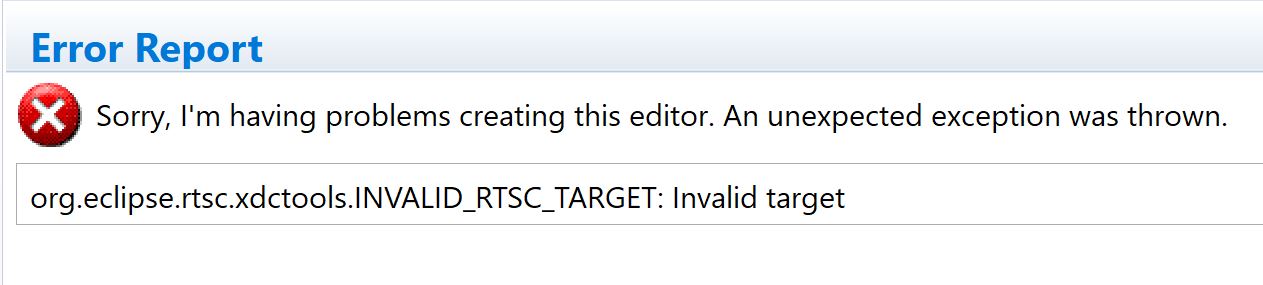
    Sorry, I'm having problems creating this editor. An unexpected exception was thrown. : org.eclipse.rtsc.xdctools.INVALID_RTSC_TARGET: Invalid target (Image below)


    After doing some more research online and reading farther in the User Guide I found that I need to connect the XDCTools Target. I can edit this by going to project Project > Properties > In the pop up window click on Products

    It gives me a list of Products I have connected to my CCS along with A list of XDCpath Repositories. And at the bottom allows me to input XDCtools Setting, such as Target, Platform and Build-profile. (Below is the Properties pop up screen show the XDCTool Setting options)


    After researching and read more, I was not  able to find what I need to input in the XDCtools Settings to fix my INVALID RTSC TARGET error.

    What do I need to do to connect my XDCtools properly? I believe my Target is the MSP430F5528 chip and my Platform is CCS. 

  • Hi Nicole,

    threads and semaphores are typically features of an RTOS. TI-RTOS is developed/supported by TI and has been the RTOS that we have typically recommended. However, FreeRTOS has been gaining in popularity so that is a very viable alternative. As for which RTOS is best for you, I'm not sure. I am going to bring this thread to the attention of the MSP experts. They will be able to provide more guidance.

    Thanks

    ki

  • Hi Nicole,

    TI-RTOS for MSP430 is still available, but future support will be limited and new releases are not expected.  You can find the downloads below.  

    https://software-dl.ti.com/dsps/dsps_public_sw/sdo_sb/targetcontent/tirtos/index.html 

    For the other RTOS environments, these are supported by the respective organizations.

    https://www.freertos.org/

  • Hey Eddie,

    Thank you for the links. I had previously found the TI-RTOS download pages you first suggested, and downloaded the 2.20.00.06 Jun 2016 version, as it was the latest for the MSP430 family.

    It downloaded the tirtos_msp43x Application, and I ran/saved it in my C:\ti folder. But after that, I could not find any instructions on how to connect the newly downloaded folder to my CCS 10.1.0 application.

    Are there any user guide for connect the TI-RTOS to CCS 10.1.0? Information I had found was limited and/or for pervious versions of CCS which I am unable to follow since my software looks unrecognizable to their solutions.

    Thank you,

    Nicole

  • Hi Nicole,

    Nicole Carpenter said:
    Are there any user guide for connect the TI-RTOS to CCS 10.1.0?

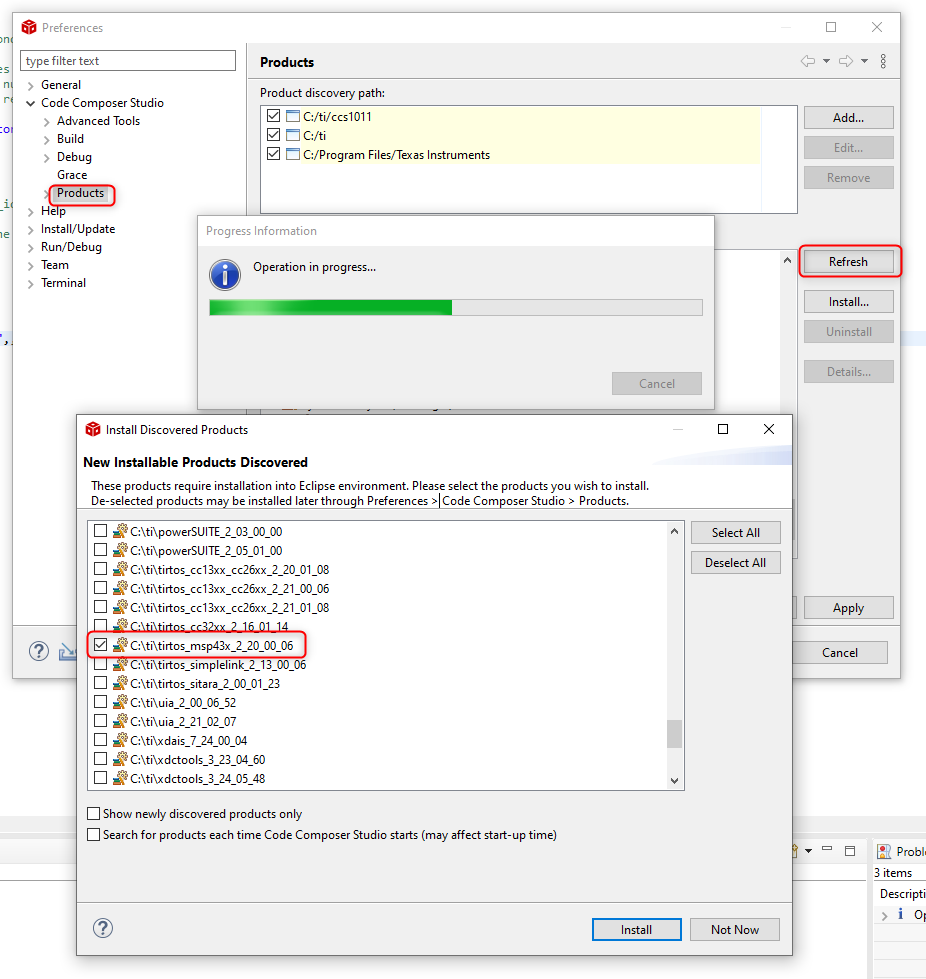
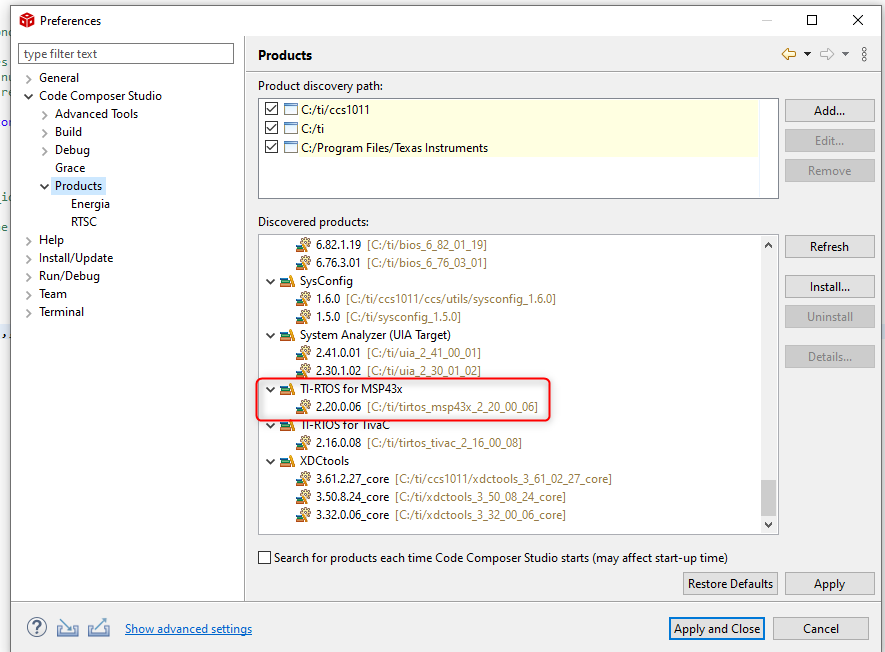
    After TI-RTOS is installed, CCS needs to "discover" it. That can be done in the workspace preferences, using the "Refresh" button to have CCS look for nwly discovered products. If you installed TI-RTOS in a location outside the standard directories, you will need to add the location to the list of Product discover paths.

    Select the option for TI-RTOS for MSP43x and press the Install button. This will have CCS correctly "discover" it (a CCS restart will be required):

    Thanks

    ki

  • Hey Ki,

    Thank you for the screen grabs of "discovering" RTOS on CCS. They were extremally helpful, I had not found such instructions else where. 

    I think for now that answers my questions on the RTOS system. 

    Thank you all for your help,

    Nicole