This thread has been locked.

If you have a related question, please click the "Ask a related question" button in the top right corner. The newly created question will be automatically linked to this question.

ccs4.1.2 crashed when connecting to the emulator

Other Parts Discussed in Thread: TMS320F2812

Hi,

 The version of CCS is 4.1.2.00027, the PC's OS is Win7 x86.

Emulator: Seed XDS510Plus, and the CPU is TMS320F2812.

The software always crashed when it was connecting the the hardware, and one ore more windows like the attached file pop-up after it crashed.

I need your help.
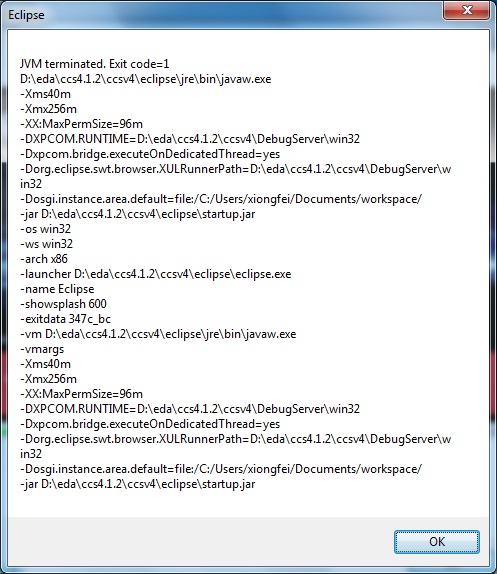
--allen


  • Allen,

    There is another post with a similar error when connecting to CCS 4.1.2 with SEED XDS510plus emulator, however there wasn't a clear resolution in that case either:
    http://e2e.ti.com/support/development_tools/code_composer_studio/f/81/p/88220/305151.aspx#305151

    Which board are you using - a TI kit or custom board? Do you have a different emulator or board so you can try the connection with a different combination of emulator/board?

    I would suggest by starting with the following troubleshooting tips:

    1) Make sure you have the latest drivers for CCS4 installed. SEED's web site shows that they updated their drivers for CCS4 in Oct 2010.

    2) Try the troubleshooting tips suggested here: http://processors.wiki.ti.com/index.php/Troubleshooting_CCS under General IDE and Debugger sections. Specifically try deleting your target cache files are described here: http://processors.wiki.ti.com/index.php/Troubleshooting_CCS#Debugger? These steps usually help resolve many such crashes and odd debugger behavior.

    Also try cleaning your workspace: http://processors.wiki.ti.com/index.php/Troubleshooting_CCS#General_IDE

    3) Send us log files are described here:  http://processors.wiki.ti.com/index.php/Troubleshooting_CCS#CCS_Diagnostic_Logs, specifically Eclipse error log, crash dump files, JVM error logs and debug server logs.

    Many times such issues are resolved by updating to a newer version of CCS, however if you are using the SEED XDS510 emulator, I don't believe they have updated drivers yet for CCS 4.1.3 and higher. You may want to check with SEED though and in case they do, you could update CCS to a newer version.

    Since you are using Windows 7, just for information here is some reference on runnning CCS4 on Win7:
    http://processors.wiki.ti.com/index.php/FAQ_-_CCSv4#Q:_Is_Windows_7_supported.3F

    Also in the referenced post, there is an updated version of the file ti_targetdb_parser.dll. You could try replacing the file in your CCS installation with this updated file and see if it helps. The file is in the folder \ccsv4\common\bin under your CCS installation path. Please make a backup of your original file, then copy the new one in its place.  

    Hope some of these suggestions help resolve the problem.