Part Number: PROCESSOR-SDK-AM335X
Other Parts Discussed in Thread: SYSBIOS
Tool/software: Code Composer Studio
Hello,
I am investigating updating to CCS 10.
As typical, everything I try fails. And every time someone tells me "You're using old stuff, you need to update it..." I have to bite my tongue.
Before taking on a massive project with an install base of hundreds of thousands of devices, and thousands of source code files, I tried a small sample project which is build with:
- TI Compiler 17.3
- XDC 3.2.25
- SYSBIOS 6.46.5.55
I had to re-discover the packages when I installed CCS 10. But it builds...
Next, try to update them.
First I updated to XDC 3.61.2.27 and it complained:
xdc.cfg.Program : The package 'ti.sysbios.knl' is not compatible with XDCtools used in this build.
Please either use XDCtools compatible with that package, or update
the product containing that package, or rebuild the package with XDCtools 3.50 or later.
HUH?? Last time I checked 3.61 is greater than 3.2.25.
Anyway, I then went on a hunt to download the newest SYSBIOS.
I tried loading it via the "products" pages in CCS, but all it wants to do is sell me new stuff. Or give me TIVA packages, or AM335x PDK... Nothing about installing a news SYSBIOS. So I just had to go do a web search. (Which was well hidden... every link took me to the Processor PDK NOT THE SAME THING)
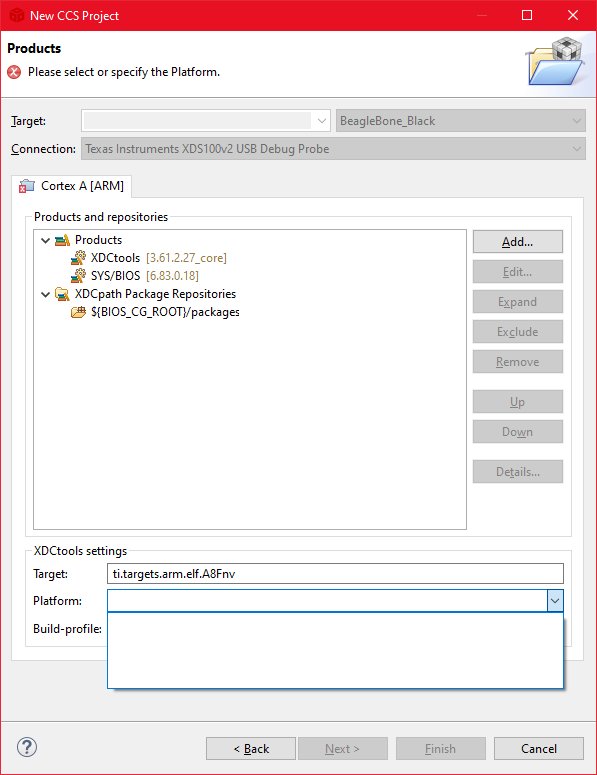
I downloaded and installed that, make sure CCS saw it, and changed the project settings to
- TI Compiler 17.3
- XDC 3.61.2.27
- SYSBIOS 6.83.0.18
Now it tells me:
js: "./config.bld", line 10: Error: Can't find the target named 'ti.targets.arm.elf.A8Fnv' along the path
'C:/ti/bios_6_83_00_18/packages;C:/ti/ccs1011/ccs/ccs_base;
 C:/ti/ccs1011/xdctools_3_61_02_27_core/packages;..;':
please check the spelling of the target's name and that it exists along this path.
Well, that's the same "target name" I've been using before.
So why is this so difficult???
What's it take to make this work?