This thread has been locked.

If you have a related question, please click the "Ask a related question" button in the top right corner. The newly created question will be automatically linked to this question.

CCS/PROCESSOR-SDK-AM335X: Output windows SOMETIMES wraps text.

Part Number: PROCESSOR-SDK-AM335X

Tool/software: Code Composer Studio

Hello,

Where is the setting to wrap text.  So far, I have not been able to discover it.

Same CCS  (CCS 10).  Two different projects.

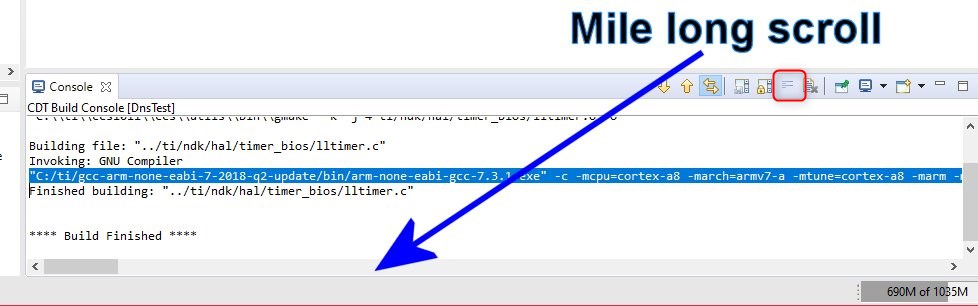
In the build output, this project build console wraps...
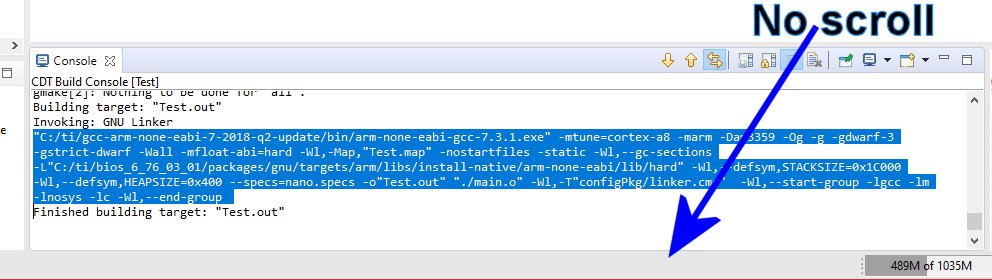
But this one didn't...   And makes is difficult to copy some text, as a slip of the cursor ruins what you are trying to select.
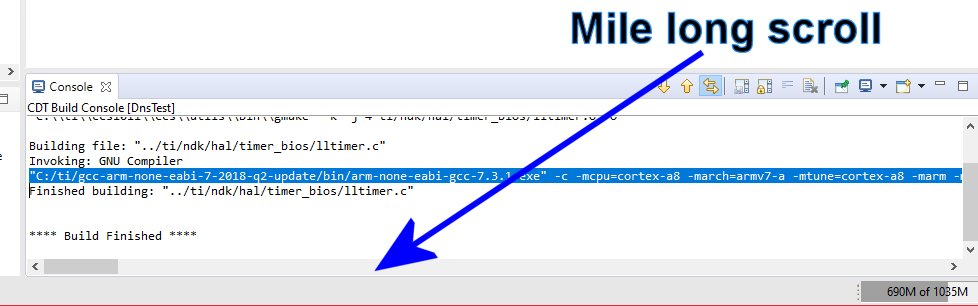
How do I enable wrapping?

  • Hi Christopher,

    Christopher Weber said:
    How do I enable wrapping?

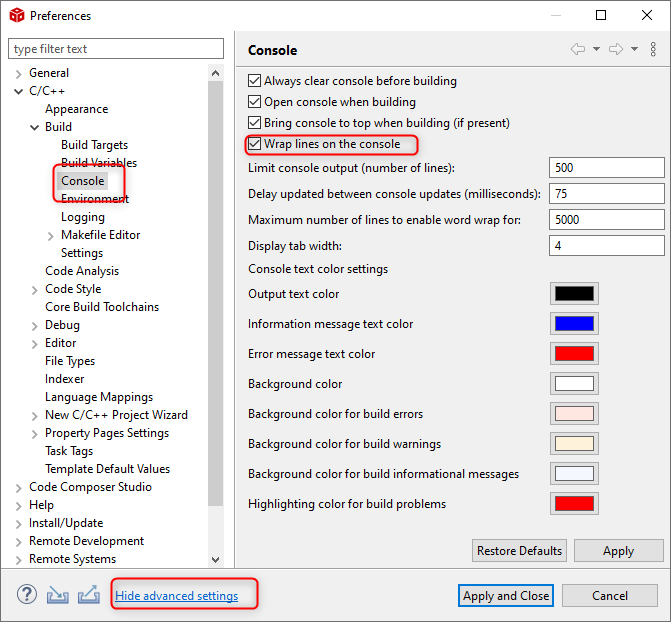
    Typically it configured in the workspace preferences:

    Note that you may have to enable the "advanced settings" to expose C/C++ CDT settings. This can be toggled in a link in the lower left corner of the dialog box.

    With that said, you mentioned:

    Christopher Weber said:
    Same CCS  (CCS 10).  Two different projects.

    That workspace preference should apply to all projects in CCS. So I'm a bit confused why one project would have the wrap enabled and the other does not. There are project level settings that can override the workspace level ones. But I don't think the console word wrapping is one that can be set at the project level. I'm still looking into this. In the meantime, please take a quick look at the workspace level settings. I suspect in your case, it is enabled (default).

    Thanks

    ki

  • Ki,

    You think YOU are confused?

    It was not checked.  So I checked it.

    No change.  One project doesn't wrap, the other does.

    The one that does NOT wrap was originally created in CCS 7.2

    The one that DOES wrap was a quick test project.

    Next... I unchecked it, and closed the dialog.  The suddenly the test project that DID wrap, unwrapped in the console.

    So I built it.  And it cleared the console, and it's wrapping. ???

    So I highlighted the big project that was created in CCS 7.2... Same thing:  Checking or unchecking the box and applying it will cause the console to wrap or unwrap.

    Exit and restart CCS 10, and the big project still doesn't wrap.  And the small created test project does wrap.

    So, the button only has an effect when the Apply button is pressed.  After that, it's ignored.  And it doesn't survive the next build or a restart.

  • Looking back at your screenshot, I noticed that the word wrap button is disabled for the instance where the wrapping was not working:

    That button is enabled in your other screenshot

  • Christopher Weber said:

    Next... I unchecked it, and closed the dialog.  The suddenly the test project that DID wrap, unwrapped in the console.

    So I built it.  And it cleared the console, and it's wrapping. ???

    So I highlighted the big project that was created in CCS 7.2... Same thing:  Checking or unchecking the box and applying it will cause the console to wrap or unwrap.

    Exit and restart CCS 10, and the big project still doesn't wrap.  And the small created test project does wrap.

    So, the button only has an effect when the Apply button is pressed.  After that, it's ignored.  And it doesn't survive the next build or a restart.

    Yep more screwy behavior I just noticed too. If you disable it and then switch projects, the setting seems to get reset. investigating...

  • Ah...  That's what I was looking for.  Something that was controlled at the project level.   It was the only thing that would make sense if they behaved differently.

    None of the tutorials I saw detailed those buttons. I always though they were just docking or copying.

    So that should mean the global setting doesn't do anything.

  • Christopher Weber said:
    So that should mean the global setting doesn't do anything.

    They should be doing something. Something is behaving screwy to me. Looks like a bug with Eclipse/CDT. I also have issues where I toggled that button and then switched projects and came back to the project to see the button toggled again on its own. I'll need to play around with this and will file a bug once I confirm my suspicions.

    ki