Part Number: LAUNCHXL-CC1312R1
Tool/software: Code Composer Studio
We tried building mesh code with some modifications which we need, but it gives below error:
This thread has been locked.
If you have a related question, please click the "Ask a related question" button in the top right corner. The newly created question will be automatically linked to this question.
Part Number: LAUNCHXL-CC1312R1
Tool/software: Code Composer Studio
We tried building mesh code with some modifications which we need, but it gives below error:
Hello,
The link to your screenshot is broken. Please repost it.
If you continue to have issue, please see the below FAQ:
https://e2e.ti.com/support/tools/ccs/f/81/t/821597
Thanks
ki
Hi
Went to project/src directory and delected all files there. Then tried to build, all erros are removed now except twofew arguments in osal.c file.
I think that due to V20 in newer CCS version, we need to use V18.1.1.LTS on CC1312.
Can u tell how to install this old version of compiler.
I tried installin this "ti_cgt_tms470_18.1.1.LTS_windows_installer.exe", but in CCS project settings compiler didnt appear?
Deepak Bansal1 said:I tried installin this "ti_cgt_tms470_18.1.1.LTS_windows_installer.exe", but in CCS project settings compiler didnt appear?
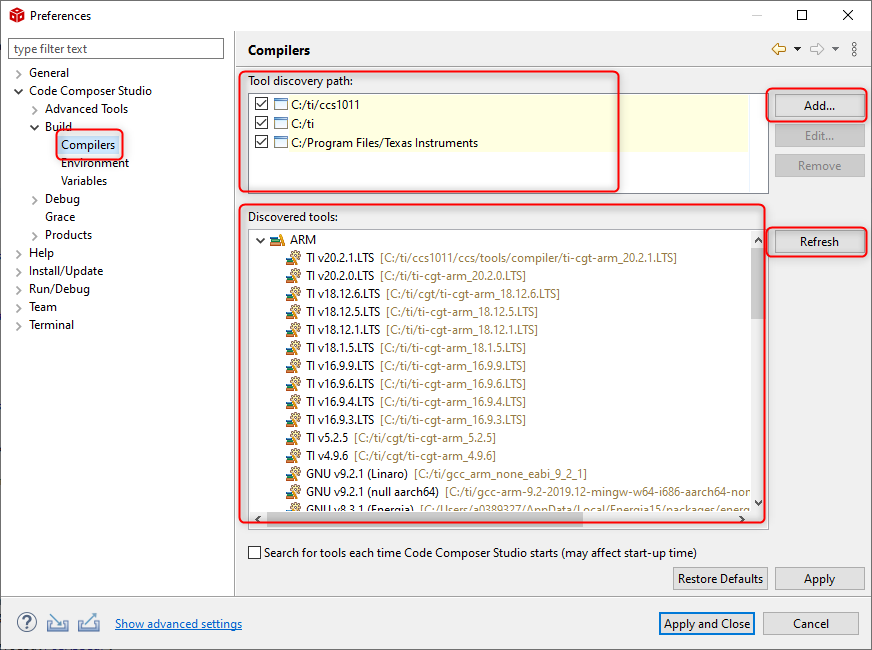
You need to have CCS "discover" the installed compiler.
Please see the below screenshot of the workspace compiler preferences. Make sure the path to where your installed the compiler appears in the Tools discover path (it can be in a subdirectory of a discovery path). If the path is not there, then Add it.
If it is there, try pressing the Refresh button and see if that allows it to appear in the Discovered tools list.
Thanks
ki