This thread has been locked.

If you have a related question, please click the "Ask a related question" button in the top right corner. The newly created question will be automatically linked to this question.

CCS/CC1352R: Suspend only possible after first breakpoint

Part Number: CC1352R

Tool/software: Code Composer Studio

Hi,

I observe that a program which I debug in CCS together with XDS110 an only be suspended when one breakpoint was reached before. Is there a reason for this?

I have to say that I work on functionality that is executed before even the main routine started. In that area the suspend button is always disabled. You can only terminate debugging.

This is very bad as practically the debugger is not usable.

But when I set a breakpoint in the beginning of my functionality CCS stops at that breakpoint. When I then press Resume execution continues and the suspend button is still enabled. So then I can pause execution and use the debugger to find out in which state my functionality is.

The good thing is that I can now really use the debugger (had very hard days before) to finalize my functionality. But is there a good/understandable reason for this behaviour?

I think in a "normal program" debugging stops also automatically at the beginning of main. May be that's because otherwise you also cannot suspend/pause your executable with a debugger.

Regards
Erwin

  • Hi Erwin,

    Can you provide a test case? I don't need your actual project, just something stripped down that can reproduce the issue. Ideally you could provide the project+source+executable. If you do not wish to post publicly, please start a private conversation with me.

    Thanks

    ki

  • Hi

    I stripped down the project to something I guess I can share. In the attached zip you should find all. And for me the issue is reproducable.

    (un)luckily today is my last working day this year. So I might not respond so quickly (even this response took quite long) to any answer.

    Regards
    ErwinNoSupendWithoutBreakpoint.zip

  • Erwin Ahlers said:
    I stripped down the project to something I guess I can share. In the attached zip you should find all. And for me the issue is reproducable.

    '

    Thank you. I tried running the program on my CC1352 LaunchPad in CCS 10.1.1. When I load it, the program is auto-run and remains running (it never reaches main). However, the suspend button is available. If I suspend the program, it will halt somewhere (bl_*.cpp). I can resume and suspend as needed. 

    If I understood your issue, you do not have the option to suspend? Is that correct? If so, can you send a screenshot where both the toolbar buttons with the "Suspend" button being unavailable, and the Debug view is visible?

    Erwin Ahlers said:
    I think in a "normal program" debugging stops also automatically at the beginning of main. May be that's because otherwise you also cannot suspend/pause your executable with a debugger.

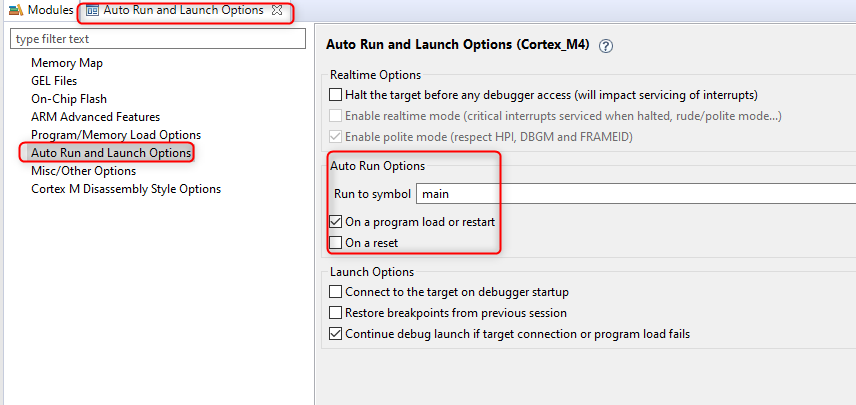
    The default behavior is to auto-run to main. But that is only because most people are interested in debug starting from that point. The auto-run feature can be disabled or set to a different label besides main in the debugger options:

    Erwin Ahlers said:
    (un)luckily today is my last working day this year. So I might not respond so quickly (even this response took quite long) to any answer.

    Happy holidays! I will wait for your response in the new year.

    ki