This thread has been locked.

If you have a related question, please click the "Ask a related question" button in the top right corner. The newly created question will be automatically linked to this question.

CCS: Failed to install Compiler v4.2.1

Other Parts Discussed in Thread: SYSCONFIG, CCSTUDIO

Tool/software: Code Composer Studio

Hi experts,

My customer is using CCS v9.3.0.00012 and when he tried to install MSP430 Compiler v4.2.1, it failed to install.

Do they need to update something else?
If so, I would appreciate it if you could tell me how to do it.

Or is it faster to reinstall CCS?
(If there is something wrong with the installation path...?)

The following are the details.
~~~~~~~~~~~~~~
Cannot complete the install because one or more required items could not be found.
Software being installed: SysConfig Data Update for 9.3 1.0.1 (com.ti.ccstudio.sysconfigdataupdate.feature.group 1.0.1)
Missing requirement: SysConfig Data Update for 9.3 1.0.1 (com.ti.ccstudio.sysconfigdataupdate.feature.group 1.0.1) requires 'org. eclipse.equinox.p2.iu; com.ti.ccstudio.sysconfig.feature.group [1.3.1030,1.3.1030]' but it could not be found
~~~~~~~~~~~~~~~~

Best regards,
O.H

  • Hello O.H.,

    O.H said:
    Cannot complete the install because one or more required items could not be found.
    Software being installed: SysConfig Data Update for 9.3 1.0.1 (com.ti.ccstudio.sysconfigdataupdate.feature.group 1.0.1)
    Missing requirement: SysConfig Data Update for 9.3 1.0.1 (com.ti.ccstudio.sysconfigdataupdate.feature.group 1.0.1) requires 'org. eclipse.equinox.p2.iu; com.ti.ccstudio.sysconfig.feature.group [1.3.1030,1.3.1030]' but it could not be found

    This error is related to SysConfig 1.0.1 update for CCS 9.3. Looks like the customer is trying to install multiple updates at once. They can try disabling the SysConfig update if there are just interested in the MSP430 compiler.

    As for the sysconfig update error, it looks like there is some missing dependency. I will need to investigate further

    Thanks

    ki

  • Hi ki,

    Thank you for your reply.

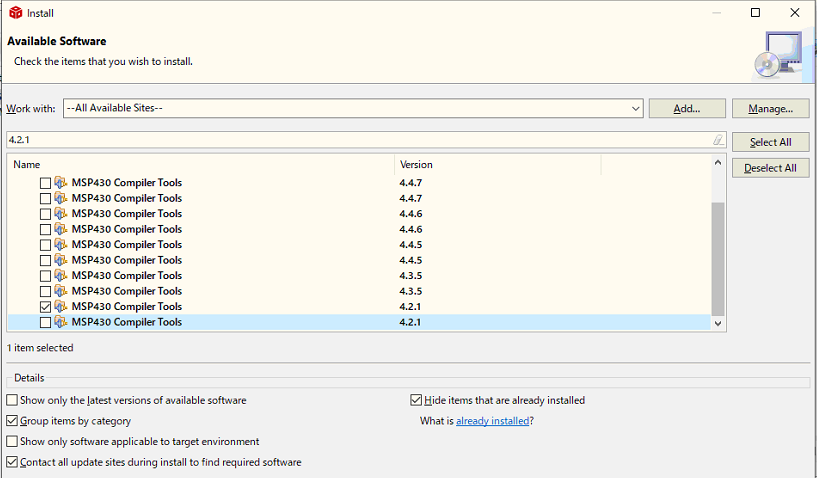
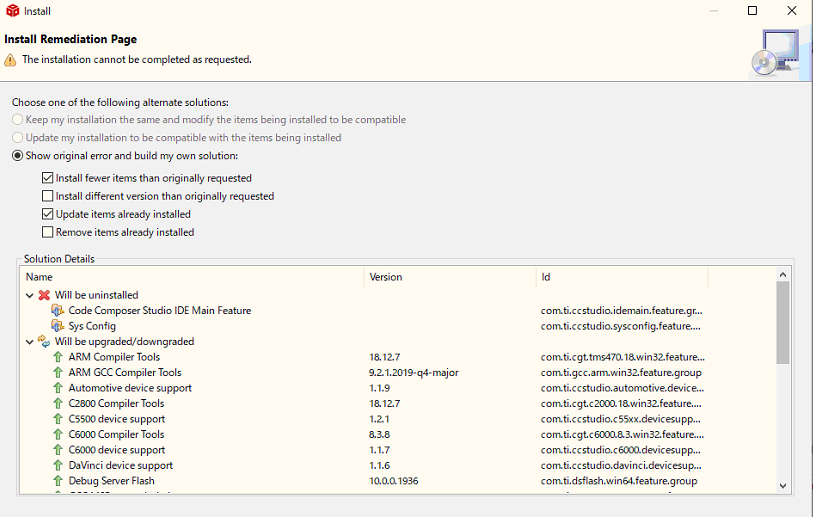
    It seems that the customer had chosen to use only the MSP430 compiler. The following are the details of the selection and error screens.

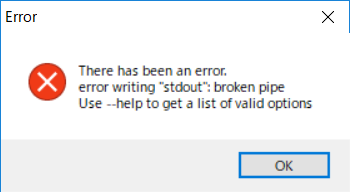
    Also, after installing CCSv9.3.0 on my PC, I proceeded to install MSP430 compiler v4.2.1 without any problems. However, when I rebooted, I got the following error message and could not start. I have run the CCS installation twice, and both times the error occurred. Also, the compiler was not in the Tool folder.

    Is it possible to use the MSP430 compiler v4.2.1 with CCSv9.3.0?

    Best regards,
    O.H

  • Hello,

    The second screenshot seems to indicate that multiple updates were attempted to be installed. 

    O.H said:
    Also, after installing CCSv9.3.0 on my PC, I proceeded to install MSP430 compiler v4.2.1 without any problems. However, when I rebooted, I got the following error message and could not start. I have run the CCS installation twice, and both times the error occurred. Also, the compiler was not in the Tool folder.

    This is an odd error that I only saw once before - also after an attempted update. the root cause was never identified.

    I had engineering take a look at the error message and they were not familiar with it. Can you try using the eclipse launcher to launch CCS?

    <CCS INSTALL DIR>\ccs\eclipse\eclipse.exe

    If that does not help, I'm afraid you may need to do what the last customer did - completely remove and then reinstall CCS. If you do choose to reinstall, I can provide a way to obtain the MSP430 v4.2.1 compiler without using the update mechanism.

    O.H said:
    Is it possible to use the MSP430 compiler v4.2.1 with CCSv9.3.0?

    yes. I was able to install that compiler with CCS 9.3.0 without issue.

    Thanks

    ki

  • Hello ki,

    The customer seems to have successfully installed the MSP430 compiler v4.2.1 on CCSv5.3.0 installed on another PC and ported it to CCSv9.3.0.

    However, there seems to be a difference between the output result (.hex file) of the project built with CCSv5.3.0 and the project built with CCSv9.3.0.

    Am I right in thinking that if the compiler and other project settings are the same, I can get the same build results even if the CCS version is different?
    I would appreciate it if you could tell me if there is any possible reason for the difference in the build results.

    The customer just imported a CCSv5.3.0 project to CCSv9.3.0.
    We are now telling them to check the settings of the imported project and press "Apply and Close", or to create a new project and build it.
    Are there any other measures you can think of?

    best regards,
    O.H

  • O.H said:
    Am I right in thinking that if the compiler and other project settings are the same, I can get the same build results even if the CCS version is different?
    I would appreciate it if you could tell me if there is any possible reason for the difference in the build results.

    Please see:

    https://e2e.ti.com/support/tools/ccs/f/81/p/876883/3243986

    Also see the below thread on why getting identical binary images can be tricky in general/

    https://e2e.ti.com/support/tools/ccs/f/81/t/682645

    Thanks

    ki