This thread has been locked.

If you have a related question, please click the "Ask a related question" button in the top right corner. The newly created question will be automatically linked to this question.

CCS/CC1352R: Unable to flash new code or connect the debugger

Part Number: CC1352R
Other Parts Discussed in Thread: UNIFLASH,

Tool/software: Code Composer Studio

Hi,

I have created a custom board with the CC1352R IC. I was initially able to connect to the debugger and flash new programs in it. After flashing the rfWsnNode example, im unable to connect to the debugger. I have tried using smartRF flash programmer 2 and uniflash, but i cant force an entire flash erase. Both softwares are unable to connect to the device and throw out errors while attempting a forced erase. Im not able to connect to the DAP also on code composer studio. The hardware connections on the chip are fine because the currently loaded rfWsnNode example runs on it and the custom board is transmitting data.

Could you please advise what steps can I take to fix this.

Thank you,

Shitij

  • Hi Shitij,

    Can you run the JTAG Connectivity Test and post the full output to this thread?

    https://dev.ti.com/tirex/explore/node?node=AMCrhRy9n80ZsUrBFVdo1Q__FUz-xrs__LATEST

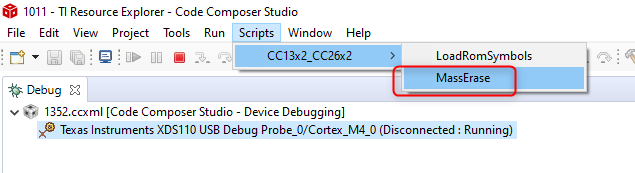
    Also try using the MassErase option in CCS before attempting to connect.

    Thanks

    ki

  • Hi Ki,

    The mass erase from CCs also did not work. The output of the error log is pasted below. The board config file works for the launchpad but apparently doesn't for the same IC on my custom board.

    [Start: Texas Instruments XDS110 USB Debug Probe]

    Execute the command:

    %ccs_base%/common/uscif/dbgjtag -f %boarddatafile% -rv -o -S integrity

    [Result]


    -----[Print the board config pathname(s)]------------------------------------

    C:\Users\shiti\AppData\Local\TEXASI~1\CCS\
    ccs1000\0\0\BrdDat\testBoard.dat

    -----[Print the reset-command software log-file]-----------------------------

    This utility has selected a 100- or 510-class product.
    This utility will load the adapter 'jioxds110.dll'.
    The library build date was 'Feb 13 2020'.
    The library build time was '18:30:11'.
    The library package version is '9.1.0.00001'.
    The library component version is '35.35.0.0'.
    The controller does not use a programmable FPGA.
    The controller has a version number of '5' (0x00000005).
    The controller has an insertion length of '0' (0x00000000).
    This utility will attempt to reset the controller.
    This utility has successfully reset the controller.

    -----[Print the reset-command hardware log-file]-----------------------------

    The scan-path will be reset by toggling the JTAG TRST signal.
    The controller is the XDS110 with USB interface.
    The link from controller to target is direct (without cable).
    The software is configured for XDS110 features.
    The controller cannot monitor the value on the EMU[0] pin.
    The controller cannot monitor the value on the EMU[1] pin.
    The controller cannot control the timing on output pins.
    The controller cannot control the timing on input pins.
    The scan-path link-delay has been set to exactly '0' (0x0000).

    An error occurred while hard opening the controller.

    -----[An error has occurred and this utility has aborted]--------------------

    This error is generated by TI's USCIF driver or utilities.

    The value is '-242' (0xffffff0e).
    The title is 'SC_ERR_ROUTER_ACCESS_SUBPATH'.

    The explanation is:
    A router subpath could not be accessed.
    The board configuration file is probably incorrect.

    [End: Texas Instruments XDS110 USB Debug Probe]

  • Shitij Avlani said:
    The board config file works for the launchpad but apparently doesn't for the same IC on my custom board.

    If it is specific to the custom board, it is likely not a tools specific issue. Must be something specific to the board after you flashed the program.

    Shitij Avlani said:
    The value is '-242' (0xffffff0e).
    The title is 'SC_ERR_ROUTER_ACCESS_SUBPATH'.

    The error is documented in the below link:

    https://software-dl.ti.com/ccs/esd/documents/ccs_debugging_jtag_connectivity_issues.html#a-router-subpath-cannot-be-accessed

    As mentioned, a mass erase can help in these cases. However, this is not working for you.

    Shitij Avlani said:
    The mass erase from CCs also did not work

    Did you get any kind of failure message when you tried this?