This thread has been locked.

If you have a related question, please click the "Ask a related question" button in the top right corner. The newly created question will be automatically linked to this question.

CCS/TMS320F28377S: TMS320F28377S

Part Number: TMS320F28377S
Other Parts Discussed in Thread: C2000WARE

Tool/software: Code Composer Studio

Hi I am debugging cla_fir32_cpu01 example. I am following these instructions:
 I am not getting those steps:
  • When a debug session is launched, the debug view (window within CCS) will have entries for C28x and CLA
I have a regular view with no entries for CLA
  • Clicking on CLA changes the context of all windows in CCS to reflect CLA data.
What CLA entity should I click, fir.cla file (that is the only one with CLA i have)?
  • Connecting to the CLA core from the debug perspective enables single stepping
This is working by clicking on Debug Probe/CPU1_CLA1
·        Load Program Symbols onto the CLA from Target menu options to begin debugging
Cannot get to any target menu as in the picture
Debugging CLA code
1.     Insert a breakpoint into CLA code
·        An __mdebugstop() intrinsic is a CLA breakpoint. It will place the instruction MDEBUGSTOP at that position in assembly.
·        If not connected to the CLA core (i.e. single step disabled), the intrinsic behaves as a MNOP (no operation)
The breakpoint is inserted in the cla_fir32_cpu01 example on line 82.

2.      Start the task: CLA will execute code until the MDEBUGSTOP is in D2

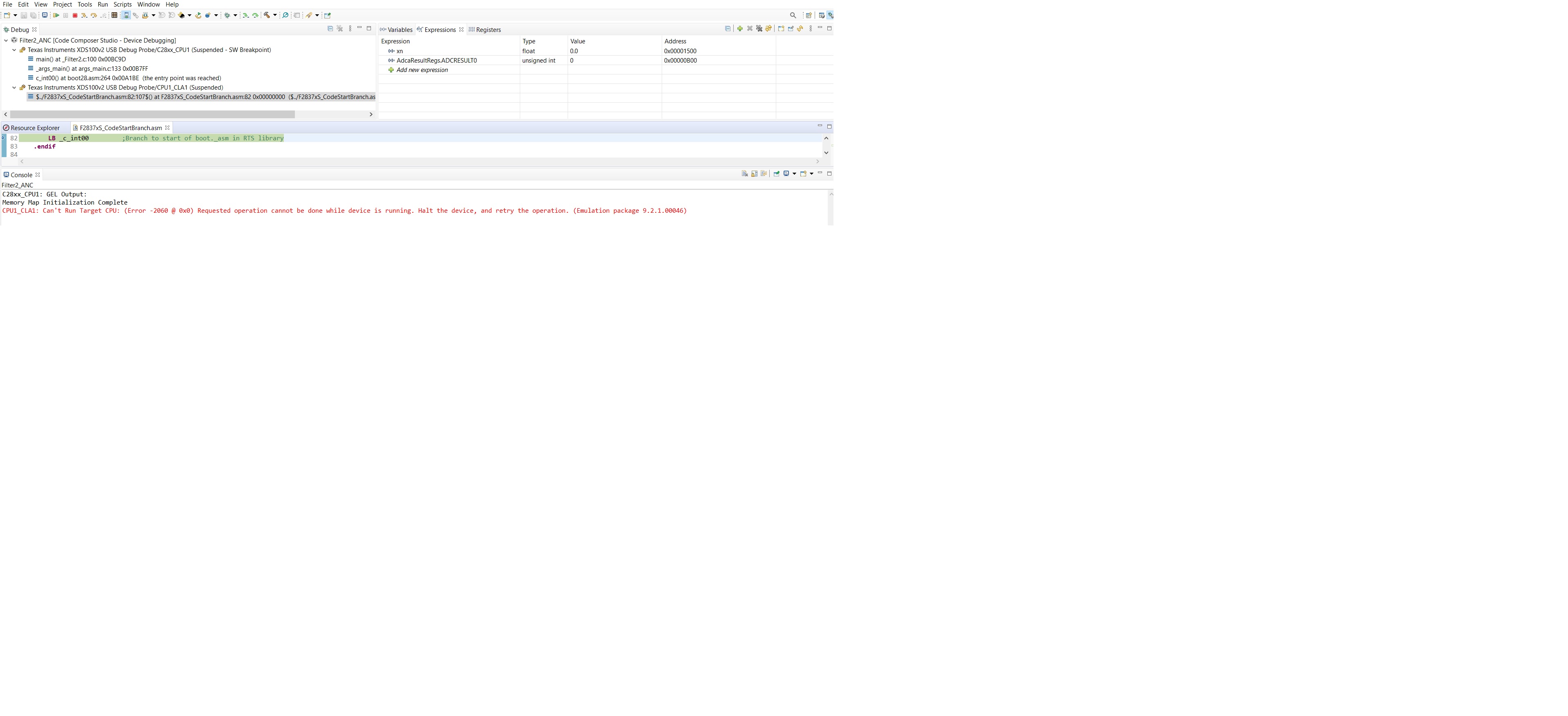
When I hit run, I have this error message
CPU1_CLA1: Can't Run Target CPU: (Error -2060 @ 0x0) Requested operation cannot be done while device is running. Halt the device, and retry the operation. (Emulation package 9.2.1.00046)

Thanks, vadim
Hi I am debugging cla_fir32_cpu01 example. I am following these instructions:
 I am not getting those steps:
  • When a debug session is launched, the debug view (window within CCS) will have entries for C28x and CLA
I have a single view with no entries for CLA
  • Clicking on CLA changes the context of all windows in CCS to reflect CLA data.
What entity should I click, file?
  • Connecting to the CLA core from the debug perspective enables single stepping
This is working by clicking on Debug Probe/CPU1_CLA1
·        Load Program Symbols onto the CLA from Target menu options to begin debugging
Cannot see any target menu
Debugging CLA code
1.     Insert a breakpoint into CLA code
·        An __mdebugstop() intrinsic is a CLA breakpoint. It will place the instruction MDEBUGSTOP at that position in assembly.
·        If not connected to the CLA core (i.e. single step disabled), the intrinsic behaves as a MNOP (no operation)
The breakpoint is inserted in the cla_fir32_cpu01 example on line 82.

2.      Start the task: CLA will execute code until the MDEBUGSTOP is in D2

When I hit run, I have this error message
CPU1_CLA1: Can't Run Target CPU: (Error -2060 @ 0x0) Requested operation cannot be done while device is running. Halt the device, and retry the operation. (Emulation package 9.2.1.00046)
Thanks, vadim

  • vadim said:
    • When a debug session is launched, the debug view (window within CCS) will have entries for C28x and CLA
    I have a regular view with no entries for CLA

    Vadim,

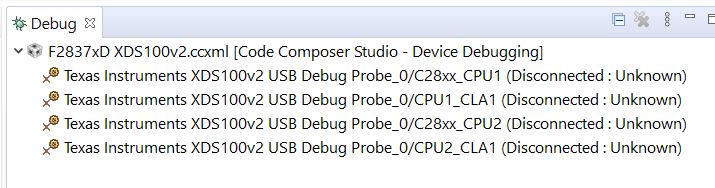
    Can you provide a screenshot of your Debug window?  If there is not a CLA entry, then the debug configuration is not correct.  It should look similar to this:

    vadim said:
    • Clicking on CLA changes the context of all windows in CCS to reflect CLA data.
    What entity should I click, file?

    This instruction refers to the CLA entry in the Debug window (see screenshot above - the 2nd and 4th entries - CPU1_CLA1 and CPU2_CLA1 - correspond to a CLA instance on the device).  When you click on an entry in the Debug window, CCS will change all of the windows to reflect the CPU you have selected.

    vadim said:
    Load Program Symbols onto the CLA from Target menu options to begin debugging
    Cannot see any target menu

    This should say from the RUN menu (i.e. run -> load -> load symbols).  

    Regards

    Lori

  • vadim said:

    2.      Start the task: CLA will execute code until the MDEBUGSTOP is in D2

    When I hit run, I have this error message
    CPU1_CLA1: Can't Run Target CPU: (Error -2060 @ 0x0) Requested operation cannot be done while device is running. Halt the device, and retry the operation. (Emulation package 9.2.1.00046)

    A CLA task is started by triggering the task.  The "run" button will only work if a task has already been triggered and has stopped at a debug breakpoint. 

    Refer to this FAQ: https://software-dl.ti.com/C2000/docs/cla_software_dev_guide/faq.html#what-can-trigger-a-task-also-referred-to-as-an-isr

    You may also find the CLA workshop helpful - A link is provided in the getting started page of the CLA guide:

    https://software-dl.ti.com/C2000/docs/cla_software_dev_guide/getting_started.html

    Regards

    Lori

  • Hi Lori,

    Thanks for your support! I carefully looked at those documents before asking for help. You can see I copied the instructions from it in my questions. How from debug window can I do these 2 steps

    1. Start the task: CLA will execute code until the MDEBUGSTOP is in D2

    2. Single step or run to the next breakpoint: Single stepping moves the CLA pipeline one cycle at a time

    This is my screen after I hit run button.

    thanks Vadim

  • Vadim,

    From your screenshot, the CLA task has not been triggered; it is in an idle state.  The "run" button will not work for the CLA if the CLA is in an idle state.  The "run" button will work once the CLA is triggered and halts at an MDEBUGSTOP.   

    For TI examples, you will need to run the C28x code first.  This will configure the device, peripherals, and in-turn trigger the CLA task.  The trigger may be from a peripheral interrupt or from the C28x CPU itself.

    Refer to this FAQ: https://software-dl.ti.com/C2000/docs/cla_software_dev_guide/faq.html#what-can-trigger-a-task-also-referred-to-as-an-isr

    I suggest going through the CLA workshop.  It describes debugging the CLA in detail. 

    Regards

    Lori

  • Hi Lori,

    i am doing precisely that, following step by step this video:

    https://training.ti.com/cla-hands-workshop-part-4-debugging-cla?context=1137755-1139642-1128649

    after I hit "run" I have error, in video it stops at __mdebugstop(); I have 377S, in the video  377D. I compared two source files and CLA triggering is the same in both.

    Could you pleas download this example for 377S,run and check it? There is another example cla_adc_fir32_cpu01 that triggers CLA with hardware 

    Cla1Regs.MCTL.bit.IACKE = 1;
    Cla1Regs.MIER.all = (M_INT8 | M_INT7);

    This example works fine for me. I have 2 questions: 

    1. Why 377D works in the workshop and 377S does not in similar example from Source Explorer?

    2. How can I start CLA task without hardware triggering in debug session ? "The trigger may be from a peripheral interrupt or from the C28x CPU itself."

    thanks vadim

  • Sorry, in my previous post i meant this register sets hardware interrupt for CLA in cla_adc_fir32_cpu01 

    //
    // Set the adca.1 as the trigger for task 7
    //
    DmaClaSrcSelRegs.CLA1TASKSRCSEL2.bit.TASK7 = 1;

    Should  this line in the current example: void CLA_initCpu1Cla1(void )  start CLA by main CPU?

    //
    // Enable the IACK instruction to start a task on CLA in software
    // for all 8 CLA tasks. Also, globally enable all 8 tasks (or a
    // subset of tasks) by writing to their respective bits in the
    // MIER register
    //
    Cla1Regs.MCTL.bit.IACKE = 1;
    Cla1Regs.MIER.all = 0x00FF;

    thanks vadim

  • vadim said:
    I have 377S, in the video  377D.

    vadim said:
    1. Why 377D works in the workshop and 377S does not in similar example from Source Explorer?

    Vadim,

    If you are using a F28377S launch pad, there are some pinout differences between it and the F28377D launchpad.  This may account for why the workshop is not working properly for your setup.

    vadim said:
    2. How can I start CLA task without hardware triggering in debug session ? "The trigger may be from a peripheral interrupt or from the C28x CPU itself."

    vadim said:
    There is another example cla_adc_fir32_cpu01 that triggers CLA with hardware 

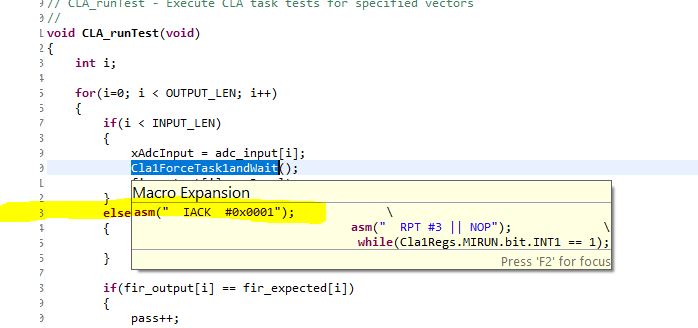
    In the example cla_fir32_cpu01 -  the CLA task is started by the C28x using IACK instruction.  There is a macro in our examples to do this and the example calls it within the CLA_runTest() function.  Refer to the the screenshot below.  This FAQ may also be helpful: https://software-dl.ti.com/C2000/docs/cla_software_dev_guide/debugging.html#why-can-t-i-force-a-task-using-software-iack

    Note - this example doesn't rely on the ADC so the pinout does not matter and should work on the launchpad for either device.

    Regards

    Lori

  • vadim said:

    sets hardware interrupt for CLA in cla_adc_fir32_cpu01 

    //
    // Set the adca.1 as the trigger for task 7
    //
    DmaClaSrcSelRegs.CLA1TASKSRCSEL2.bit.TASK7 = 1;

    Vadim,

    The registers for the device are documented in the Technical Reference Manual which can be downloaded from the product folder (i.e. https://www.ti.com/product/TMS320F28377S). Refer to table 6.3.4 CLA Tasks and Interrupt Vectors for the list of sources.  In this case, 1 corresponds to ADCAINT1.  This interrupt will trigger the CLA. 

    vadim said:
    Should  this line in the current example: void CLA_initCpu1Cla1(void )  start CLA by main CPU?

    This calls a function which initializes the CLA peripheral (i.e. the interrupt vectors etc)

    vadim said:
    //
    // Enable the IACK instruction to start a task on CLA in software
    // for all 8 CLA tasks. Also, globally enable all 8 tasks (or a
    // subset of tasks) by writing to their respective bits in the
    // MIER register
    //
    Cla1Regs.MCTL.bit.IACKE = 1;
    Cla1Regs.MIER.all = 0x00FF;

    This enables the IACK instruction to start a task - refer to my previous post for an example of this. 

    Regards

    Lori

  • Hi Lori,

    I tried both hardware and software interrupts but it looks like they both do not work. could you please have a look?

    thanks vadim

    *****main*****

    //
    // Included Files
    //
    #include "F28x_Project.h"
    #include "math.h"


    //
    // Defines
    //

    #define WAITSTEP asm(" RPT #255 || NOP")


    //
    // Globals
    //
    Uint16 TBPRD = 400;


    // <Step 1>: Assign the CLA variables to their respective memory spaces
    // - Input/Output variables should go into the Cla1ToCpuMsgRam/CpuToCla1MsgRam
    // - Global variables in the .cla file are automatically placed in the ".bss_cla" so
    // no manual placement is required.
    // - The same goes for constants in the .cla file; they are placed in the
    // ".const_cla" section but you will need to load it to FLASH and then copy
    // to RAM at runtime
    // - You can manually place shared variables in a user defined section, e.g. Cla1DataRam0,
    // to allow the C28x to also access them
    //Task 1 (C) Variables

    #pragma DATA_SECTION(xn,"CpuToCla1MsgRAM")
    float xn; //input data

    #pragma DATA_SECTION(yn,"Cla1ToCpuMsgRAM")
    float yn; //filtered data

    // <Step 2>: The CLA can only operate out of RAM i.e. its program and data spaces are restricted
    // to RAM. Depending on the device, the CLA may be configured to access the entire lower
    // 64K of RAM (F2837x) or its prorgam and data spaces are restricted to certain RAMs
    // (F2806x, F2803x, F2805x program -> RAML3, data -> RAML0,1,/2)
    // - In standalone mode, you must load the CLA code and constants to FLASH and then copy
    // these over to RAM at runtime
    // - The linker defines placement variables for the section "Cla1Prog" and ".const_cla"
    // - In order to use these variables in a memcpy() we need to tell the C compiler that
    // these variables are declared externally (by the linker). We use the "extern" storage
    // qualifier to do just that

    //
    // Function Prototypes
    //
    __interrupt void Cla1Task1();
    __interrupt void Cla1Task2();
    __interrupt void Cla1Task3();
    __interrupt void Cla1Task4();
    __interrupt void Cla1Task5();
    __interrupt void Cla1Task6();
    __interrupt void Cla1Task7();
    __interrupt void Cla1Task8();

    __interrupt void cla1Isr1();
    __interrupt void cla1Isr2();
    __interrupt void cla1Isr3();
    __interrupt void cla1Isr4();
    __interrupt void cla1Isr5();
    __interrupt void cla1Isr6();
    __interrupt void cla1Isr7();
    __interrupt void cla1Isr8();

    void configureDACb(void);
    void ConfigureADCA(void);
    void ConfigureEPwm2(void);
    void SetupADCAEpwm(Uint16 channel);
    // Step 3: Setup the CLA in initCLA() and its memory resources in
    // configCLAMemory()
    // - see the initCLA() and configCLAMemory() for more steps
    // - add the End-of-Task 1 prototype here
    void CLA_configClaMemory(void);
    void CLA_initCpu1Cla1(void);

    //
    // Main
    //
    void main(void)
    {

    InitSysCtrl();
    SetupADCAEpwm(0);
    ConfigureADCA();
    configureDACb();
    ConfigureEPwm2();
    EALLOW;
    ClkCfgRegs.PERCLKDIVSEL.bit.EPWMCLKDIV = 0;
    EDIS;
    DINT;
    InitPieCtrl();
    IER = 0x0000;
    IFR = 0x0000;
    InitPieVectTable();
    //*************************************************************************
    // Setup the CLA, peripherals and interrupt service routines
    //*************************************************************************
    //! Setup the CLA, ADC and ePWM
    //*************************************************************************

    CLA_configClaMemory();
    CLA_initCpu1Cla1();


    // <Step 7> : We want task 1 to trigger an end-of-task interrupt in the PIE
    // so we create an end-of-task1 interrupt service routine and we
    // assign it to the PieVectTable (see TRM, Table 1-118)
    // - Enable the PIE group and subgroup for that particular interrupt
    PieVectTable.CLA1_1_INT = &cla1Isr1;
    PieCtrlRegs.PIEIER11.bit.INTx1 = 0x01;
    IER |= (M_INT11);

    EDIS;
    EINT; // Enable Global interrupt INTM
    ERTM; // Enable Global realtime interrupt DBGM

    //
    //take conversions indefinitely in loop
    //
    do
    {

    }while(1);
    }


    //
    // CLA_configClaMemory - Configure CLA memory sections
    //
    void CLA_configClaMemory(void)
    {
    extern uint32_t Cla1funcsRunStart, Cla1funcsLoadStart, Cla1funcsLoadSize;
    EALLOW;

    #ifdef _FLASH
    //
    // Copy over code from FLASH to RAM
    //
    memcpy((uint32_t *)&Cla1funcsRunStart, (uint32_t *)&Cla1funcsLoadStart,
    (uint32_t)&Cla1funcsLoadSize);
    #endif //_FLASH

    //
    // Initialize and wait for CLA1ToCPUMsgRAM
    //
    MemCfgRegs.MSGxINIT.bit.INIT_CLA1TOCPU = 1;
    while(MemCfgRegs.MSGxINITDONE.bit.INITDONE_CLA1TOCPU != 1){};

    //
    // Initialize and wait for CPUToCLA1MsgRAM
    //
    MemCfgRegs.MSGxINIT.bit.INIT_CPUTOCLA1 = 1;
    while(MemCfgRegs.MSGxINITDONE.bit.INITDONE_CPUTOCLA1 != 1){};

    //
    // Select LS4RAM and LS5RAM to be the programming space for the CLA
    // First configure the CLA to be the master for LS4 and LS5 and then
    // set the space to be a program block
    //
    MemCfgRegs.LSxMSEL.bit.MSEL_LS4 = 1;
    MemCfgRegs.LSxCLAPGM.bit.CLAPGM_LS4 = 1;
    MemCfgRegs.LSxMSEL.bit.MSEL_LS5 = 1;
    MemCfgRegs.LSxCLAPGM.bit.CLAPGM_LS5 = 1;

    //
    // Next configure LS0RAM and LS1RAM as data spaces for the CLA
    // First configure the CLA to be the master for LS0(1) and then
    // set the spaces to be code blocks
    //
    MemCfgRegs.LSxMSEL.bit.MSEL_LS0 = 1;
    MemCfgRegs.LSxCLAPGM.bit.CLAPGM_LS0 = 0;

    MemCfgRegs.LSxMSEL.bit.MSEL_LS1 = 1;
    MemCfgRegs.LSxCLAPGM.bit.CLAPGM_LS1 = 0;

    EDIS;
    }

    //
    // CLA_initCpu1Cla1 - Initialize CLA1 task vectors and end of task interrupts
    //
    void CLA_initCpu1Cla1(void)
    {
    //
    // Compute all CLA task vectors
    // On Type-1 CLAs the MVECT registers accept full 16-bit task addresses as
    // opposed to offsets used on older Type-0 CLAs
    //
    EALLOW;
    Cla1Regs.MVECT1 = (uint16_t)(&Cla1Task1);
    Cla1Regs.MVECT2 = (uint16_t)(&Cla1Task2);
    Cla1Regs.MVECT3 = (uint16_t)(&Cla1Task3);
    Cla1Regs.MVECT4 = (uint16_t)(&Cla1Task4);
    Cla1Regs.MVECT5 = (uint16_t)(&Cla1Task5);
    Cla1Regs.MVECT6 = (uint16_t)(&Cla1Task6);
    Cla1Regs.MVECT7 = (uint16_t)(&Cla1Task7);
    Cla1Regs.MVECT8 = (uint16_t)(&Cla1Task8);

    //
    // Enable the IACK instruction to start a task on CLA in software
    // for all 8 CLA tasks. Also, globally enable all 8 tasks (or a
    // subset of tasks) by writing to their respective bits in the
    // MIER register
    //
    Cla1Regs.MCTL.bit.IACKE = 1;
    Cla1Regs.MIER.all = 0x00FF;


    //
    // Configure the vectors for the end-of-task interrupt for all
    // 8 tasks
    //
    PieVectTable.CLA1_1_INT = &cla1Isr1;
    PieVectTable.CLA1_2_INT = &cla1Isr2;
    PieVectTable.CLA1_3_INT = &cla1Isr3;
    PieVectTable.CLA1_4_INT = &cla1Isr4;
    PieVectTable.CLA1_5_INT = &cla1Isr5;
    PieVectTable.CLA1_6_INT = &cla1Isr6;
    PieVectTable.CLA1_7_INT = &cla1Isr7;
    PieVectTable.CLA1_8_INT = &cla1Isr8;

    //
    // Set the ADCAINT1 as the trigger for TASK1, ADCBINT1 as 6 for TASK2
    //
    DmaClaSrcSelRegs.CLA1TASKSRCSEL1.bit.TASK1 = CLA_TRIG_ADCAINT1;
    Cla1Regs.MIER.all = M_INT1;
    //
    // Enable CLA interrupts at the group and subgroup levels
    //

    // <Step 6>: Enable software forcing and run task 8 once
    // - The MCTL register allows for a task to be triggered by software
    // see TRM 5.7.2.9
    // - Run any one-time tasks by using the software force. "F2806x_Cla_defines.h"
    // has some useful macro functions to force each task
    Cla1Regs.MCTL.bit.IACKE = 1;
    EDIS;
    Cla1ForceTask8andWait();
    }

    //
    // cla1Isr1 - CLA1 ISR 1
    //
    __interrupt void cla1Isr1 ()
    {
    //
    // Acknowledge the end-of-task interrupt for task 1
    //
    DacbRegs.DACVALS.all = xn;
    AdcaRegs.ADCINTFLGCLR.bit.ADCINT1 = 1;
    PieCtrlRegs.PIEACK.all = (PIEACK_GROUP1 | PIEACK_GROUP11);
    //
    // Uncomment to halt debugger and stop here
    //
    // asm(" ESTOP0");
    }

    //
    // cla1Isr1 - CLA1 ISR 2
    //
    __interrupt void cla1Isr2 ()
    {
    // asm(" ESTOP0");
    }

    //
    // cla1Isr1 - CLA1 ISR 3
    //
    __interrupt void cla1Isr3 ()
    {
    asm(" ESTOP0");
    }

    //
    // cla1Isr1 - CLA1 ISR 4
    //
    __interrupt void cla1Isr4 ()
    {
    asm(" ESTOP0");
    }

    //
    // cla1Isr1 - CLA1 ISR 5
    //
    __interrupt void cla1Isr5 ()
    {
    asm(" ESTOP0");
    }

    //
    // cla1Isr1 - CLA1 ISR 6
    //
    __interrupt void cla1Isr6 ()
    {
    asm(" ESTOP0");
    }

    //
    // cla1Isr1 - CLA1 ISR 7
    //
    __interrupt void cla1Isr7 ()
    {
    asm(" ESTOP0");
    }

    //
    // cla1Isr1 - CLA1 ISR 8
    //
    __interrupt void cla1Isr8 ()
    {
    //
    // Acknowledge the end-of-task interrupt for task 8
    //
    PieCtrlRegs.PIEACK.all = M_INT11;

    //
    // Uncomment to halt debugger and stop here
    //
    // asm(" ESTOP0");
    }

    void configureDACb()
    {
    EALLOW;
    DacbRegs.DACCTL.bit.DACREFSEL = 1;
    DacbRegs.DACOUTEN.bit.DACOUTEN = 1;
    DacbRegs.DACVALS.all = 0;

    DELAY_US(10); // Delay for buffered DAC to power up

    EDIS;
    }

    void ConfigureADCA(void)
    {
    EALLOW;

    //
    //write configurations
    //
    AdcaRegs.ADCCTL2.bit.PRESCALE = 6; //set ADCCLK divider to /4
    AdcSetMode(ADC_ADCA, ADC_RESOLUTION_12BIT, ADC_SIGNALMODE_SINGLE);

    //
    //Set pulse positions to late
    //
    AdcaRegs.ADCCTL1.bit.INTPULSEPOS = 1;

    //
    //power up the ADC
    //
    AdcaRegs.ADCCTL1.bit.ADCPWDNZ = 1;

    //
    //delay for 1ms to allow ADC time to power up
    //
    DELAY_US(1000);

    EDIS;
    }

    void SetupADCAEpwm(Uint16 channel)
    {
    Uint16 acqps;

    //
    //determine minimum acquisition window (in SYSCLKS) based on resolution
    //
    if(ADC_RESOLUTION_12BIT == AdcaRegs.ADCCTL2.bit.RESOLUTION)
    {
    acqps = 14; //75ns
    // acqps = 4; //75ns
    }
    else //resolution is 16-bit
    {
    acqps = 63; //320ns
    }

    //
    //Select the channels to convert and end of conversion flag
    //
    EALLOW;
    AdcaRegs.ADCSOC0CTL.bit.CHSEL = channel; //SOC0 will convert pin A0
    AdcaRegs.ADCSOC0CTL.bit.ACQPS = acqps; //sample window is 100 SYSCLK cycles
    AdcaRegs.ADCSOC0CTL.bit.TRIGSEL = 0x7; //trigger on ePWM2 SOCA/C
    AdcaRegs.ADCINTSEL1N2.bit.INT1SEL = 0; //end of SOC0 will set INT1 flag
    // AdcaRegs.ADCINTSEL1N2.bit.INT1CONT = 1; //continuous interrupt
    AdcaRegs.ADCINTSEL1N2.bit.INT1E = 1; //enable INT1 flag
    AdcaRegs.ADCINTFLGCLR.bit.ADCINT1 = 1; //make sure INT1 flag is cleared
    EDIS;
    }

    void ConfigureEPwm2(void)
    {
    EALLOW;
    // Assumes ePWM clock is already enabled
    EPwm2Regs.ETSEL.bit.SOCAEN = 1; // Disable SOC on A group
    EPwm2Regs.ETSEL.bit.SOCASEL = 4; // Select SOC on up-count
    EPwm2Regs.ETPS.bit.SOCAPRD = 1; // Generate pulse on 1st event
    EPwm2Regs.CMPA.bit.CMPA = TBPRD/2; // Set compare A value to 2048 counts
    EPwm2Regs.TBPRD = TBPRD; // Set period to 4096 counts
    EPwm2Regs.TBCTL.bit.CTRMODE = TB_COUNT_UP; // start counter
    EPwm2Regs.AQCTLA.bit.PRD = AQ_CLEAR; // Clear PWM2A on Period
    EPwm2Regs.AQCTLA.bit.CAU = AQ_SET;
    EPwm2Regs.TBCTL.bit.HSPCLKDIV=0;

    EDIS;
    }

    ****CLA****

    extern float xn; //Sample input
    extern float yn; //Sample output

    //Variables global to all CLA tasks only

    interrupt void Cla1Task1 ( void )
    {
    //Local Variables

    //Code
    __mdebugstop();
    yn = xn+5;
    }

    interrupt void Cla1Task2 ( void )
    {}
    interrupt void Cla1Task3 ( void )
    {}
    interrupt void Cla1Task4 ( void )
    {}
    interrupt void Cla1Task5 ( void )
    {}
    interrupt void Cla1Task6 ( void )
    {}
    interrupt void Cla1Task7 ( void )
    {}
    interrupt void Cla1Task8 ( void )
    {
    __mdebugstop();
    yn=0;
    }

    //
    // End of file
    //

  • Vadim,

    I won't be able to go through all of your code looking for issues.  TI has supplied a number of examples in C2000Ware you can compare this project with.

    The one thing I did notice is the ADC is setup very early within main() while the CLA is setup later.  CLA tasks are edge triggered, so the interrupt may be missed if the CLA is not configured first. 

    Please see this FAQ regarding CLA tasks being edge triggered:

    https://software-dl.ti.com/C2000/docs/cla_software_dev_guide/debugging.html#my-cla-task-never-starts

    Regards

    Lori

  • Hi Lori,

    I will check it out. Meanwhile how can I switch between debugging CLA and C28xxCPU? I modified the example you suggested

    for(;;)
    {
    ii++;
    CLA_runTest();
    }

    When CLA is not connected I can set a breakpoint at CLA_run Test() and stop execution.

    When I connect CLA target and run, I can stop execution at each  __mdebugstop() in CLA file;

    If I disconnect CLA and switch to CPU I cannot stop execution at the breakpoint at CLA_runTest() any more. Is there a way to switch between CLA and CPU debugging and keeping all data in the same session?

    thanks vadim

  • vadim said:
    If I disconnect CLA and switch to CPU I cannot stop execution at the breakpoint at CLA_runTest() any more.

    Vadim, 

    That sounds strange.  You should still be able to stop at the breakpoints in the C28x code when the CLA is disconnected. 

    -Lori

  • Hi Lori,

    Could you please point me to any example of using CLA  peripheral triggering in Resource Explorer? I could find only one "cla_adc_fir32_cpu01 " with .asm file for CLA.

    thanks vadim

  • I'll look - I thought there were more.  Let me check.  In the meantime did you try moving the ADC setup after the CLA setup?

  • Hi Lori,

    I tried and it worked, than I put CLA back and it as well worked. I am getting up to speed with CLA and can compare software call to claTask and hardware interrupt call. If I use software call to claTask from adc_int I have no problems. When I trigger from ADCs : DmaClaSrcSelRegs.CLA1TASKSRCSEL1.bit.TASK1 = 1;  DmaClaSrcSelRegs.CLA1TASKSRCSEL1.bit.TASK1 = 6;  The very first time I run it stops with this message

    "Break at address "0xa024" with no debug information available, or outside of program code."

    I hit run again it continues running with no stops. when I enable cla debug and there is only __mdebugstop(); inside a task I can stop at task1 and task2 both ADCs interrupts working, but if I add some code inside task 1 with for{} loop and start stepping over I get this message:

    "PU1_CLA1: Can't Single Step Target Program: (Error -2060 @ 0x0) Requested operation cannot be done while device is running. Halt the device, and retry the operation. (Emulation package 9.2.1.00046) "

    thanks vadim

  • Great!  It is good to hear it worked.

    vadim said:
    "Break at address "0xa024" with no debug information available, or outside of program code."

    If this is a CLA address and the CLA halted, it should show the debug information if the symbols were loaded on the CLA debug.

    vadim said:
    I hit run again it continues running with no stops. when I enable cla debug and there is only __mdebugstop(); inside a task I can stop at task1 and task2 both ADCs interrupts working, but if I add some code inside task 1 with for{} loop and start stepping over I get this message:

    "PU1_CLA1: Can't Single Step Target Program: (Error -2060 @ 0x0) Requested operation cannot be done while device is running. Halt the device, and retry the operation. (Emulation package 9.2.1.00046) "

    If the CLA is triggered and halts at _mdebugstop()  then you should be able to single step from the __mdebugstop() and through the for loop.  

    I suspect, however, that the CLA was in idle instead of halted at __mdebugstop.  The @0x0 in the error message indicates the MPC is in its reset state and not halted within CLA program space.  The run/resume does not work if the CLA is in idle (case 3 below).

    1. If the CLA is at an breakpoint (mdebugstop) then execution can be started using the "run/resume" button. 
    2. If the CLA is halted on an instruction (ie stops at a breakpoint, and you single step instructions) then execution can be started using the run/resume button.
    3. If the CLA is idle (i.e. at a MSTOP) instruction, then it can not be started using the run/resume button.  Only a trigger (peripheral interrupt) or software force from the C28x can start / restart the CLA.  This is the case before a task is triggered and when the CLA reaches an MSTOP instruction.