This thread has been locked.

If you have a related question, please click the "Ask a related question" button in the top right corner. The newly created question will be automatically linked to this question.

Failed to build by eclipsec

Other Parts Discussed in Thread: CCSTUDIO

My customer is using CCS for project development with CC2642RQ1.

There is an issue that from time to time, fail to build by using eclipsec.exe.

Please check below capture for successful and unsuccessful case log.
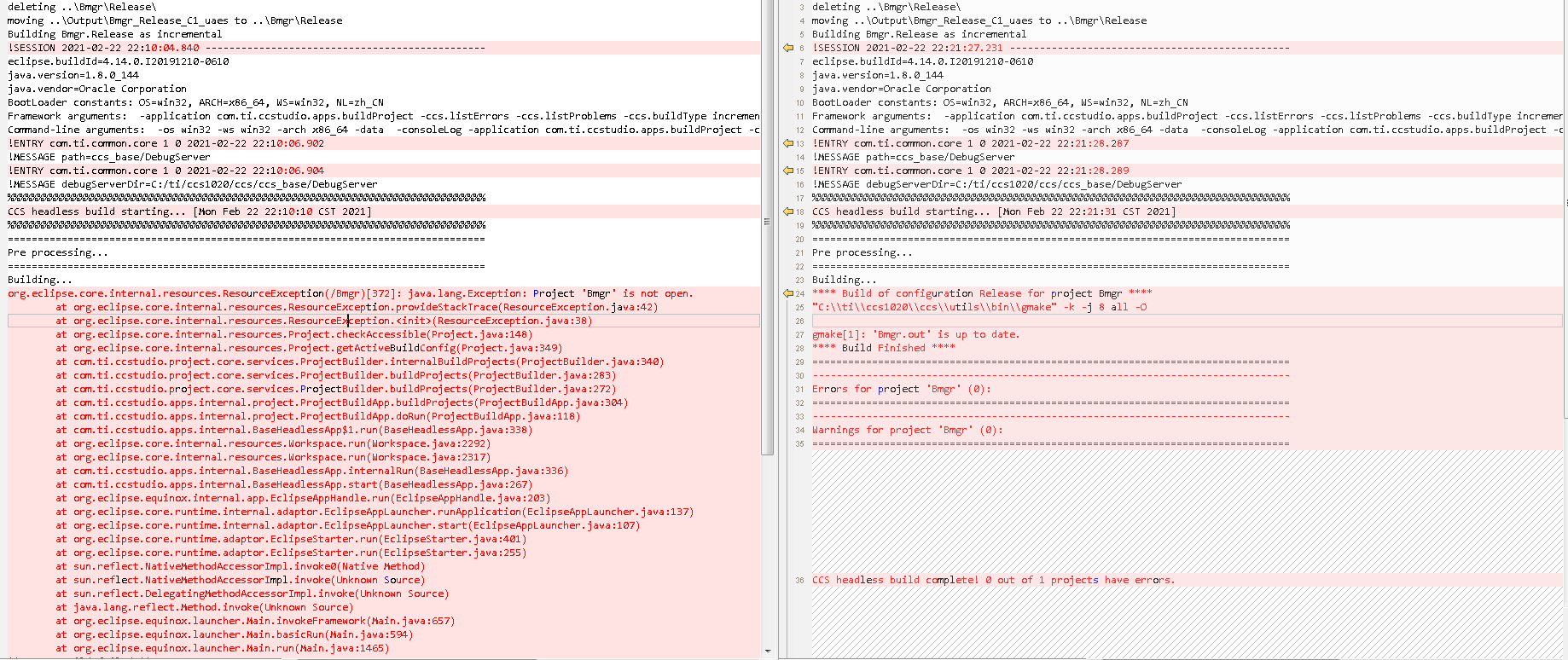
Why this happen? And how to fix?

Thanks.

BR.

Barbara

  • Barbara,

    I will assign someone to help you. 

    -Luis

  • The message implies that the project being built is closed.  A project needs to be open to be built.  Typically projects are not closed in a workspace but it is possible that the customer is doing this.

    Have them add -ccs.autoOpen to the command to see if that resolves the issue.  That will force CCS to open any projects that are being built.

    Regards,

    John

  • hi John,

          i am a software engineer come from UAES, i have try to use -ccs.autoOpen in my project ,such as com.ti.ccstudio.apps.buildProject -ccs.autoOpen, but this problem still exits. attached is my log.

         Could you check it and give some advices?

    Regards,

    Sen

    Launch directory: D:\02_Project\BEV3\157_1_Fbl\UAES\rbd\pk\pf\sw\BleCC26x2\Veh\CCSworkspace
    Executing BleCC26x2_InvokeCCS.bat with these parameters: -p Bmgr -v C1_uaes
    deleting ..\Bmgr\Release\
    moving ..\Output\Bmgr_Release_C1_uaes to ..\Bmgr\Release
    Building Bmgr.Release as incremental
    !SESSION 2021-02-24 12:01:12.554 -----------------------------------------------
    eclipse.buildId=4.14.0.I20191210-0610
    java.version=1.8.0_144
    java.vendor=Oracle Corporation
    BootLoader constants: OS=win32, ARCH=x86_64, WS=win32, NL=zh_CN
    Framework arguments:  -application com.ti.ccstudio.apps.buildProject -ccs.autoOpen -ccs.listErrors -ccs.listProblems -ccs.buildType incremental -ccs.projects Bmgr -ccs.configuration Release
    Command-line arguments:  -os win32 -ws win32 -arch x86_64 -data  -consoleLog -application com.ti.ccstudio.apps.buildProject -ccs.autoOpen -ccs.listErrors -ccs.listProblems -ccs.buildType incremental -ccs.projects Bmgr -ccs.configuration Release
    
    !ENTRY com.ti.common.core 1 0 2021-02-24 12:01:13.517
    !MESSAGE path=ccs_base/DebugServer
    
    !ENTRY com.ti.common.core 1 0 2021-02-24 12:01:13.518
    !MESSAGE debugServerDir=C:/ti/ccs1020/ccs/ccs_base/DebugServer
    
    %%%%%%%%%%%%%%%%%%%%%%%%%%%%%%%%%%%%%%%%%%%%%%%%%%%%%%%%%%%%%%%%%%%%%%%%%%%%%%%%
    CCS headless build starting... [Wed Feb 24 12:01:15 CST 2021] 
    %%%%%%%%%%%%%%%%%%%%%%%%%%%%%%%%%%%%%%%%%%%%%%%%%%%%%%%%%%%%%%%%%%%%%%%%%%%%%%%%
    
    ================================================================================
    Pre processing...
    
    
    ================================================================================
    Building...
    
    org.eclipse.core.internal.resources.ResourceException(/Bmgr)[372]: java.lang.Exception: Project 'Bmgr' is not open.
    	at org.eclipse.core.internal.resources.ResourceException.provideStackTrace(ResourceException.java:42)
    	at org.eclipse.core.internal.resources.ResourceException.<init>(ResourceException.java:38)
    	at org.eclipse.core.internal.resources.Project.checkAccessible(Project.java:148)
    	at org.eclipse.core.internal.resources.Project.getActiveBuildConfig(Project.java:349)
    	at com.ti.ccstudio.project.core.services.ProjectBuilder.internalBuildProjects(ProjectBuilder.java:340)
    	at com.ti.ccstudio.project.core.services.ProjectBuilder.buildProjects(ProjectBuilder.java:283)
    	at com.ti.ccstudio.project.core.services.ProjectBuilder.buildProjects(ProjectBuilder.java:272)
    	at com.ti.ccstudio.apps.internal.project.ProjectBuildApp.buildProjects(ProjectBuildApp.java:304)
    	at com.ti.ccstudio.apps.internal.project.ProjectBuildApp.doRun(ProjectBuildApp.java:118)
    	at com.ti.ccstudio.apps.internal.BaseHeadlessApp$1.run(BaseHeadlessApp.java:338)
    	at org.eclipse.core.internal.resources.Workspace.run(Workspace.java:2292)
    	at org.eclipse.core.internal.resources.Workspace.run(Workspace.java:2317)
    	at com.ti.ccstudio.apps.internal.BaseHeadlessApp.internalRun(BaseHeadlessApp.java:336)
    	at com.ti.ccstudio.apps.internal.BaseHeadlessApp.start(BaseHeadlessApp.java:267)
    	at org.eclipse.equinox.internal.app.EclipseAppHandle.run(EclipseAppHandle.java:203)
    	at org.eclipse.core.runtime.internal.adaptor.EclipseAppLauncher.runApplication(EclipseAppLauncher.java:137)
    	at org.eclipse.core.runtime.internal.adaptor.EclipseAppLauncher.start(EclipseAppLauncher.java:107)
    	at org.eclipse.core.runtime.adaptor.EclipseStarter.run(EclipseStarter.java:401)
    	at org.eclipse.core.runtime.adaptor.EclipseStarter.run(EclipseStarter.java:255)
    	at sun.reflect.NativeMethodAccessorImpl.invoke0(Native Method)
    	at sun.reflect.NativeMethodAccessorImpl.invoke(Unknown Source)
    	at sun.reflect.DelegatingMethodAccessorImpl.invoke(Unknown Source)
    	at java.lang.reflect.Method.invoke(Unknown Source)
    	at org.eclipse.equinox.launcher.Main.invokeFramework(Main.java:657)
    	at org.eclipse.equinox.launcher.Main.basicRun(Main.java:594)
    	at org.eclipse.equinox.launcher.Main.run(Main.java:1465)
    ** ERROR:Build failed **
    
    *** Script aborted due to an error ***
    moving ..\Bmgr\Release to ..\Output\Bmgr_Release_C1_uaes
    copying ..\Output\Bmgr_Release_C1_uaes\Bmgr.c
    
    Started at: 12:01:12.35
      Ended at: 12:01:16.19
    

  • Hi Sen,

    It is possible that this project is somehow corrupted.  Could you please provide some additional details for questions below?

    1. Does this issue happen consistently on the same machine? 
    2. Have you ever observed this issue happen on other machines?
    3. Could you try building the same project using the CCS IDE?  Let me know what you observe in this case, and please attach the workspace log.
    4. Could you try importing the same project into a new clean workspace and then try building it?

    Thanks,

    Baltasar

  • Hi,Baltasar

         Today i tried several times and found that  deleting some files(.metadata、dvt、RemoteSystemsTempFiles in workspace) before compiling will compile successfully, so  before every compilation, i need to delete these files.

  • Hi Baltasar,

         Today i tried severy times and found that deleting some files(.metadata、dvt、RemoteSystemsTempFiles in workspace) before compiling will compile successfully, so before every compilation,i need to delete.

         if importing the same project into a new workspace ,and it will compile successfull.

  • Thanks for the update.  The 'dvt' and 'RemoteSystemsTempFiles' directories do not affect the project build.  It was deleting the .metadata folder that made the difference.  This means that your project is fine, but the metadata somehow got corrupted.  It is safe to delete the .metadata folder - you lose some of your IDE settings, and some temporary project metadata.  The project metadata will be regenerated when you import the project back into the workspace.  Deleting the .metadata folder is exactly the same as importing your project into a clean new workspace.

    FYI, I don't think it is necessary to delete the .metadata folder before every build.  Such metadata corruption does not happen very often.  But if you are setting up an automated build script, then it is probably a good idea to delete the .metadata folder (or start with a clean new workspace) before every run.  That would give you consistent repeatable results, and would avoid accumulating various log files, cache files, etc. - various data is cached in the .metadata folder to allow the IDE to start up faster.

    Baltasar