This thread has been locked.

If you have a related question, please click the "Ask a related question" button in the top right corner. The newly created question will be automatically linked to this question.

TI-SCB (Sensor Control Board or PAMB) Enumeration Failure

Other Parts Discussed in Thread: TMAG5273EVM

Hello,

I recently purchased a Sensor Board Controller for use with a TMAG5273EVM eval kit. Unfortunately I have been unable to successfully establish communication with the SCB via TMAG5x73EVM_GUI. I have installed the provided drivers (sbac253a) as well as the Chrome extension and associated cloud agent, but when I connect the device and/or attempt to enter DFU mode, the device does not behave as expected. 

When initially connected, the SCB enumerates as a serial port for approximately 10s before disconnecting (the disconnection event can be heard in the attached video). During this time the LED's turn on one at a time (D1, D2, D3 and D4), then off one at a time (D1, D2, D3 and D4). I have attached a recording of the sequence. 

After the disconnection event, the device does not exhibit any other behavior.

If I try to force DFU mode, the device fails to enumerate at all and no LED's (other than D5) are illuminated.

Any help would be greatly appreciated!

Thanks!

-Nate

  • Hi Nate,

    Thank you for posting to the Sensors forum!

    Just to make sure that I have the full picture, after putting the device into DFU mode, did you flash the SCB with the firmware for the GUI?

    Best,

    ~Alicia

  • Hi Alicia,

    Thanks for the quick response! Unfortunately I was never able to actually flash (or re-flash?) the SCB. When I followed the steps to place it into DFU mode (short the jumper and press the reset button) the device would appear to enter DFU mode (only D5 illuminated) but would not enumerated. Based on the user guides / similar questions the device should enumerate when in DFU mode in order to apply the new firmware?

    Thanks!

    -Nate

  • Hi Nate,

    To help me understand, what exactly is the behavior you are expecting to see once the device enters DFU mode?

    On my end, I was able to put the device into DFU mode by shorting the two pins circled in red below and pressing reset:

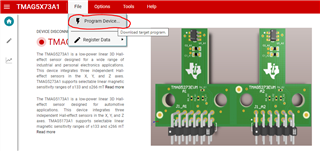
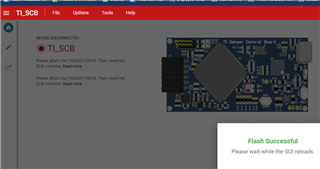
    The result is shown above. From here, I was able to go to the GUI and, in the 'File' drop-down menu, select 'Program Device', as shown below. 

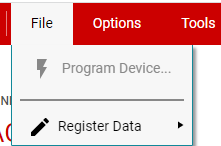
    After selecting 'Program Device', the firmware for the GUI was able to be successfully flashed onto the SCB. After putting the device into DFU mode, is the 'Program Device' button still greyed out, as below?

    Or is it the case that when you press 'Program Device', you get an error message? If so, could you share an image of the error message that you are getting?

    Best,

    ~Alicia

  • Hi Alicia, 

    Can you share the link to the web app you're using?

    I am currently trying https://dev.ti.com/gallery/view/7472171/TMAG5x73EVM_GUI/ver/2.0.0/, Maybe this is related to the problem?

    Thanks!

    -Nate

  • Hi Nate,

    The link that you shared is to the correct GUI, which is what I used.

    Best,

    ~Alicia

  • Apologies Alicia,

    I don't know quite what has changed, but I now see the device in the device manager on entering DFU mode. I'll keep you posted but I'm guessing I'll be all set.

    Thanks for your time!

    -Nate

  • Hi Nate,

    Before entering DFU mode, the device appears in the Device Manager, but once I enter DFU mode, it does not. However, once I flash the device with the firmware for the GUI, it reappears in the Device Manager.

    Best,

    ~Alicia

  • Hey Alicia, 

    I see the device enumerating as a "TivaWare Device Firmware Upgrade" device, I was hoping that was expected?


    In any case the "Program Device" option was finally enabled and I was able to reprogram the device. Once that was accomplished, I reset the device, updated the drivers and restarted. I now am able to connect to the device through the web app!

    Thanks again for your patience!

    -Nate

  • Hi Nate,

    I see the device enumerating as a "TivaWare Device Firmware Upgrade" device, I was hoping that was expected?

    I was looking at the device popping up under Ports (COM & LPT) as USB Serial Device (COM4). I myself don't see "TivaWare Device Firmware Upgrade" at all.

    However, I am glad that you were able to reprogram the device and get it working with the GUI! Please feel free to let me know if you have anymore questions!

    Best,

    ~Alicia

  • Will do! 

    Sorry to clarify, when the device is not in DFU mode, I do see it enumerate under "Ports (COM & LPT)" as "USB Serial Device (COMx)", it is when I place it into DFU mode does it appear as a "TivaWare Device Firmware Upgrade" device. 

    For anyone else who may stumble upon this issue (or similar), a bit more detail on the issue and the steps I took to stumble on its resolution:

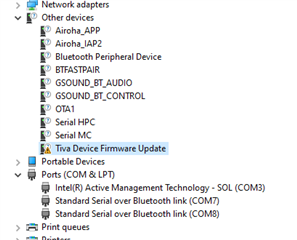
    I had to manually install the driver for the DFU device which started out under "Other Devices"

    also at this point selecting "Program Device" in the web app fails with:

    Once I updated the driver using the one found in "C:\Program Files (x86)\Texas Instruments\Drivers\PAMB", it then appeared as a "TivaWare Device Firmware Upgrade":

    At that point I am successfully able reprogram the device via the "Program Device" option in the web app.


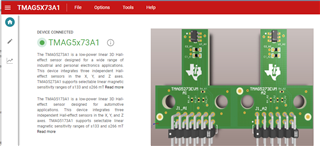
    After the GUI reloads it displays as expected:


    Overall, I think it was some combination of an improper driver installation and/or lack of restarts but I'm still not 100%.

    Thanks! 

    -Nate