This thread has been locked.

If you have a related question, please click the "Ask a related question" button in the top right corner. The newly created question will be automatically linked to this question.

How to force a specific regulator into multi-output design?

Other Parts Discussed in Thread: LM46002

New to Webench. Trying to design a 3 output supply, one output is driven by the rail of one of the other outputs. Wide input range. GEt it all working, go to Build-It-Lite and parts are not available, find substitutes for passives, but basic regular itself is not available.

If I manually search through ti.com and find a regulator that will do the job, I can Webench it, but it is only a single output.

Question: How do I force the regulator of choice (with available parts!) into a multi-output design and allow it to optimize/simulate? The Webench system insists on using an unavailable regulator when a different item can actually do the job and get better efficiency numbers.

  • Hi Doug,

    Thanks for using WEBENCH.

    Would you please give us a little more detail on the detail and which part you are try to use for the design so we can ensure it will be availabe at the distrubutor for BuildIt lite order. If you mind putting the detail on the forum, you can send the detail to my email dien.mac@ti.com

    Regards

    Dien Mac

    WEBENCH Design Center.

  • The part the tool is trying to use is: LMR24210TL/NOPB .

    The part I am trying to force it to use instead of that in this multi-output design is: LM46002, which I can come up with an acceptable design by itself, but I can't seem to get it to come up in a multi-output solution to generate the 3.3V rail which then also feeds a low power 1.8V switcher. I have come up with a 4-switcher solution, but it is far less efficient even with the "knob" all the way to the "efficient" setting.

    Thanks,
    Doug
  • We have put the Part into Digikey feed, it will be available within 2 hours so you can proceed witht BuildIt Lite order.

    The other alternative is to get a sample order directly from ti website for that part:


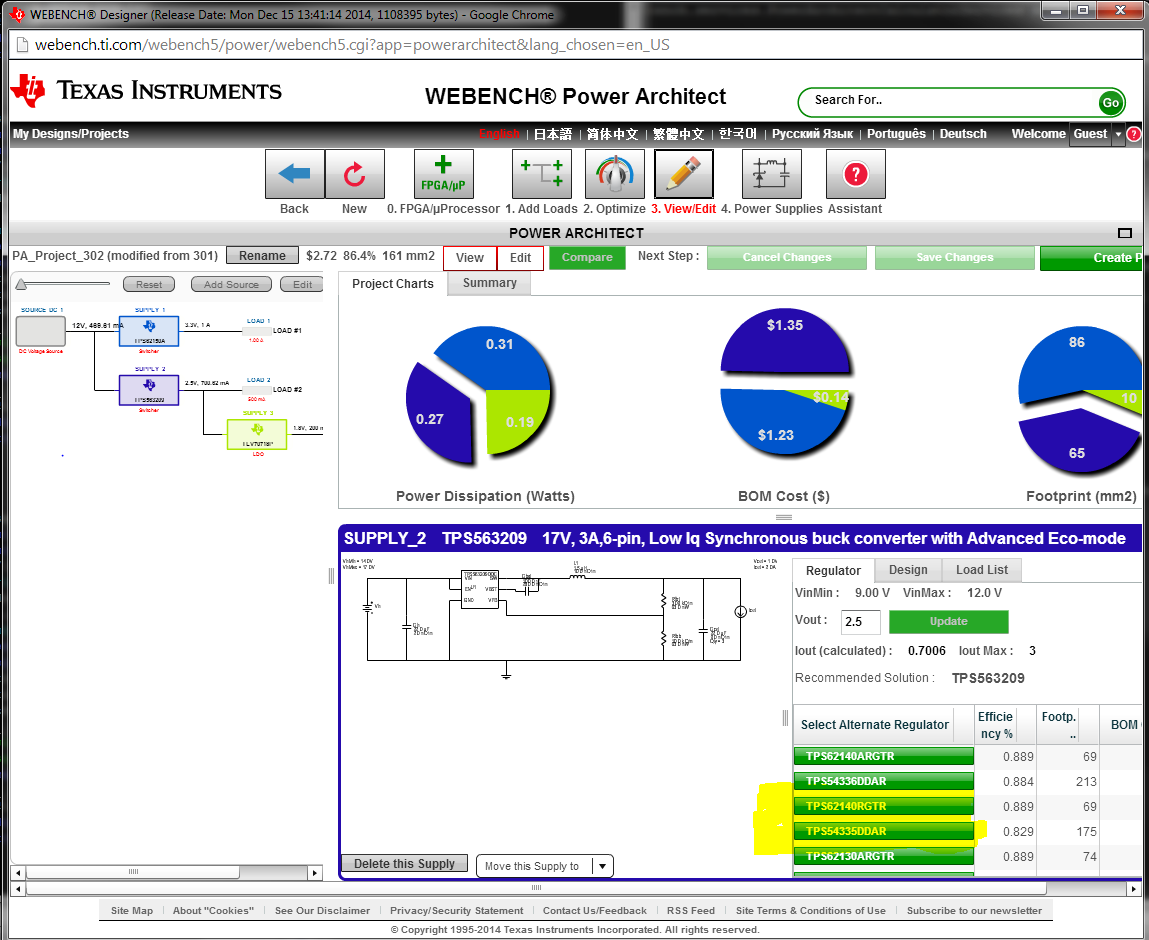
    Come back to your question about how to force the Power Architect to certain part number. You need to perform this on step #3: "View Project Detail" Edit for the power architect tree. This step will allow you to either change the rail, or change the IC being use for solution by select another IC from the "Select Alternate Regulator". Then when you click "Create Project", The tree will be update and created with the new selected IC.

    Hope this help

    DIen

  • Editing A Power Architect Tree 12-2014.ppt

    Doug,

    BTW, Here is the presentation on how to edit your power architect tree in detail

    Dien