This thread has been locked.

If you have a related question, please click the "Ask a related question" button in the top right corner. The newly created question will be automatically linked to this question.

Tina irregular circuit error message.

Other Parts Discussed in Thread: TINA-TI

I am getting a consistent error message (Irregular circuit) when trying to run a simulation (DC, AC or Transient analysis). I've deleted the component in question and re-created it and re-wired it but nothing seems to work to get rid of the error. What am I doing wrong?

Also, how do I get an output waveform from this circuit? I put two "output" nodes on it but I'm not sure how to use them or if I've even done this correctly. I recognize that my "Output 2" is not going to show anything but I just added it because the output of this circuit goes into a differential input in the next circuit.

Thanks,

Gil.

P.S. I don't know how to upload the circuit here for help on it. Let's start with that. Thanks.

  • Gil,

    There should be an option to upload a file to the forum. You may have to click on the Use Rich Formatting link below the window. The window should change and there should be a paperclip icon that you can click on to add the file.

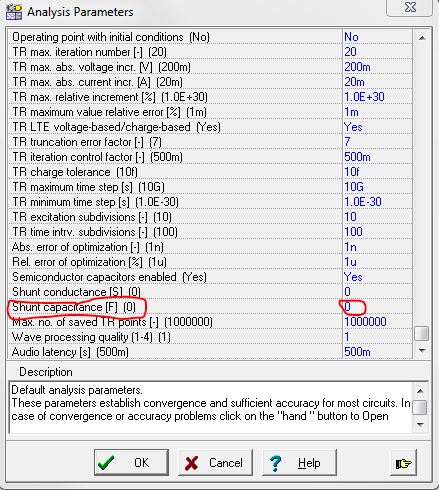
    An irregular circuit in TINA-TI usually means that there is a node that does not have a direct path to ground. For example, TINA-TI will flag two capacitors in series as an irregular circuit since the node between them does not have a path to ground. However, this is due to the default in TINA-TI for shunt capacitance. You can change this value in the Set Analysis Parameters (Analysis-->Set Analysis Parameters...). Click on the Hand icone and select View All. Scroll to the bottom and change the Shunt Capcitance to 1p. This may help with the issue.

  • Hi Britt!

    Thanks for the reply. I appreciate it. I tried your suggestion including changing the shunt conductances to 1uOhm. I still get the same errors. I've uploaded the file here (I think if it worked properly) so that you can have a look at it. Thanks for the help.

    Gil.

    Op Amp Buffer for 10MHz.TSC

  • Gil,

    Take a look at this circuit. I have added a shunt conductance of 1f.

    I do not use the Insert-->Output for monitoring. I recommend using the meters. In this case, I am using voltage pins to measure the voltage at the two locations. If you want a differential voltage, you can use the Voltmeter. The voltage pins refer to ground all of the time.

    BTW, did you really want R5 to have a value of 0Ohms?

    OpAmp_Buffer.TSC